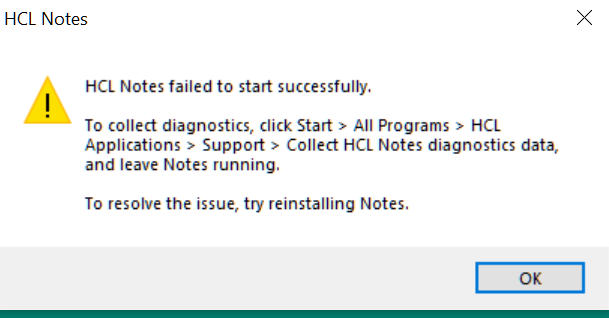
I have been using Notes 12.0.2 for about a month. This morning I was working just fine. I shut down for lunch and now my client will not open. I get this error.
I am connecting to the server via VPN which I always do. I do not know how to determine what the issue is and I really don't want to uninstall and reinstall. Does anyone have any suggestions?
Rename the following files located in the Notes data directory (e.g., Bookmark.nsf.bk) and start the Notes Client. As the files are re-created at start-up, check whether this improves the situation.
Bookmark.nsf
Cache.ndk
Desktop8.ndk
Example:
Rename cache.ndk and start the Notes. 2. If the situation does not improve, recreate bookmark.nsf and start the Notes. 3. If the situation still persists, rename desktop8.ndk and start the Notes.
4. Isolating the occurrence situation between the Standard and Basic editions
There are two versions of the Notes Client, the Standard version, which is based on Eclipse, and the Basic version, which follows the conventional architecture. The following parameters can be added to notes.ini to start the Basic version. The parameter can be used to distinguish whether the problem only occurs when starting the Standard version or whether it also occurs in the Basic version.
UseBasicNotes=1
If you are able to start as a Basic Edition, delete the workspace folder and restart Notes as a Standard Edition to see if the problem no longer occurs.
5. Stop using third-party applications
Third-party applications such as anti-virus software, personal firewalls, and backup software may be affected. Temporarily disable this software to see if the problem improves. Alternatively, start Windows in Safe Mode to isolate whether the problem no longer occurs.
If you still facing issue log a case with HCL Support along with workspace logs and IBM technical Folder .Support team will get in touch with you
Even though this was resolved by reinstalling, thought I would mention one other oddball reason for the Client failing to start if using Windows
Some critical files are stored by default in Users > UserName > AppData > Local > Temp. In my case they are contained in a directory called notes90C43B. As this is a temporary folder the contents can get deleted, and this did happen. Searching through the logs I found the entry 'Unable to find files in..." and the temp directory.
I was able to mount a backup and recover the files and Notes started again.
Please note that this is a known issue currently affecting multiple customers. It has been identified to be related to the Microsoft OS patch KB5055523.
We kindly request you to check your operating system settings. If the patch KB5055523 is installed, please proceed to uninstall it to resolve the issue.
Additionally, this issue has been logged under the problem report number SPR # NNAIDFQBWQ with our Product Development team, who are actively working on a resolution.
If the above patch is not present on your system, we may need the following troubleshooting logs from your environment to assist you further: Please generate a manual NSD by following the instructions provided in this Knowledge Base article and share the following log folders with us
These can typically be found under the Data directory based on your installation type:Single-user installation: "C:\Program Files (x86) \IBM\Notes\Data" -32bit "C:\Program Files \IBM\Notes\Data" -64bit Multi-user installation: "C:\Users\<username>\AppData\Local\IBM\Notes\Data" (<username> is the user name of Windows).
Please don’t hesitate to reach out if you have any further questions or need assistance.