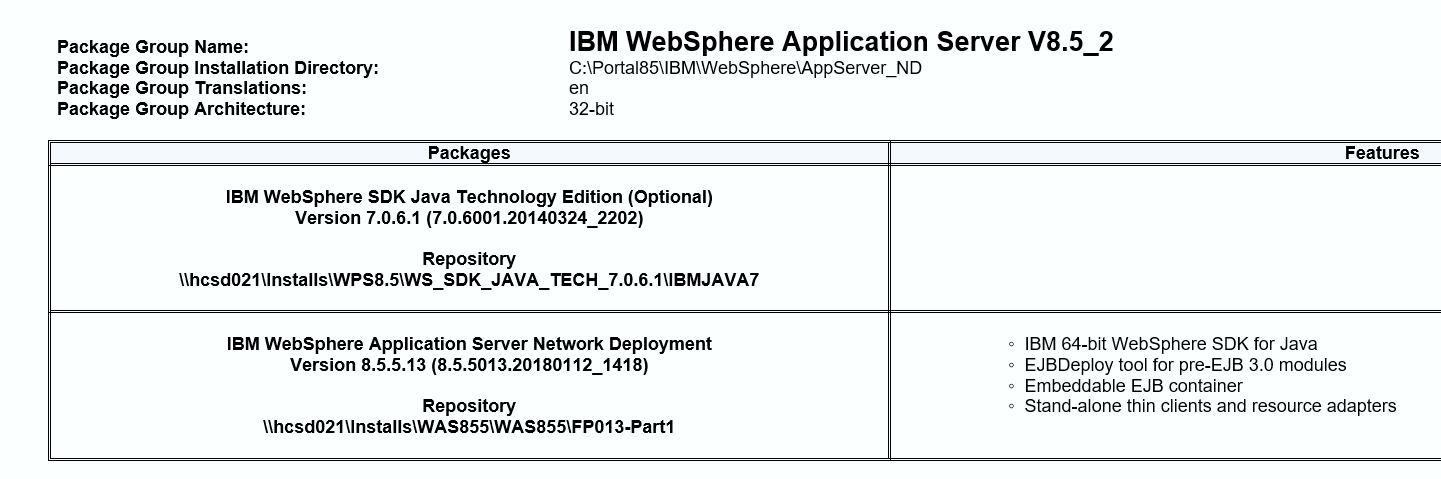
The first thing that puzzles me is that no IBM WebSphere SDK Java Technology Edition 8 package is installed in the WebSphere Application Server Network Deployment package group
yet the Java 8 SDK is available
C:\Portal85\IBM\WebSphere\AppServer_ND\bin>managesdk -listavailable -verbose
CWSDK1003I: Available SDKs :
CWSDK1005I: SDK name: 1.7_64
- com.ibm.websphere.sdk.version.1.7_64=1.7
- com.ibm.websphere.sdk.bits.1.7_64=64
- com.ibm.websphere.sdk.location.1.7_64=${WAS_INSTALL_ROOT}/java_1.7_64
- com.ibm.websphere.sdk.platform.1.7_64=windows
- com.ibm.websphere.sdk.architecture.1.7_64=x86_64
- com.ibm.websphere.sdk.nativeLibPath.1.7_64=${WAS_INSTALL_ROOT}/lib/native/win/x86_64/
CWSDK1005I: SDK name: 1.8_64_bundled
- com.ibm.websphere.sdk.version.1.8_64_bundled=1.8
- com.ibm.websphere.sdk.bits.1.8_64_bundled=64
- com.ibm.websphere.sdk.location.1.8_64_bundled=${WAS_INSTALL_ROOT}/java
- com.ibm.websphere.sdk.platform.1.8_64_bundled=windows
- com.ibm.websphere.sdk.architecture.1.8_64_bundled=x86_64
- com.ibm.websphere.sdk.nativeLibPath.1.8_64_bundled=${WAS_INSTALL_ROOT}/lib/native/win/x86_64/
CWSDK1001I: Successfully performed the requested managesdk task.
C:\Portal85\IBM\WebSphere\AppServer_ND\bin>
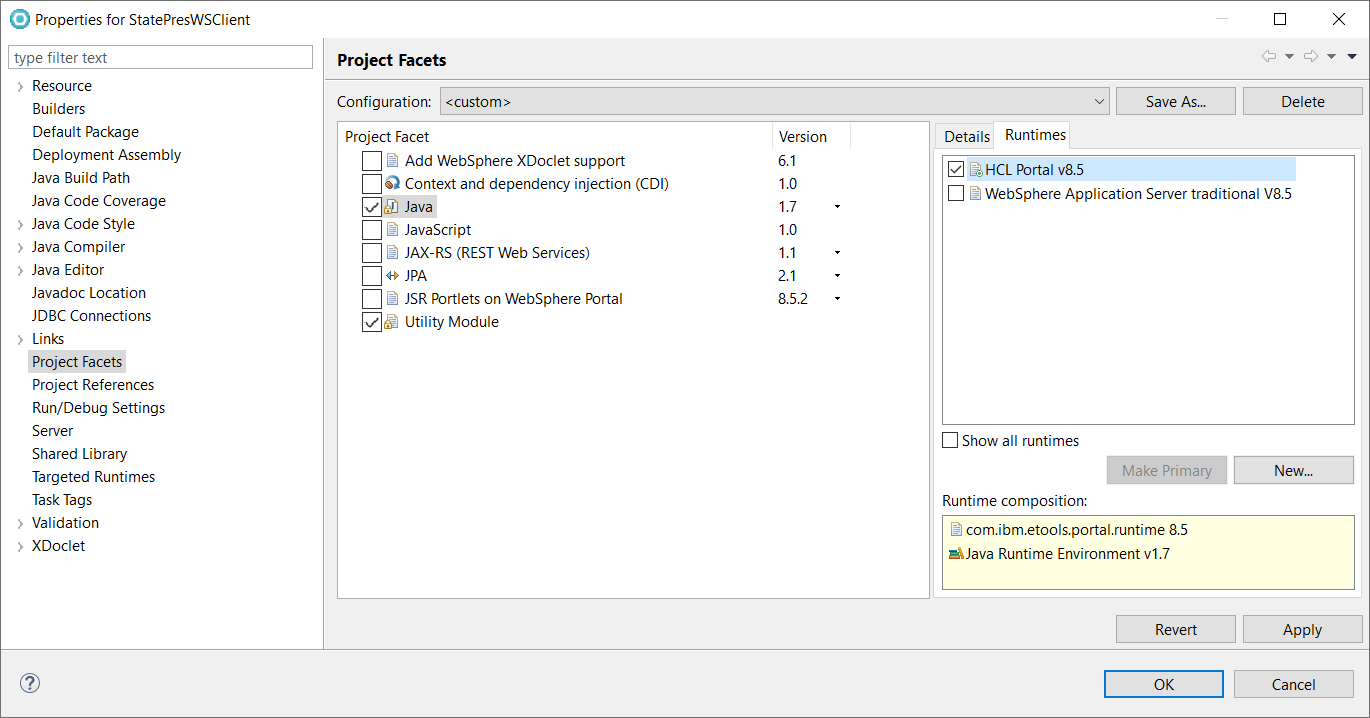
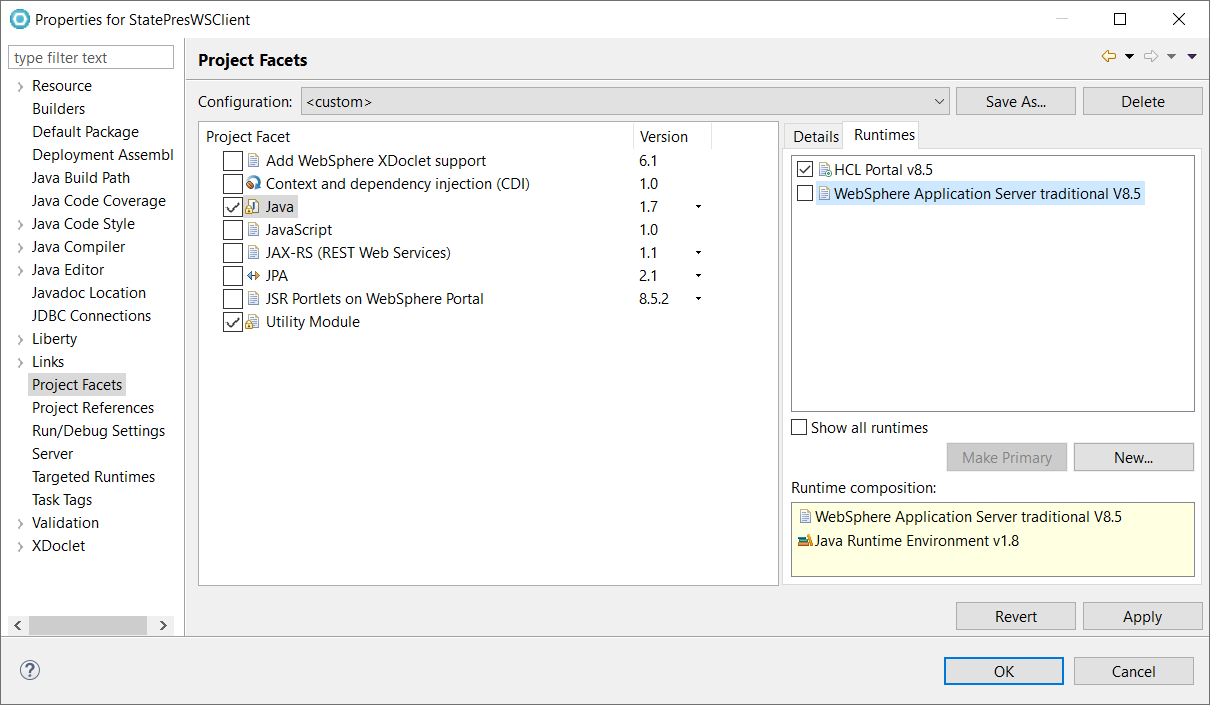
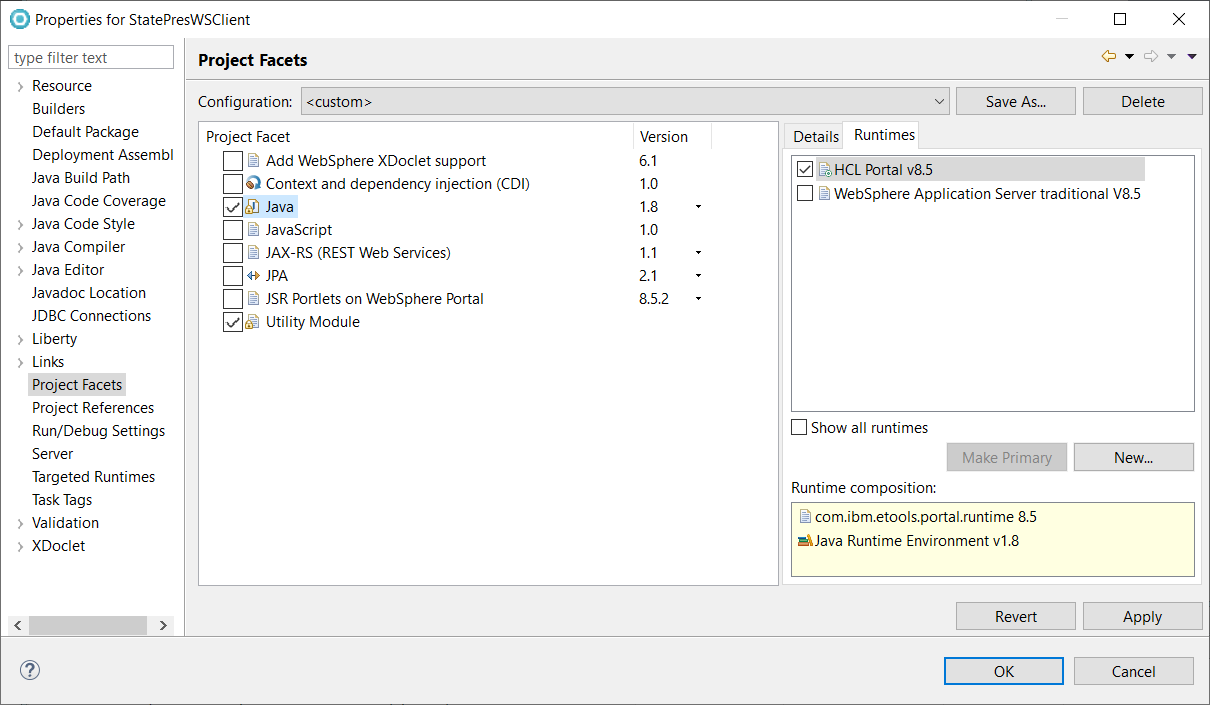
Rational Application Developer for WebSphere Software fails to offer 1.8 on its version drop-down menu for Java project facet while the HCL Portal v8.5 runtime is selected. Furthermore, the runtime composition is shown to lack JRE 1.8.
What is the version of your RAD?
RAD is 9.6.1.
There are two installations of RAD 9.6.1 on this computer. Yesterday, I tried the second one and got the same result. This causes me to shift my focus to the WebSphere Application Server Network Deployment and HCL Portal installations.
update to 9611,
https://www.ibm.com/support/pages/rational-application-developer-websphere-software-version-95x-96x-and-97x-new-features-and-enhancements
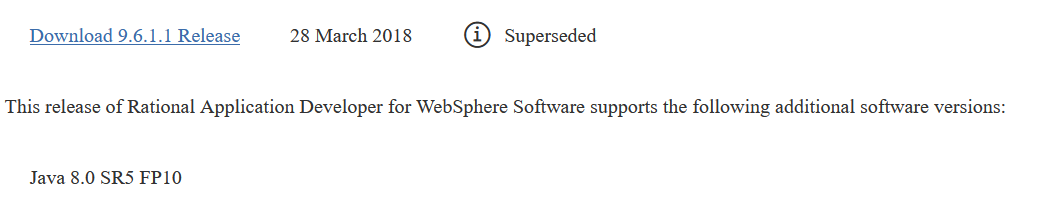
says :
That's interesting. When I previously had success with this, I had not 9.6.1, but 9.6.1.4 installed. I'm going to consider what you're presenting.
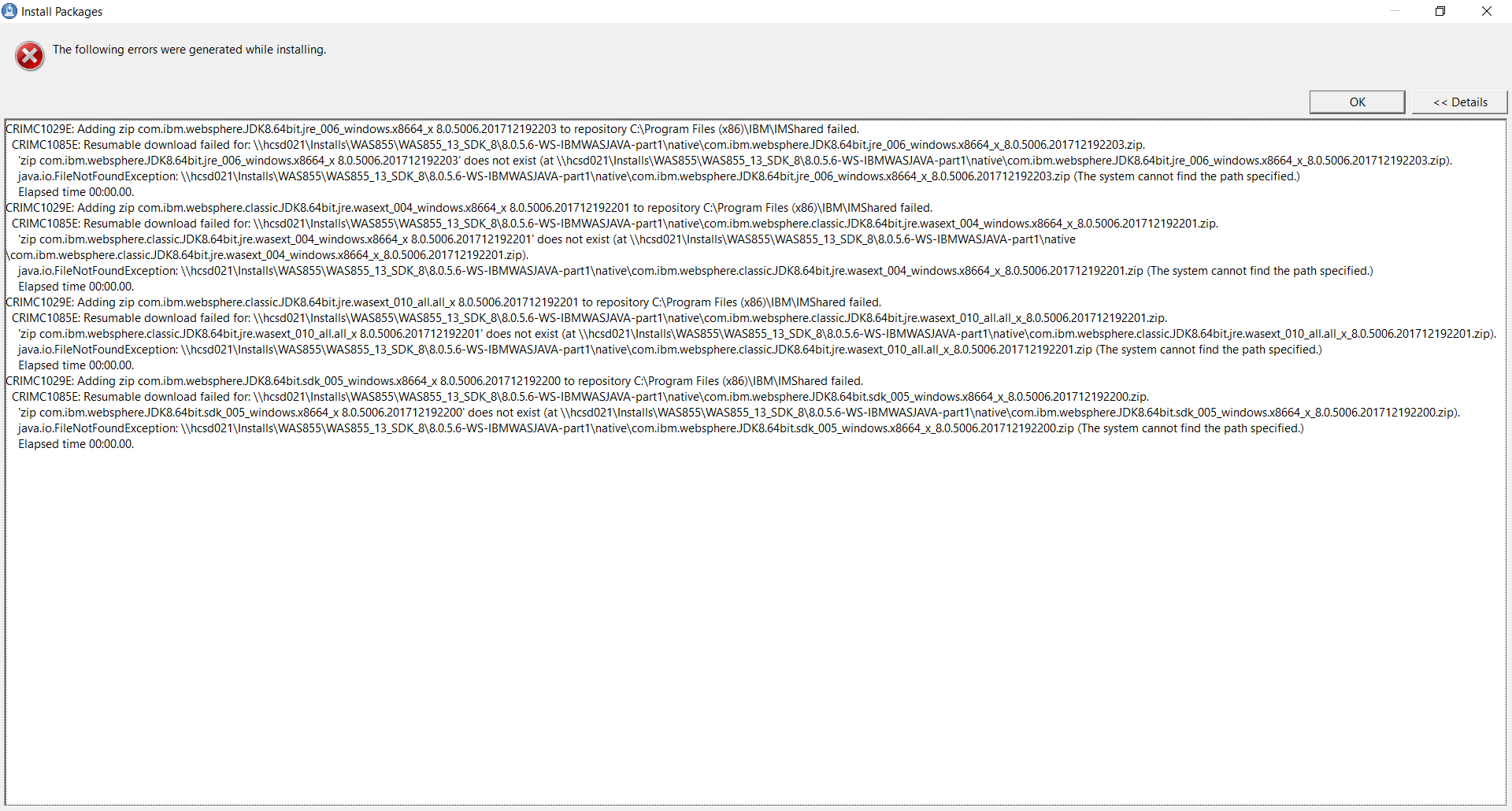
But first, I have to determine whether I did any damage yesterday when I attempted to install the IBM WebSphere SDK Java Technology Edition 8.0.5.6 package into the WebSphere Application Server Network Deployment package group. I have yet to study the resulting error message:
download failed, file not found exception. seems a repository issue
Agreed. It was an early failure. IBM Installation Manager reports that the package was not installed. managesdk still lists as available SDK name 1.8_64_bundled.
I'm considering 9.6.1.1 now.
C:\Portal85\IBM\WebSphere\AppServer_ND\bin>..\java\bin\java.exe -version
java version "1.8.0_151"
Java(TM) SE Runtime Environment (build 8.0.5.6 - pwa6480sr5fp6-20171124_02(SR5 FP6))
IBM J9 VM (build 2.9, JRE 1.8.0 Windows 10 amd64-64 Compressed References 20171122_371101 (JIT enabled, AOT enabled)
OpenJ9   - 8e3c85d
OMR      - 713f08e
IBM      - c041ee8)
JCL - 20171113_01 based on Oracle jdk8u151-b12

C:\Portal85\IBM\WebSphere\AppServer_ND\bin>
That's SR5 FP6 that needs to be supported. RAD 9.6.1.1 introduces support for SR5 FP10. I don't know if RAD 9.6.1 supports SR5 FP6.
In a screenshot above of an Eclipse project's properties, the HCL Portal v8.5 runtime is selected and is shown to be deficient. However, when I click on the other listed runtime (still in RAD 9.6.1) we can see that its composition is not deficient:
Furthermore, if I were to select that runtime, then version 1.8 of the Java project facet becomes available.
By the way, IBM Installation Manager offers me only 9.6.1.4 as an update.
This page supports Leila Ezeddin's suggestion. The highlighted fix in particular suggests that I don't yet have IDE support for SR5 FP5, let alone SR5 FP6.
After the RAD 9.6.1.4 update, runtime composition is correct and 1.8 appears on the Java project facet drop-down menu.
I think even RAD 961 supports java 8.
if you cannot see the java 8 in RAD 961, it might be that you have unchecked the check box for java updates.
So updating to 9.6.1.4 fixed the items on the SDK list rather than adding to the list? I'm unfamiliar with the check box to which you refer. One way or another, updating to 9.6.1.4 corrected RAD's HCL Portal v8.5 runtime composition.
RAD 961 comes with JDK 8
check about RAD > Install detail configuration
then look for java.home property and java.version
The only difference I see is that you are on Mac OS.
Then it might be that your mac os flavor is not supported.
After update to 9.6.1.4, I see the following (I'm sure that was there before update):
java.home=C:\Program Files\IBM\SDP_RAD961\jdk\jre
java.version=1.8.0_241
C:\WINDOWS\system32>"\Program Files\IBM\SDP_RAD961\jdk\jre\bin\java" -version
java version "1.8.0_241"
Java(TM) SE Runtime Environment (build 8.0.6.7 - pwa6480sr6fp7-20200312_01(SR6 FP7))
IBM J9 VM (build 2.9, JRE 1.8.0 Windows 10 amd64-64-Bit Compressed References 20200219_440062 (JIT enabled, AOT enabled)
OpenJ9   - 3088245
OMR      - eb95a4d
IBM      - 83517b6)
JCL - 20200310_01 based on Oracle jdk8u241-b07
C:\WINDOWS\system32>
But this is not the JRE provided by WAS ND and presented by RAD's HCL Portal v8.5 runtime object.