I updated a picture for an employee 5 days ago and the old picture still exists in embedded chat. Do I have to restart the entire Sametime server for it to realize the picture changed or is there a "refresh Sametime cache" command? Also, along the same lines, if someone can point me to a list of Sametime console commands, I would greatly appreciate it.
@Quin Filipowicz
with regards to your question
to get the photo to show , you will need to refresh the sametime client cache
the following article will show you what you need to do
How to clear the Sametime client cache
as far as console commands is concerned
The console that you see is the Domino server console, and not a sametime console.
you can find a list of domino server commands in the following link
List of server commands and syntax
lastly as an FYI and recommended best Practice
you can shutdown the sametime server by quitting the staddin task
issuing the command
tell staddin quit on the server console
this will bring down the sametime server but will leave the domino server running.
Some Users will try to use the Load Staddin task to start sametime ( and it will start)
but not everything will start correctly and will lead you to crash, hangs or erratic behavior
to restart the Sametime server correctly
You must restart the Domino server and allow sametime to start with the domino restart.
Please let me know if this was helpful......
Hi Daniel,
Thanks for the reply.
1. That's interesting and I'll keep that in my back pocket, however, I wanted to refresh all user's clients so they all see the picture for the new employee. Maybe if I restart the domino server that would refresh the cache all at once?
2. Thanks for the list of commands. I pretty much knew these, but I wanted to know all of them that were related to Sametime. Like where you mentioned STADDIN. Similar to what you see here for Traveler: https://help.hcltechsw.com/traveler/11.0.0/List_of_Notes_Traver_Server_task_Tell_commands.html
3. Lastly, I didn't know that shutting down STADDIN and bringing it back up will eventually cause issues. That's good to know.
Thank You, Quin
@Quin Filipowicz
Restarting the server is not going to clear the client cache
additionally we do not have a way to automatically clear the client cache
as you can see, depending on the client, the cache is stored in different location.
with regards to the traveler commands that you pointed out
those are actually domino commands and will work with sametime as well.
But as I precaution-ed in my previous comment I would not use the load and restart command
Hello,
as already mentioned by Daniel the sametime bizcard (and its picture) is cached locally at the sametime (or notes) client.
<notesdata>\.metadata\.plugins\com.ibm.collaboration.realtime.people.impl\
If you want to update the cache you can use three methods
- Right-click the contact and select “Refresh Person Info”. This will make Sametime refetch the data from the Sametime server.
- Clear the cache from disk (deleting the folder or files above)
- Setting an eclipse parameter to reload sametime bizcard more often (usually all seven days)
com.ibm.collaboration.realtime.people/lookupExpirationDays=0
0 days means cache is cleared on every client start
Also - there are no server commands for sametime on domino (like you have for traveler), you can only stop and start staddin which will start subtasks (you can see additionally windows services) and only if all subtasks are started sametime is full functionally.
Staddin Tasks will load the "Sametime Server" service (or stlaunch), all other tasks are controlled by this service
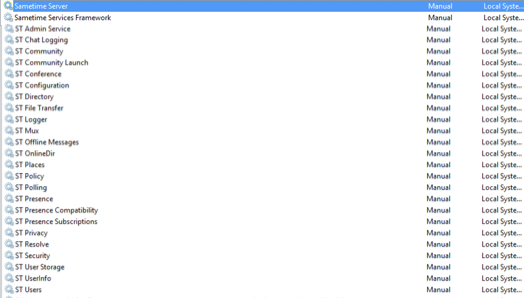
It is also important that you have http task running (or restarted) because there are http servlets for controlling sametime services (look also for servlets.properties file). Without these servlets sametime subtasks will not load
Servlet engine initialization was successful
HTTP JVM: com.lotus.sametime.configuration.DominoBootstrapServlet: init
HTTP JVM: com.lotus.sametime.configuration.DominoConfigurationServlet: init
HTTP JVM: com.lotus.sametime.admin.authentication.AccessControlServlet: init
HTTP JVM: com.lotus.sametime.admin.DominoAdminXPathRequestServletJAXP: init
HTTP JVM: com.lotus.sametime.statistics.StatisticsServlet: init
HTTP JVM: com.lotus.sametime.admin.namechange.NameChangeServlet: init
HTTP JVM: com.ibm.sametime.userinfo.servlets.UserInfoServlet: init
HTTP JVM: com.lotus.sametime.startup.SametimeStartupServlet: init
HTTP Server: Started
Hope this helps a little bit