| This thread was migrated from an old forum. It may contain information that are no longer valid. For further assistance, please post a new question or open a support ticket from the Customer Support portal. |
#[Informational Post]
Issue
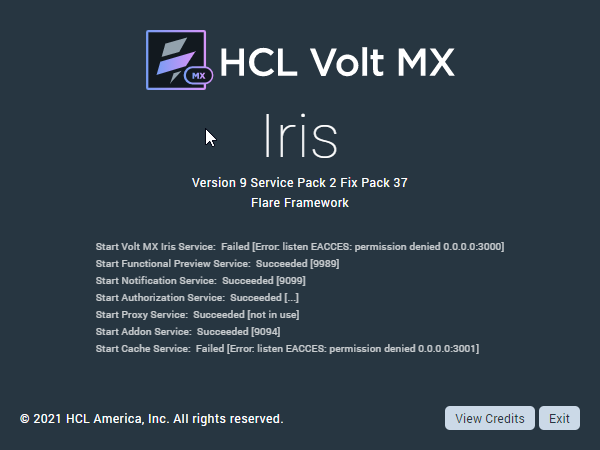
When trying to launch Visualizer on my windows PC I get an exception Error: listen eacces: permission denied 0.0.0.0:3000 and the application never loads
Action Plan
1. Please make sure that the visualizer installation folder has all the permissions
2. Did you install the docker/VM on your Windows machine?
3. If yes, can you please check that did it create any virtual Ethernet adapter in your networks that might be stopping the visualizer launch? Please disable that adapter then visualizer should start without any issues. To summarize, this issue is related to the network adapter
Thanks for sharing the knowledge.
Thank you for sharing this information.
I faced the same issue in my Iris (please find the attached screen shot of the error). By following the steps in this post, I disabled all the unused ethernet adapters and then restarted Iris, with these steps I was able to successfully resolve this issue. Thank you.
Thank you,
Venkata Raju Bankapalli
Hi Venkata, it's a port conflict, not uncommon. You can customize the ports that Iris uses following these steps:
1. Make sure Iris is not running.
2. Navigate to your Iris install folder.
3. Edit the install_config.js file in the text editor of your choice.
4. Change the default 3000 and 3001 values to any open ports of your preference for the lines:
exports.serverPort = 3000;
exports.cacheServerPort = 3001;
5. Save and start Iris. You should see the new ports listed and used and Iris should start normally.
Please keep in mind that you will need to reapply this change after installing a fix pack or service pack. I would suggest keeping a copy somewhere you can refer back to.
Cheers,
Gunndarr