As per my question title, our colleague sending out the email with around 10MB attachment and stucked in his mailbox.
May I know the maximum size for the email sent from IBM Verse? or any setting can be modify?
Thank you so much!!
As per my question title, our colleague sending out the email with around 10MB attachment and stucked in his mailbox.
May I know the maximum size for the email sent from IBM Verse? or any setting can be modify?
Thank you so much!!
Hi Ralf,
Good day! The default attachment size limit for HCL Verse iOS/Android is set to 10 MB. But this can be modified by changing the Default request and POST size limitation in the Domino HTTP server to a value appropriate for your installation via the Domino Administrator client.
Where preferred or allowed maximum size of attachment should be multiplied by 1.37 and should be the value of the following:
First Setting:
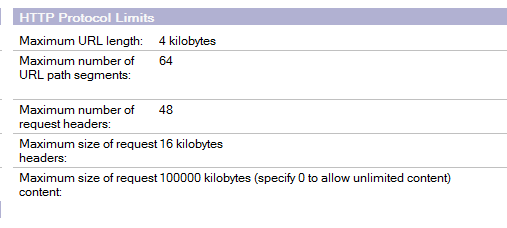
Server document for the Traveler server-->Internet Protocols Tab-->HTTP Tab-->Http Protocol Limits section-->'Maximum Size of Request Content' field (defaults to 10,000 Kilobytes)
Second Setting:
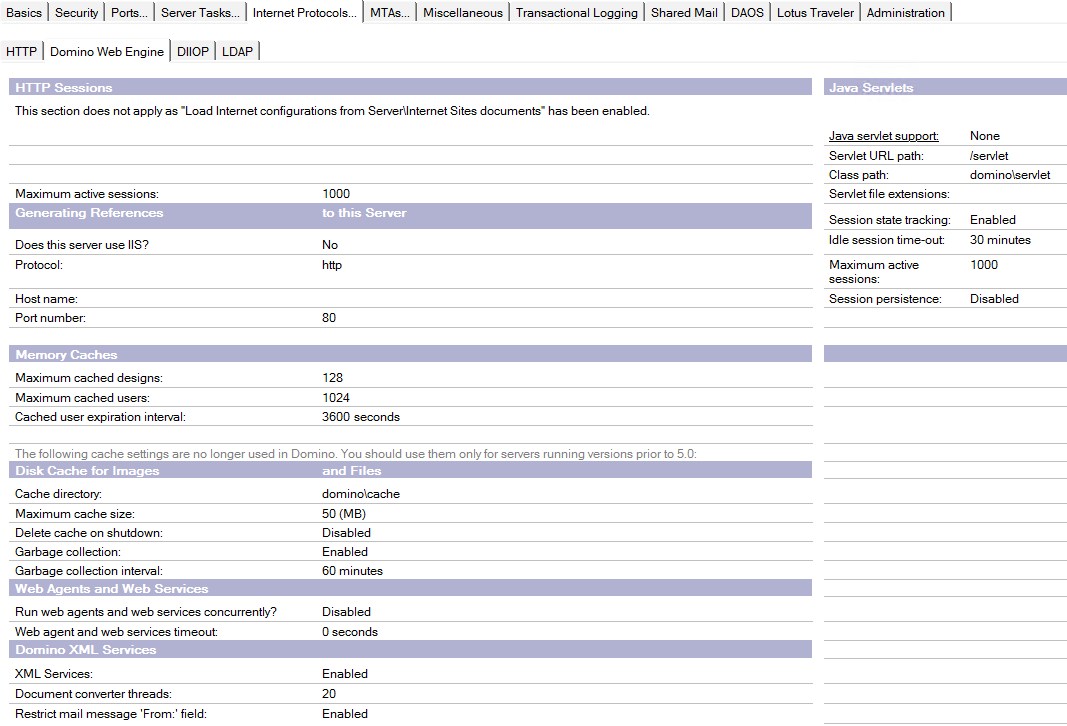
Server Document for the Traveler server-->Internet Protocols Tab-->Domino Web Engine Tab-->POST Data section-->'Maximum POST Data (in kilobytes) field (defaults to 10,000 kilobytes)
For more information, kindly check the below link:
https://support.hcltechsw.com/csm?id=kb_article&sysparm_article=KB0038123
Regards,
Joseph
Hi Ralf,
On your Traveler server v9.0.1, you can find the setting by opening your web site document, then go to Domino Web Engine > Post Data > Maximum Post data
Regards,
Joseph
Thanks Joseph!! I can find the option now.
Moreover, I know that defaults is 10,000 Kilobytes; actually any maximum limitation for the attachment in traveler?
Hi Ralf,
As mentioned on the screenshot, you can set the value to 0 to allow unlimited attachment size and not put a size restriction on it.

Hope this helps!
Regards,
Joseph