the notes application does not authenticate in google chrome, but on ie and firefox works
Hi Vinicius,
Please let me know what is the Domino version is being used and what is the Chrome version you are using?.
Any error message it reports while it fails on the chrome ?.
Thank you.
Regards
Shrikant J
Google Chrome is updated Version 84.0.4147.105 (Official version)

Server build number: Release 11.0.1

even with authentication configured on domcfg.nsf
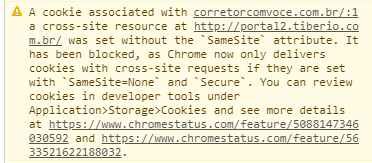
Hi Vincius,
Thanks for screenshot.
I assume from the screen shot it shows two sites as below.
http://corretorcomvoce.com.br
http://portal2.tiberio.com.br
http://portal2.tiberio.com.br
Are the above site are domino servers ? OR you logged in to some portal already and then tried to access the Domino server URL for login and then chrome shows the above message ?
Thank you.
Regards
Shrikant J
Hello Vincius,
Additional update, The SameSite attribute was added by the IETF as a way to provide additional protection against information leakage and CSRF attacks. The HTTP header SAMESITE is a new HTTP header that came about last October.
More info on the "The Chromium Projects - SameSite Updates"
https://www.chromium.org/updates/same-site
The Domino server does not currently have a way to emit this cookie attribute. An alternative to Domino having this support would be to use a PROXY server in front of Domino server to add the header to the set-cookie response for this cookie.
We have already an enhancement request to add this feature via SPR # RJTOBLWNAE.
You may also want to vote on the enhancement request from the below link:
https://domino-ideas.hcltechsw.com/ideas/DOMINO-I-1169
Thank you.
Regards
Shrikant J
Hi Vincius,
Since we have enhancement request from the Domino server end. You may try workaround by disabling the "SameSite" flags on the chrome browser.
Steps:
1) On the chrome browser in the address bar type chrome://flags/
2) Scroll down and disable the following SameSite cookies options.
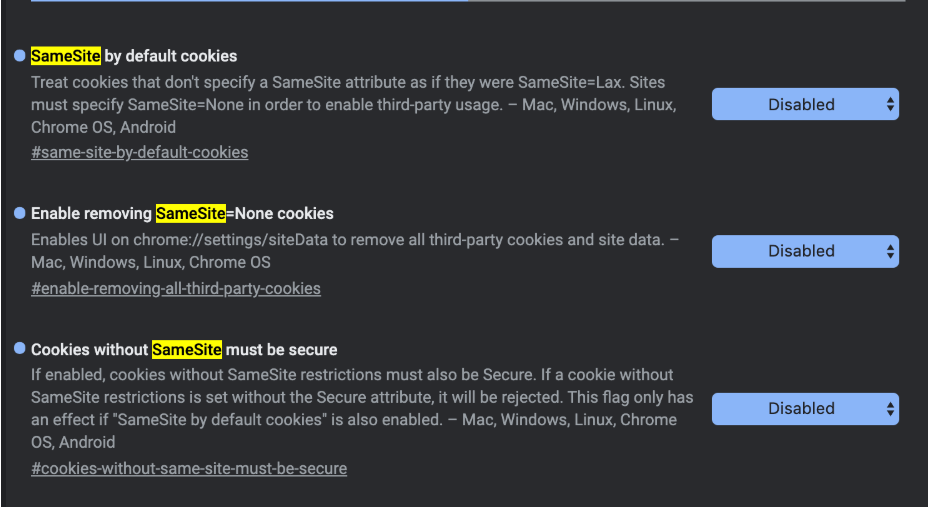
Then test the issue.
Reference link for the workaround.
https://github.com/google/google-api-javascript-client/issues/561
Thank you.
Regards
Shrikant J
Hi Shrikant
I'm here with the same problem, Domino APPs are embedded in a Joomla portal with a iFrame, but my domino servers are in version 9.01. I'm currently testing my apps on last version 11.01 (a lot of java code to check...), so I need to adress this on 9.01. I will explore using apache as a proxy. Could you take us some info about this?
I means, how to change this atribute of domino's cookie from the apache side...
Thanks and regards
Ruben
Hi ,
Version 84.0.4147.105
Release 11.0.1
but on ie and firefox works
this occurs when the address is from the outside to the inside .
but on ie and firefox works
- I would recommend to check if you have the same behavior from this article:
Login Screen appears again even with a valid Domino user name and password
https://support.hcltechsw.com/csm?id=kb_article&sysparm_article=KB0039474
- In case you are using ssl/https confirm that Google Chrome not show any error about the certificate.
SHA-2 support available for Domino 9.x
https://support.hcltechsw.com/csm?id=kb_article&sysparm_article=KB0040632
this environment is not the same
sorry , this environment is not the same