Hi all, does anyone know how or whether you can insert a variable into a text field? I have a link and I would like to insert a variable there. The code looks like this:
<p>Contact our <a href="mailto:app.getSharedData().myVar">Team</a></p>
Thanks in advance
Vici
Hello Vici,
I believe this won't work in a default text item element to have variable to insert in the Source (html).
However, you can do the below approach:
-Assign the value of the variable to another text item element (as hidden).
-Then, create two seperate text elements that has different href values.
-Create a rule to show/hide those two text elements that depends in hidden text element value.
Hope this helps.
Thanks,
Jayve
You cannot insert a javascript variable, but you can insert a field value...
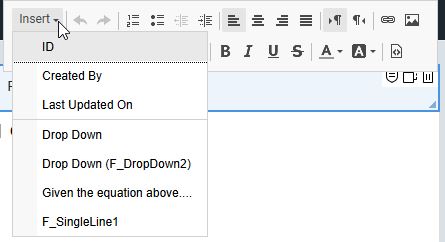
So you could use javascript to set the value of the field and then use the insert menu to insert it into your text.
You can also just set the entire content of the text using the setContent() function (but using this method does not allow you to keep formatting).
You can achieve this by adding a hidden Richtext filed and showing the content of it in a Text field.
- Create a new RichText input field and set it to hidden
- in the Text field enter a placeholder for the Richtext Item: ”{Richtext_Placeholder}”
- You can then fill the RichText Input field via JavaScript with a string similar to the one you provided:
BO.F_RT_Input.setValue(‘<p>Contact our <a href="mailto:’ + app.getSharedData().myVar + ‘“>Team</a></p>‘);
// Note the additional quotes and adding the value of variable with + to the string.
The result of this will be a clickable link in a text field, where the link text is “Team” but directs to the mailto variable.