Goodmorning everyone.
a question for when configuring an nsf mailbox for use with outlook creating an imap account.
It works for me, but I always have a problem with "Sent" folder.
Is there a way to have the sent mail folder in outlook and the sent mail folder in lotus synchronized?

Thank you
PS: I know Hcl Traveler for microsoft outlook , but for now I still have to use the
"old" method of the imap account
Hi Andrea,
can you please check in the user mail file if there is any duplicate folder named Sent item?
Also, click on the subscription and select the sent folder otherwise outlook uses its own send folder to save sent emails.
Maybe this link will help you.
https://support.hcltechsw.com/csm?id=kb_article&sysparm_article=KB0086650
If still has the issue then open the case for further troubleshooting.
Regards,
Sudhir
Hello @Andrea Ravasio !
Please check the document below with information related to Sent folder synchronisation:
> EnableImapFolderSynch
https://help.hcltechsw.com/domino/11.0.0/admin/conf_enableimapfoldersynch_r.html
I hope it helps!
Please mark this question as answered and helpful if your issue is resolved.
Regards!
Rodrigo de San Vicente
Staff Software Engineer
Collaborative Workflow Platform
good afternoon, thanks but .. that parameter is already like this! :-(
Hi Andrea,
have you configured IMAP Subscription in Outlook?
I have written a small Manual how to create a local Outlook PST-File from a Notes Mailbox, this is the Part for the Folder Synchronization:
In order to synchronize the Folder structure you have do an IMAP Subscription for the Folders.
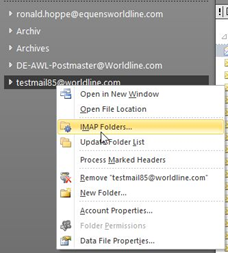
To synchronize all Folders, do a right-click on the Account and then click on “IMAP Folders”.
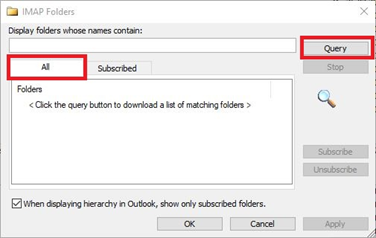
In the now opening Window, click on the Tab “All” and then “Query”
Now all Folders in the source Mailbox are displayed.
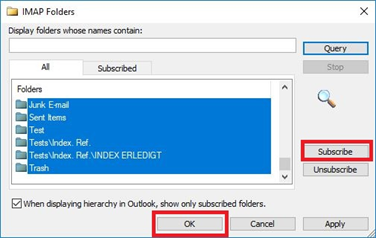
Mark them all and click “Subscribe” and then “OK”.