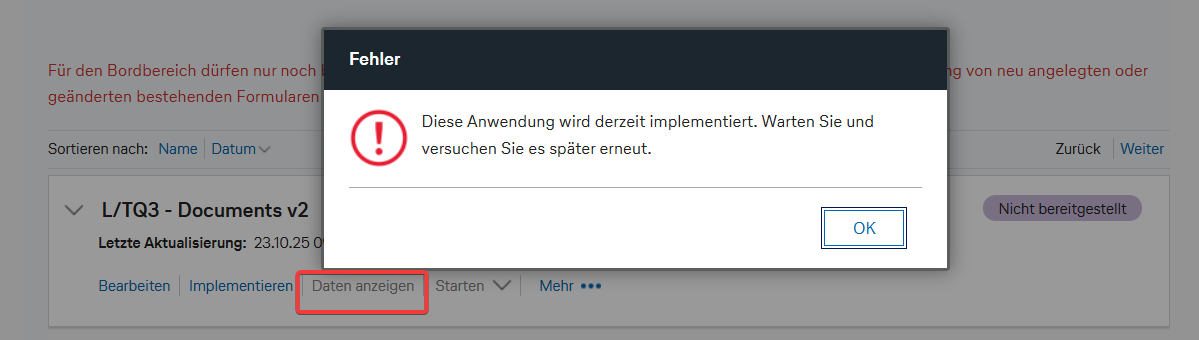
For some reason, I am unable to deploy my HCL Leap form. I always get the error message: “This application is currently being deployed. Please wait and try again later.”
I can no longer even access the overview page with all submitted forms. Also, I cannot load a leap-file backup of all forms (file size 1.1 GB). The attempt always fails.
I have no further ideas on how to access the forms. However, access is very important, and I absolutely need to get to this data.
To all HCL Leap developers: What options do I have to retrieve the data? Why can’t I load the exported leap file as a new app? Could you please provide me with a solution to this problem? I really need the data urgently!
Is this only happening on this specific application or also with other imported applications? If also happening with other applications, have you tried restarting your WebSphere Application Server? Are you also an Administrator of this app and did you set yourself as one of the Admin in the Access control? You can also open a support ticket so that we can look and review the issue from your environment. Thank you.
thank you very much for the quick response. Unfortunately, I don’t have access to a WebSphere server, but yes, I am the owner of this application, and there are a total of four applications that can no longer be implemented. All of them produce an error when they are supposed to be implemented. Where can I open a ticket so that someone can look into the problem? And should I assign someone as an administrator so they have access, or do you need an app ID?
It is important to get some support for this particular kind of issue.
It is intentional that Leap “locks up” like this after a failed deployment, for the following reasons:
a failure in a deployment and redeployment is an unexpected scenario, and needs to be examined carefully, for root cause and any possible issues in the DB
subsequent failures in deployment or redeployment could put things into a worse state, potentially hiding the original root cause
There is a way to “unlock” a failed deployment in Leap (with a direct SQL statement against the DB), but I would advise against it before getting support from HCL.