Upgrading public keys problem

Dear Community,

In my system 10 Domino servers are registered, all running Domino 9.0.1 FP8 or FP9 or FP10.
Adress book has about 2 100 users.
names.nsf (and some other system db) is replicated to all servers in the domain.
Policies use ID Vault.
All users have a 630 bits certificate.

Prior to the Domino V11 deployement, I have decided to upgrade these keys to 2048 bits.
I do know that Domino V11 will work with 630 bits and requires 1024 for new users.
The fact that 2048 has been choosen has nothing to do with my problem, hasn't it ?

Registration policy settings document has been set to use a public key of 2048 bits
Security policy settings document has been set to 2048 bits.
For this document I also set the following fields "Spread new key generation for all users over this many days": 15 days.

Things went well:

New users are creating with a 2048 key length and request for new key appear in the Administration Request database (admin4.nsf).

I have noticed that recertifying a user whose does not give a 2048 bits key but keeps on with the 630 one. These users are not (yet) in the admin4: they are just people whose certificate comes to end.
In order to do this I follow instructions found on https://help.hcltechsw.com/domino/11.0.0/conf_assigninganewkeypairtoacertifer_t.html
This link is related to V11, but in my understanding this is also valid on previous version, at least for Domino 9.

Then, things went wrong.
Many actions related with the ID Vault do not work anymore or as expected.
1. User creation: policy using the ID Vault gives an error while putting the newly created user in ID Vault.
Workaround: a new policy which do not use ID Vault

2. User deletion : I didn't test this but assume it will give the same error.
Workaround: I just put users in deny group.

3. Password reset: it is no more possible to do it with the ID Vault tool
Workaround: downloading user's ID from the ID vault is still working. I just give a new password and put the ID in the user's environment. It appears that ID replication with ID Vault is still working.

There are a couple of error messages:
Error processing certificate created by /***** for *********/*****: The signature on the certificate was found to be invalid. Check the log file for details.
Log ? Which log ?
Personnal log ? This message comes from the personnal log.
Server log ? Nothing found.
Certlog ? Last record for this user doesn't show any problem (never see an error message in the cerlog btw).
This is not preventing me for logging or working (excepted for above actions).


23/03/2021 08:54:12 ********** ************/****** from host [***.***.***.***:***] failed to authenticate: Your public key does not match the one stored in the Address Book
Analysing such messages shown me that for some users keep on working and this error message just go away after some time.
For other users, they cannot log any more.
Workaround:
On user's environment, File/Security/User Security/Your Identity/Your certificates/Other Actions/Mail Copy Certificate (Public key).
I just set the user's public key stored in the user's document on the adress book with this key.


23/03/2021 11:18:04 ID containing certificates for new keys for ************/***** marked for backup
What does the message means ?
Key in user's document is 2048 length.
Is it done ?

Found in admin4.nsf
Title: server adress book name Path: names.nsf; Error: Object validity dates not within specified time range
What does the message means ?


I have contacted my local IBM/HCL Reseller and Service Providor.
I have been proposed to restore names.nsf !
Worst case scenario and certainly not without a fight !

Does anyone can explain me what happend and what did I do wrong ?
What should be done in ordre to get back to a correct situation ?

Thank you very much for any comment.
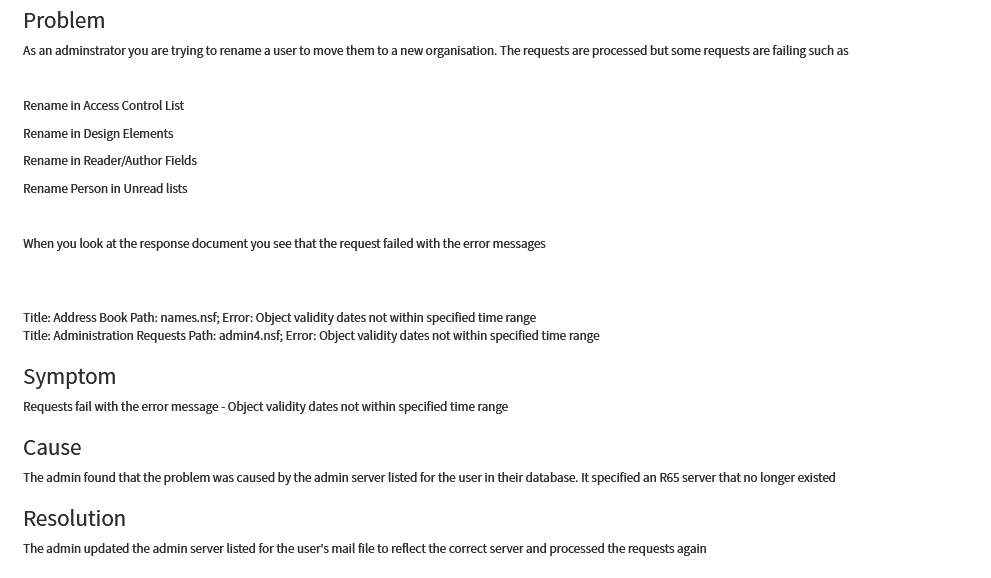
Regarding Error --> Object validity dates not within specified time range

Please refer to below URL explaining this error :

https://hclpnpsupport.hcltech.com/kb_view.do?sys_kb_id=f473ff481bfee450beab64e6ec4bcb20

Access not possible to this link "Security constraints prevent access to requested page"

Please refer to below link and confirm if this is accessible or not. Sharing the content of the link via screenshot as well-->

https://support.hcl-software.com/csm?id=kb_article&sysparm_article=KB0038482

Refer to attached screenshot highlighting information about this error.

This is the same error, but no rename process running.

But we will check this.

Any idea for other (and main) issues ?

Hello benoit,

It seems you performed keyrollover of user IDs to change their Notes ID public key to 2048 by changing settings in security policy -> keys and certificates -> User public key requirements.

After that issues observed in your environment.

Please refer to attached document for the process to perform keyrollover in Domino environment.

Please refer "Key Rollover With ID Vault" section from the attached document, it explains about some of error messages you observed on logs and workarounds.

Please check if you missed to any prerequisites while implementing User IDs keyrollover in your environment.

The Domino Certificate Authority Rollover Process.pdf

Check on its way

Hello Yalavarthy,

I did not read the whole document so far.

But as soon as I started (directly to page 42 - Rollover with ID Vault) I found an exact description of what I am currently seeing.

This is the first good news in a couple of days !

I shouldn't have run into problems if I had this document prior to start the key upgrade.

You make my day ! Thank you.

Hello Benoit,

Good to hear that the document help you.

All the best!!

Regarding this process I would like to give some more information.

First of all, special thanks to Yalavarthy Chaitanya for bringing me the document.
Special thanks also to Graham Farrell for this so usefull material.

To be or not to be ?
Is it mandatory to proceed through the rollover process ?
The answer is clearly "No", current Domino server (12) still works with keys lower than 1024 !
New users will be created with 1024 bits key strenght and existing users will remains with their current values.

So, why do I take the decision to upgrade the key size ?

Reason 1 : Security
We are currently using a 630 bits length which has never been challenged since the beginning.
Increasing length worths it. A length of 2048 bits was choosen, just in case HCL will come with a new upgrade in a future version ( :-) ).

Reason 2 : limiting the number of policies
Users management is done through 6 policies.
Knowing the fact that ID Vault will be unavailable for some moments, some additionnal policies should be required.
Creating dedicated policies for 630 key length and another set for 2048 bits might (will) lead to future problems.

Some considerations before starting the process
1- Reading the Graham Farrell document is a MUST !
But this is not enough. You should understand everything (action, effects and side-effects) in order to make good decisions.
Challenge any decision before applying it.

2- This is a long term journey !
It will last months before it will be completed for all of yours users.
Keep in mind that during the whole process, you will have a safety check disabled : "Local public key should be the same as the one store in names.nsf".
That means you will allow users with public key in local id file is different from the one in personal document in the adress book.

3- Create new policies to allow creation of non vault users.
It may takes some time and probably some attempts before you will figure out how to deal with the process.
You may (will) make mistakes which will prevent you from creating standard ID Vault users.
Having a new set of policies would be welcome on that dark times.

4- Check for cert.id files.
I was estonished (and quite puzzled) to find more than one instance of the cert.id file.
In fact, I found 6 of them on different places ( locally on administrator workspace, on some places on our network and on some servers) !
Inspect all of them in details. Find what is inside and which one is the good one.
When done, all remaining ones MUST be put out of reach ! But don't delete them - just in case :-)

5- Recertify your users before rolling over them !
This is explained in page 52 (and following) of the document.
If you don't do this, you won't be able to created vaulted users before the process is completed for all of your users.
Do NOT do this.

6- Take your time.
This process of rolling over the differents ID (cert, OU, servers and users) will take time. A long time.
And you should let time enough for every steps to completed before getting to the next one.
Think about the time for a process to complete, the time for replicating changes to other servers and so on...
Giving enough time for these process to completed is a key to success.
Not allowing enough time may lead to very complex situations.
And when you think you give enough time to your servers, take a break and come back later.

7- Low security level ?
As soon as you have completed the process, your Domino administration server will work on its way.
In fact, the server will create "Certify New Key Request" documents in the Administration Request" database (admin4.nsf).
The order of the users and the time the request documents will appear, will be choosen by the server - As in a black box.
Currently, more than 7 weeks after the rollover process, the process is completed for only 25% of users and started for 29 % of them.
This situation is rather problematic as a safety check has been removed in order to let users logging during the rollover process.
Refer to page 46 - Disable Public Key Checking to understand why.
I really do not undestand why it is not possible to rollover all users at the same time.
I may understand that doing this might put down some low performance servers or in case of a very large number of users.
But this decision must be done by the Domino administrator and not by a machine.

Errors found
Currently, I have less than 30 users (out of 2 000) with some issues.
But for most of them, they even don't noticed it.
Error messages are to be found in log.nsf, admin4.nsf and certlog.nsf.
Usefull documentation of these error are to be found ... nowhere.

Here are the problems founds so far:
1 Certificate expired
Some users (for uncertain reason) got an outdated certificate in their local user.id.
I assumed their ID have not replicated with the vault or users did not log since the rollover.
Solution: rename local id and restart Notes.

2 Object validity dates not within specified time range
Reason : unknown
Solution : not found so far - Replacing local id the one in IDVault does not fix it.

3 ... did not accept the new certificates because they were not issued after the current certificates
Reason : unknown
Solution: Nothing to do (really ?)
I got this error for a couple of users, error which disappear after some time. Users seem to have achieved the process afterwards.

4 The signature on the certificate was found to be invalid
Reason : unknown
Solution : unknown

5 Multiple documents for same users found in admin4.nsf
Sometimes I got same doc twice or one more time later.
I stard the process for each of them but usually they went into error
Reason : unknown
Solution : unknown

Measuring the process.
As no tool exists to measure this, you have to build one.

Figures to take into account
1 Users created after you rolled over your server.
These users are created with the new key length as so nothing has to be done for them.

2 Users with error(s)
Just count them - Hopefully they won't be numerous :-)

3 User with rollover not yet started
When the process is started for a user, person document gets a field "Rollover".
This field contains some information which looks like a key.
Every key is different but does not fit to any known key.
I do not know what this is about.
But this is a fact: new users do not have this field. Users for whom the process have not started do not have either.


4 User with rollover started
This is based on log.nsf.
I have written an agent which count unique users which present the log message "Your public key does not match the one stored in the Address Book".
If a user has completed the process in the meantime, he will be counted as long as the message remains in the log (a couple of days). This is not an issue.

5 Users with rollover completed
= Total Users - (1) - (2) - (3) - (4)

Putting all these pieces of information into a pie chart and you have an easy way to display the progress.
Data are not exact data, but this is not usefull to have precise figures.
It is also possible that some entries are counted twice. But this absolutelly not an issue as I just want to know if the process keeps on working.

So far so good.

Have fun !

Hello Benoit Weissen,

Thank you for your sharing information about progress.

Regarding the errors you observed, can you please check below articles if it may help you?

2 Object validity dates not within specified time range

https://support.hcl-software.com/csm?id=kb_article&sysparm_article=KB0038482

3 ... did not accept the new certificates because they were not issued after the current certificates

https://support.hcl-software.com/csm?id=kb_article&sysparm_article=KB0037808

* This KB is in japanese

4 The signature on the certificate was found to be invalid

Add IDV_RefreshCerts=1 on server's notes.ini

https://support.hcl-software.com/csm?id=kb_article&sysparm_article=KB0038896

All the best!!

Regards,

Chaitanya

2 Object validity dates not within specified time range

https://support.hcl-software.com/csm?id=kb_article&sysparm_article=KB0038482

=> Problem described not related with mine.

=> Solution not applicable

3 ... did not accept the new certificates because they were not issued after the current certificates

https://support.hcl-software.com/csm?id=kb_article&sysparm_article=KB0037808

* This KB is in japanese

=> Google is very friendly regarding translation ;-)

=> The rename process and a key ugrade are very similar process or seem to have the same workflow.

=> Looks like a good solution, but as I see that users with such error don't get it anymore after sometime I do not do anything

4 The signature on the certificate was found to be invalid

Add IDV_RefreshCerts=1 on server's notes.ini

https://support.hcl-software.com/csm?id=kb_article&sysparm_article=KB0038896

=> Server is currently running FP10. I have to check if FP6 was installed in the past.

I assumed, but I might be wrong, that this issue was fixed on FP later than 6.

=> But where is the issue ?

OR local id is uncorrect and id in ID Vault is correct

OR local id is correct and if in ID Vault is incorrect

I am afraid about side effects of putting IDV_RefreshCerts=1.

If problem is located on local id, I just have to delete it and restart Notes.

Notes client will automatically call server in order to get the id.

As I have only a couple of users with such error, this won't be a problem.

=> But anyway, I will have a look at this solution

I noticed a another error message on the Security par of log.nsf

"ID failed to synchronize with vault 'O=xxxxx' for ‘aaaaaaa: ID files cannot be merged"

Has to be investigated.

Benoit,

Regarding the error ,"ID failed to synchronize with vault 'O=xxxxx' for ‘aaaaaaa: ID files cannot be merged", you can perform below steps.

1. Run updall command against the id vault database to make sure it will gets updated and sync.
load updall -R <path>\<Vault File Name>

If issue persists, please see the next step.

2.Delete the affected ID from the Vault and re-upload it again.
- Delete the affected users ID file from vault
- load updall -R <path>\<Vault File Name>
- Let the user re-authenticate user from notes client so the ID will be upload to vault.
- load updall -R <path>\<Vault File Name>

That assuming the local id is the correct one - should be correct as the user still log on...

Will get a try and keeps you posted.

hi, anyone can help how to

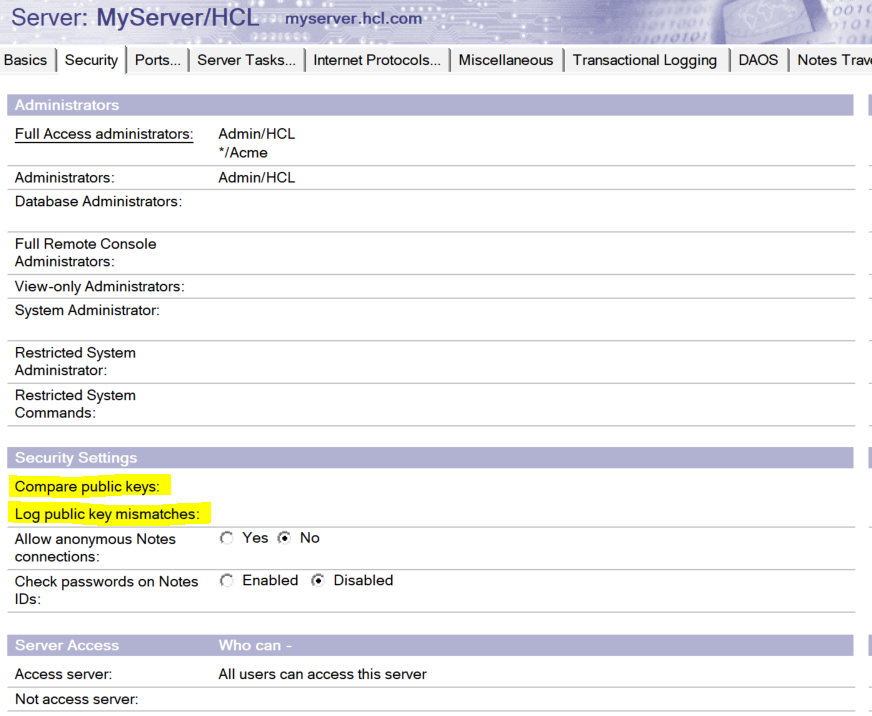
safety check disabled : "Local public key should be the same as the one store in names.nsf".

I cannot found it on server document.

Hi @Justin WP Chuck

Below settings to be enabled in server document to record publickey mismatches.

Administrator need to monitor logs to find the users who are using ID files having public key which is not matching with the one stored in person document and take action by copying the public key from ID file and paste in respective user's document in NAB.

Thanks & Regards,

Chaitanya Y