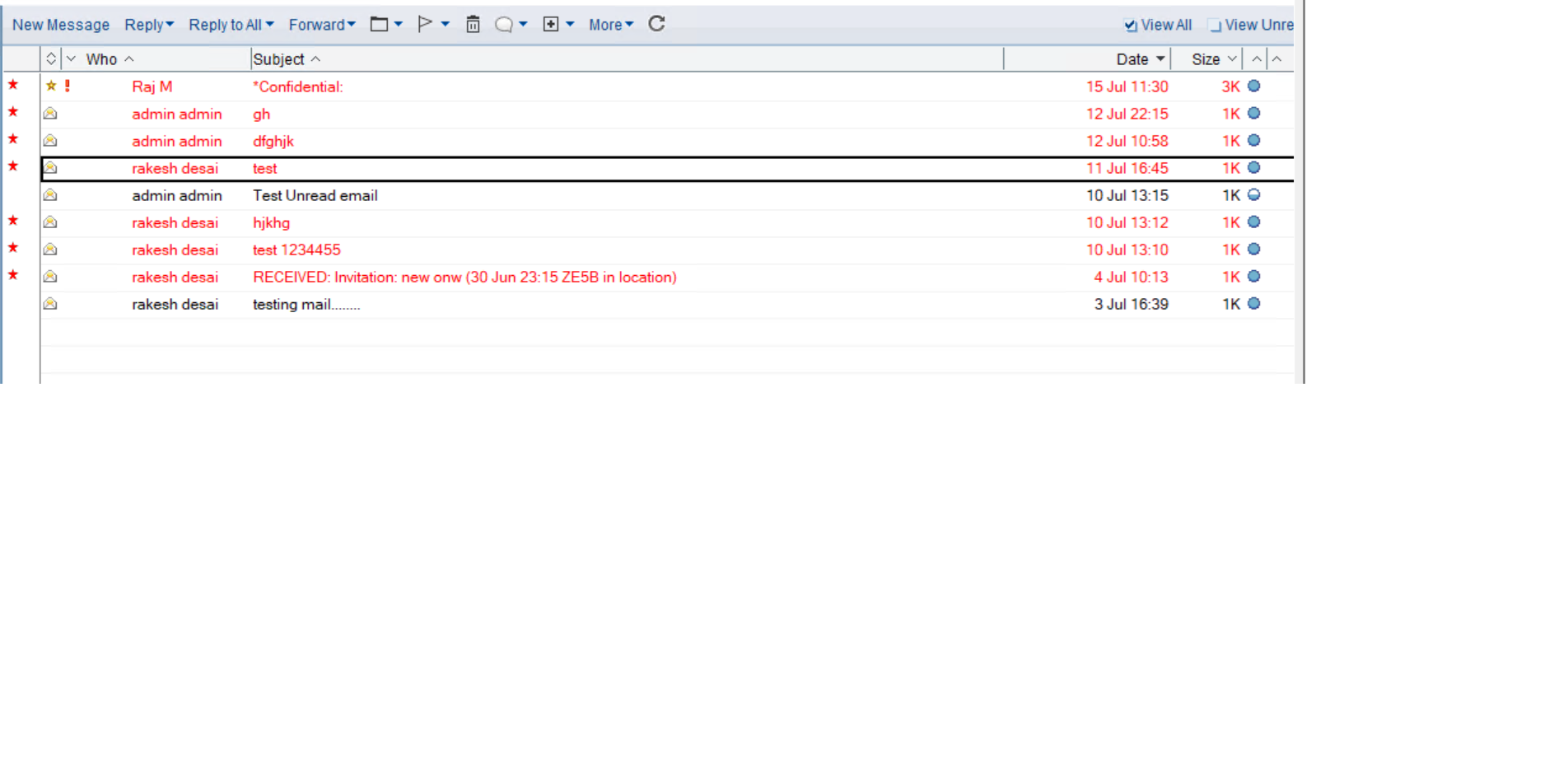
Unable to Retrieve Unread Emails Using NSFDbGetUnreadNoteTable

Hello Community,

I’m currently working with the HCL C API (version: CAPIToolkit_1202_MP1) to extract unread emails from a user’s NSF mail database. I’m attempting to use the NSFDbGetUnreadNoteTable function, but it seems to return all documents — including read ones — instead of only unread notes.

Here’s a simplified version of the code I’m using:
c api

UNREADTABLE *pUnreadTable = NULL;
// Get unread note ID table
STATUS status = NSFDbGetUnreadNoteTable(
hDb, userName,
strlen(userName),
FALSE, // create if not there
&hTable);

The function executes without error and returns a valid UNREADTABLE pointer. However, when I iterate through the entries, it appears to include all note IDs, not just the unread ones from, say, the Inbox view.

My goal:

To retrieve only unread emails from a specific view such as ($Inbox) or the whole database.
Hi @ritu

I checked the documentation for NSFDbGetUnreadNoteTable.

This function returns a handle to an ID Table containing the Note IDs of unread documents for a specified user in a given database

STATUS LNPUBLIC NSFDbGetUnreadNoteTable(
DBHANDLE hDB,
char far *UserName,
WORD UserNameLength,
BOOL fCreateIfNotAvailable,
DHANDLE far *rethUnreadList
);

To extract unread emails from a user’s NSF mail database using the NSFDbGetUnreadNoteTable function in the Lotus Notes C API, follow these steps:

  1. Open the NSF Database
    Use NSFDbOpen() to get a valid DBHANDLE for the user’s mail database.

DBHANDLE hDB;
STATUS error = NSFDbOpen(“mail\jdoe.nsf”, &hDB);

  1. Prepare the User Name
    Ensure the user name is in canonical hierarchical format (e.g., CN=John Doe/O=Company). Use DNCanonicalize() if needed.

char *userName = “CN=John Doe/O=Company”;
WORD userNameLength = strlen(userName);

  1. Call NSFDbGetUnreadNoteTable
    Set fCreateIfNotAvailable to TRUE to ensure the function returns a list even if one doesn’t exist.

DHANDLE hUnreadTable;
STATUS status = NSFDbGetUnreadNoteTable(hDB, userName, userNameLength, TRUE, &hUnreadTable);

  1. Check for Success
    Verify that status == NOERROR and hUnreadTable is not NULL.

  2. Extract Note IDs
    Use IDScan() or IDEnumerate() to iterate through the Note IDs in the unread table.

NOTEID noteID;
BOOL more = IDScan(hUnreadTable, TRUE, &noteID);
while (more) {
// Process each unread note ID
more = IDScan(hUnreadTable, FALSE, &noteID);
}

  1. Open and Read Each Note
    Use NSFNoteOpen() and NSFItemGetText() to extract fields like Subject, From, Body, etc.

  2. Clean Up
    Free the ID Table and close the database.

OSMemFree(hUnreadTable);
NSFDbClose(hDB);

Important Notes:

  • This function only accesses unread marks stored in the database, not those in desktop.dsk
  • It works with local databases unless both client and server are version 4.5+
  • Unread marks are user-specific and not replicated across replicas

Best Regards,

Jho Ann Leanne A. Labayani
Technical Support - Application Integration Team
HCL Technologies

Hi Jho,

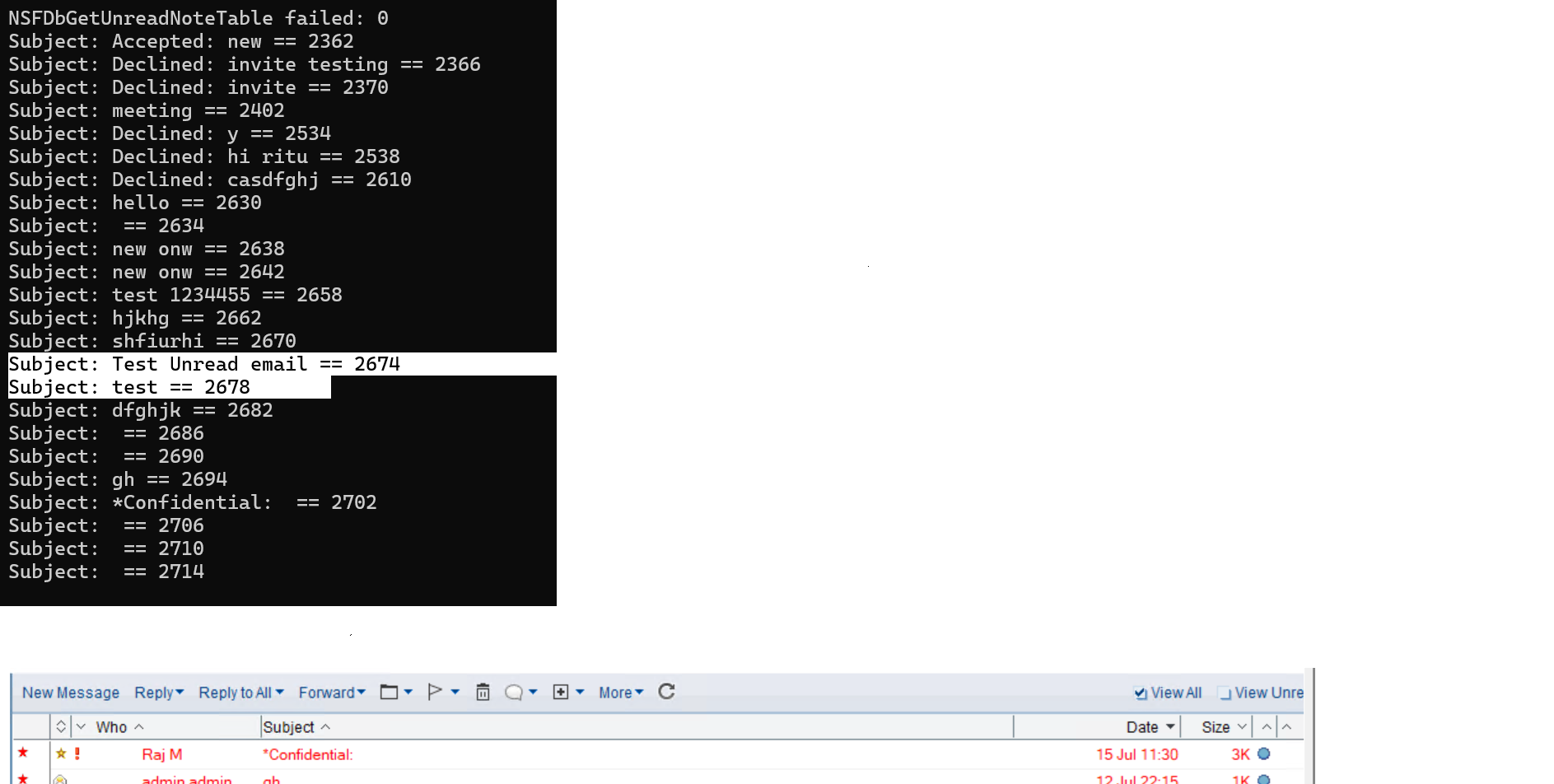
Thanks for your response. I tried the approach you suggested, but I’m still not getting unread emails correctly.
Here’s the code sample I used and also shared screenshot which i got :

my code sample :-
DBHANDLE hDB;
STATUS status;
DHANDLE hUnreadTable = NULLHANDLE;
NOTEID noteID;
BOOL more;

// Initialize Notes/Domino
status = NotesInitExtended(0, NULL);
if (status != NOERROR) {
printf(“Error initializing Notes: %d\n”, status);
return status;
}

// Open NSF database
status = NSFDbOpen(filename, &hDB);
if (status != NOERROR) {
printf(“NSFDbOpen failed: %d\n”, status);
NotesTerm();
return status;
}

// Specify user for unread check
char* userName = “CN=ritu r yadav/O=DomainName”;
WORD userNameLength = (WORD)strlen(userName);

// Get unread note table
status = NSFDbGetUnreadNoteTable(hDB, userName, userNameLength, TRUE, &hUnreadTable);
if (status != NOERROR) {
printf(“NSFDbGetUnreadNoteTable failed: %d\n”, status);
NSFDbClose(hDB);
NotesTerm();
return status;
}

// Scan unread Note IDs
more = IDScan(hUnreadTable, TRUE, &noteID);
while (more) {
NOTEHANDLE hNote;
status = NSFNoteOpen(hDB, noteID, 0, &hNote);
if (status == NOERROR) {
char subject[256] = { 0 };
NSFItemGetText(hNote, “Subject”, subject, sizeof(subject) - 1);
printf(“Subject: %s (NoteID: %08x)\n”, subject, noteID);
NSFNoteClose(hNote);
}
more = IDScan(hUnreadTable, FALSE, &noteID);
}

// Clean up
IDDestroyTable(hUnreadTable);
NSFDbClose(hDB);
NotesTerm();

Thanks

Source screenshot :-:

Hi team ,

Any update ?

Thanks

Hi @ritu,

NSFDbGetUnreadNoteTable retrieves all unread documents in a database. To ensure you’re only getting unread emails, add a check for the “Form” item within the note. Common forms for emails are “Memo” and “Reply”. You might need to adjust this list based on your specific mail template. Also, check if there’s a difference between indexed and unindexed mail database. Thank you.

HI TJJabien ,

I have checked but still not getting expected output. Now I am trying with READ_MASK_INDEXANYUNREAD

STATUS error =
NIFReadEntries(
hViewCollection, // collection handle
&IndexPos, // where to start
NAVIGATE_NEXT, // skip direction
dwSkipCount, // number to skip
NAVIGATE_NEXT, // return direction
dwFillCount, // number to read
READ_MASK_NOTEID + READ_MASK_INDEXANYUNREAD, // data to return (or add READ_MASK_SUMMARY)
&hBuffer, // output buffer
&wSummarySize, // buffer size (optional)
&dwEntriesSkipped, // skipped count
&dwEntriesReturned, // returned count
&wSignalFlags // signal flags (optional)
);
but not getting it. could help me on this how to extract unread status ?

Thanks

HI TJJabien ,

any update ?

Hi @ritu ,

Can you open a support ticket instead so we can take a look at the exact issue that you have?

Let me know if you have further concerns. Thank you.