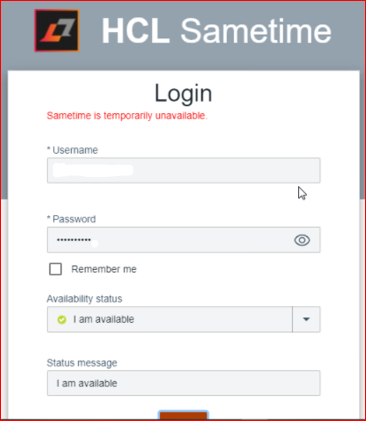
Hello,
This is the new Sametime 11.6 environment on the RHEL 8.5. The user is able to login to Sametime client chat using Notes embedded client, but the same user is unable to login to browser web chat.
All users are unable to login to Sametime proxy chat and getting this error - "Sametime is temporarily unavailable". SSO configuration is done properly.
The log files are not generated under folder path - /opt/hcl/sametimeproxy/logs even I uncommemnted the two lines in the logging.properties and restarted the proxy service.
Please do help.
Thank you in advance.
Regards,
Elango
How long does it take for that screen to comeback? If its immediate, the first thing to check is the connectivity to the Community server itself.
If it takes ~ 10 seconds - then this is a timeout - and the usual culprit is an issue with the UserInfo service on Community.
The best way for us to help you is with a case.
Dear Tony, Thank you for your response.
Yes, sure I will raise a ticket now.
I am surprised why the log files are not created under the logs directory of the proxy even removed # in the last two lines of the logging.properties. I could address the issue if the logs are created on the ST 11.6.
I've not seen a case where no logs were created - permissions maybe? there is no catalina.out?
Oh, I am sorry. Yes, let me check the permission status for the directory.
Hi Elango,
You may also use this short video for an understanding of verifying STProxy connection with Community Server;
HCL Sametime checking STProxy connection with Community Server
https://youtu.be/q0DvdnJSqYw
Hi @Elango Gopal, we checked together and found issue in SSO configuration. We have fixed the SSO configuration by following the article below and our problem is resolved.
https://help.hcl-software.com/sametime/11.0.2/admin/st_adm_security_tokenauthen_c.html