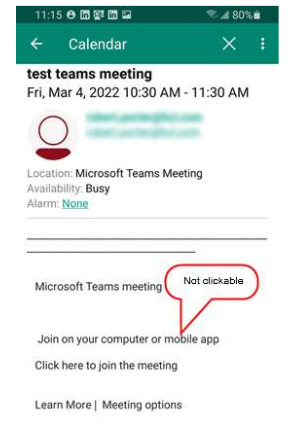
It has come to my attention that when a Verse Mobile (Traveler) user tries to join a MS teams meeting on their mobile device, they are unable to do so as the "Click here to join meeting" in the meeting body is not clickable.
In the Notes client, Verse (web browser), iNotes this all works prefectly as the link is clickable. But in the Verse Mobile client it is not.
Are there any workarounds to this? Is this a bug?
Hi.
Thanks for bringing this up. I wasn't able to post this same odd behavior.
It's really frustrating to have a meeting and not being able to launch in from the Verse Mobile client.
What I do (not a comfy workaround, but works) is: I also have the Verse (web app) installed on my mobile device, and open the meeting from there.
But his definitely need to be addressed by HCL Traveler team, or let us know a better workaround.
If any test is needed, I'm available to help.
Sincerely,
Elvis.
I have just been doing a further bit of testing. If I create a test Teams Meeting in Outlook and send it to a Notes user...
If they accept the meeting in their Notes client, the acceptance is correctly sent back and the outlook calendar entry is updated with their response.
If the invite is accepted in either Verse (web) or on Verse Mobile a response is sent but this is not updated into the calendar entry in Outlook...
This looks like a massive bug to me...
All tested using Outlook (O365), Domino 12.0, Traveler 12.0.0.2, Notes 12.0, Verse 2.2.0 (web) and Verse Mobile (android) 12.0.4.0
So not only does it seem you cannot join a Teams meeting from Verse Mobile, you also cannot correctly accept the meeting either as the response that is sent does not correctly update the Outlook calendar entry.
I have opened a ticket at HCL 11 days ago regarding this issue. iOS has the exact the same problem and we're getting more and more complains about it from our users / managers who are using iPads/iPhones.
HCL stated that this is a Traveler Limitation (see https://help.hcltechsw.com/traveler/12.0.0/GeneralLimitations.html - "Rich Text is not supported for calendar entry to the devices..........The meeting link in the invitation sent from MS Teams is in the body of the invite and due to the limitation the link is removed and the text is displayed as plain text").
There is also a enhancement request related to rich text support in Calendar - please vote for it https://domino-ideas.hcltechsw.com/ideas/TRVLR-I-220. If you compare how gmail is handling these type of invitations then it should not be so complicated to implement/fix this.
I have refused in my ticket the HCL answer/explanation of this issue and insisted that this is a defect in traveler which should be fixed (SPR). At least the weblinks should not removed in the body text. Weblinks are supported in calendar entries (our footers containing weblinks are in calendar entris visible and clickable).
I'm waiting now for 5 days for an answer from HCL. I hope that it will be fixed soon because our users getting more and more Teams invitations from office 365 users and we (IT) complains.
Hi Rolf.
Totally agree with you and already voted!
Thank you very much for bringing this up.
Sincerely,
Elvis.
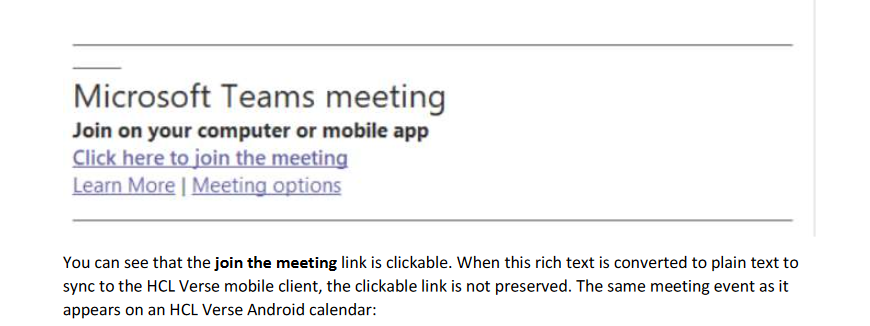
The initial issue discussed is that from Verse Mobile, the user cannot join a Teams Meeting (The "Click here to join" is not live). This is not a bug but a limitation of the Traveler server and mobile clients. Traveler does not support syncing rich text descriptions. The way the MS Teams link is sent is in HTML format. So when this is sync'd as plain text to the client, the link is lost. For basic links (https://, etc), the Verse mobile client is able to "link-a-fy" those but that doesn't apply to these ms teams link. As noted by Rolf Kuster, there is an idea for this (https://domino-ideas.hcltechsw.com/ideas/TRVLR-I-220) so I encourage voting for it so that it can be prioritized by product management.
For the issue of the calendar response not being correct (at Outlook), please open an HCL Support ticket.
Curtis Ebbs
HCL Development
it seems that this setting helps: set config ICAL_FORCEADD_XALTDESC=0
Starting with Domino 12.0, changes were implemented to better handle the non-standard iCal typical of Microsoft Teams meeting invitations. This allows the meeting link to appear in HCL Notes as it was intended. So instead of the very long ms teams https link that used to appear in the calendar event, you now have the intended "join this meeting". However, because the Verse Mobile clients do not handle the resulting rich text in the Calendar event description, its no longer clickable.
There is a workaround as you indicated. The following notes.ini's must be set on the user's home mail server (where the ical conversion occurs).
IcalReadXAltDesk=0
ICAL_FORCEADD_XALTDESC=0
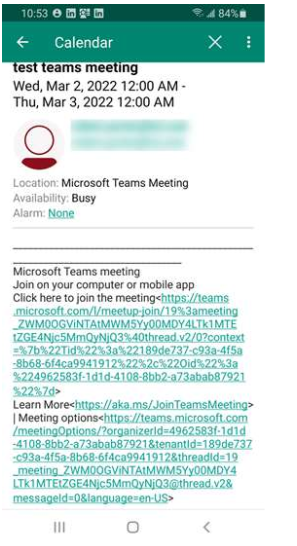
This will result in the pre-12.0 handling of these MS teams meeting invites which will be a clickable https link on the mobile clients. Note that this only helps with new invites, not existing invites processed prior to the notes.ini changes.
The Traveler/Verse Mobile teams are actively working on adding calendar rich text support.
Regards,
Curtis Ebbs
HCL Development
Hi @Charles (Curtis) Ebbs .
Thank you very much for this clarification and information.
Can this parameters be safely added to any productive instance of Domino 12.0.1 with no other impact ?
Is any task required to be performed once added ? Restart traveler ? Restart http ?
Thank you very much in advance once again.
Sincerely,
Elvis.
Elvis,
We (Traveler) did not do extensive testing with these notes.ini changes. We proved out (as I think some other contributors here have done) that it reverts changes in Domino 12 in how the iCal is handled when an external invite is received. Certainly the ms teams invites are going to look uglier (clickable but uglier) on the Notes and Verse Web clients. So the warning is this affects more than just the Verse Mobile clients and may be considered a visual degradation. I do recommend you do some of your own testing (if possible).
Development focus is getting the rich text calendar support as soon as possible.
Note that these notes.ini changes are not on the Traveler server (unless that's also the mail server). They have to be on the mail server that is receiving the external mail for a user which is where the initial ical handling will be performed. I'm not sure if these notes.ini settings are dynamic or not. Enabling or removing only affects new invites. Meaning once the conversion has occurred, changing these settings will not affect existing calendar events.
Regards,
Curtis
HCL (Traveler) Development
Hi Charles.
Thank you very much for this detailed response.
Sincerely,
Elvis.
Note that the subject issue was addressed in Traveler server 12.0.1 fp1 (available as of May 23, 2022) by adding support for syncing/viewing rich text calendar descriptions in the HCL Verse Mobile clients.
12.0.1 fp1 release notes: https://support.hcltechsw.com/csm?id=kb_article&sysparm_article=KB0098182
Regards,
Curtis Ebbs
HCL Traveler Development
Hello Curtis,
my environment is this: Mail Server 12.0.2, Traveler server 12.0.2.0.
I tried to send an invitation from Teams to me as Notes user and I accepted it.
If now I check my iPhone I see that I'm able to join Teams meeting if I use Verse but I'm not if I use Apple Mail (I don't have links but plain text only in body) Is there a chance to solve? Because 90/95% use Apple Mail instead of Verse on iOS.
Thanks
Stefano,
Although the answer is included earlier in this thread, please read this more recent forum post on the same topic: https://support.hcltechsw.com/community?id=community_question&sys_id=a66cc38adbf5251055f38d6d139619f3&anchor=answer_198700121bf92910574121f7ec4bcbff&view_source=searchResult
If you still have questions, then don't hesitate to continue this conversation.
Regards,
Curtis Ebbs
HCL Traveler development
Thank you Curtis. Just one more question: What negative side effects could have setting
IcalReadXAltDesk=0
ICAL_FORCEADD_XALTDESC=0
Thanks again.
Stefano,
To answer your question, I think its helpful to restate the problem. With the Domino 12.0 improvements, a MS Teams meeting invitation looks as it was intended in rich text/html format:
However, since the iOS Calendar app doesn't support rich text, it ends up like this because the link is not just a basic https:// link:
If you implement the workaround on the mail servers:
IcalReadXAltDesk=0
ICAL_FORCEADD_XALTDESC=0
This disables the Domino 12.0 improved handling of the MS Teams invites so what you will end up with is the way it was before:
Example on notes client:

So now that the links, ugly as they are, are now in https:// format, the iOS Calendar app will "linkify" the url
So the negative side effect is living with this less than optimum formatting of MS team meeting links.
Regards,
Curtis Ebbs
HCL Traveler Development
Hi, @Charles (Curtis) Ebbs
notes.ini parameters you mention are:
IcalReadXAltDesk=0
ICAL_FORCEADD_XALTDESC=0
just curious if there are misspelling , one is
icalReadXALTDESK second is
ical_FORCEADD_XALTDESC
faced issue that dounble byte text is garbaged in teams invitations, and noticed that Description is coded with different abbreviations, may be code also has different names?
vlad
@Vladislav Tatarincev (HCL Ambassador) I believe the notes.ini properties are correct.
See this post for more info on that this and it is only needed for native iOS Calendar. https://support.hcltechsw.com/community?id=community_question&sys_id=a66cc38adbf5251055f38d6d139619f3&anchor=answer_198700121bf92910574121f7ec4bcbff&view_source=searchResult
Depending on what Domino/Traveler Version and clients you are using I think if you are seeing issues with DBCS characters that you should probably open a support issue.