Just upgraded from 12.0.1 Domino\HEI to 14.0. Had successful installations of both, upon server startup HEI task:
[1540:0002-14D4] 03/01/2024 11:03:14 PM HEI: Initializing HCL Enterprise Integrator for Domino
[1540:0002-14D4] 03/01/2024 11:03:15 PM HEI: (Release 14.0)
540:0002-14D4] 03/01/2024 11:04:16 PM HEI: Unable to communicate with HEI control store manager
[1540:0002-14D4] 03/01/2024 11:04:17 PM HEI: Abnormal HEI Termination.
>
Release 14.0|November 09, 2023
I've already referred to https://support.hcltechsw.com/csm?id=kb_article&sysparm_article=KB0078846 to no avail. Re-install of both Domino and HEI resolves nothing. Even removing old decsadm.nsf and allowing new blank one returns same failed results above. Any advice from anyone?
Hi Eric,
How is Domino running at your end? (As an Service or an application)
Please perform below steps and see if that helps in resolving the issue.
A. Stop the Domino server.
b. Delete Lei from the server task line of the Notes.ini file on the server and save the file.
This line is as follows.
Servertasks = Update, Replica, Router, AMGR, AMGR, ADMINP, CALCONN, SCHED, LDAP, RNRMGR, Lei
C. Remove Decsadm.nsf, Leilog.nsf, and Leivlt6.nsf from Domino Data directory. (You Can Also Rename THESE DATABASES TO Let Say Decsadm_old.nsf, Leilog_old.nsf, and Leivlt6_old.nsf)
d. Restart the Domino server as an application.
e. Please execute the HEI 14.0 installer again and check.
Note: When installing HEI, make sure that the Domino server is running.
Regards,
Amit
Hello Amit. Thank you for your reply. Domino typically runs as a Service in our environment. I followed your suggestions, but still have no luck with HEIv14 on Domino v14.
I was able to revert both Domino & HEI back to 12.0.1 with success. Then I methodically did incremental upgrades of Domino & then HEI. To do any of the HEI installs, I had to disable the Service and run Domino as a regular application (as noted in KB0091389 )
During this process I continually ran as regular application and would typically start HEI with "load lei" server commend. I was successful until I upgraded both to v14, which would reliably give me "HEI: Unable to communicate with HEI control store manager" error. I received this error when run both as application and as service. I did have limited success of HEI v14 on Domino 12.0.2, but not when run as a service.
The only issues I can think of might be related to Domino v14 new step of "User Name = NT AUTHORITY\LocalService" and/or the change in location of notes.ini (from Domino to Data).
But now, after stepping through the incremental upgrades and failing at v14, I've reverted once again to both at 12.0.1 with new issues. Now HEI works, both as application AND service. BUT it does not work when LEI is listed in notes.ini line "SERVERTASKS = ..." line. It fails. So I start as service and have to send server command "load lei" after server start, instead of automatically
And even more troubling and related(?), now my Admin clients on multiple PCs gives me timeout error on the Server tab (Server Tasks, Notes, Users, Database Users, Server Console, etc). Things have really gone downhill with this exercise.
Hi Eric,
Thanks for your sharing your test results in a detailed manner.
I apologise for the inconvenience caused to you while using HEI 14.0.
I would suggest to open a support case for HCL regarding this issue.
Might need to gather some data from your environment for further investigation.
Regards,
Amit
Hello Amit,
I have the same issue.
HEI is working fine in version 14 on a domino server which runs version 12.0.2 on a Windows Server 2019.
After updating the domino to version 14 HEI task does not start.
If I follow your steps, I will start with complete empty brand new databases?
And how to I get alle the needed configurations back working?
Many thanks and kind regards
Hubertus
Hello Hubertus. As Amit suggested, I opened a HCL support case for this issue, which is still ongoing. I was able to get HEI v14 to run on Domino v14, by doing the following:
- go to the Control Panel > System > Advanced system settings" and click on "Environment Variables..." button.
- Edit "Path" then add the directory you specified for the Domino server's note.ini. This is for both "User" and "System" variables.
- Restart the machine for the new added entries to take effect.
The notes.ini file moves from Domino dir to Domino\Data dir in v14, so perhaps related. Making the Path edits described above got me to run 14 on 14. BUT with some serious issues still. It will not run as a SERVERTASK. I must "load lei" every time Domino starts (I do this with a Program doc for now).
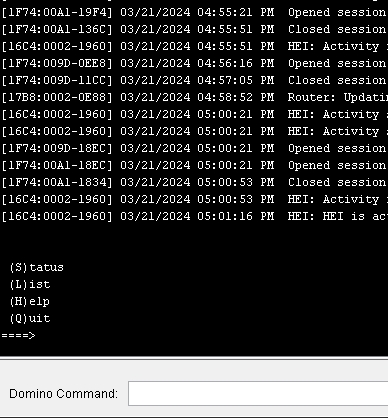
This current state also renders my Admin client useless. As long as the LEI task is loaded, I cannot utilize the Server tab of my Admin client. I get 2 timeout errors after a long wait. Even the Domino Console on the server can't perform simple task like "sh us" or "sh ta" while LEI runs. It takes over the console and I have to (Q)uit it in order to perform usual functions (see pic below). If I quit the LEI task, Admin client functionality returns back to normal.
Try the PATH changes, and please keep me posted. It's hard to find a fellow Enterprise Integrator customer to share with.
Did you guys ever get these problems ironed out? What must we do, short of reinstalling HEI from scratch, to get it to start up when Domino starts, via "ServerTasks=...,LEI"?
If we do have to reinstall it from scratch, how can we preserve our existing Activities?
Rob Kirkland
Hello Rob. What specific issues are you experiencing? The good news is that I ultimately got everything resolved, relatively easily, but not without the growing pains.
I had to reinstall both Domino AND HEI to a new directory, outside of Program Files (e.g. C:\HCL). Doing this made everything work as expected. Be sure to backup & copy all your data before moving it. All HEI Connection & Activities are contained in decsadm.nsf, so keep that handy. My approach was to:
- copy all the data, and then Uninstall both HEI & Domino.
- Restart the Windows server.
- Install Domino v14 in new directory off root.
- Start Domino, run thru setup wizard.
- Then install HEI v14. Ensure everything works as expected, using just the newly created nsf's. I was able to confirm HEI task loaded properly and that my Admin client worked.
- Down Domino, and replace Data with all my backed up data.
- Start Domino and confirm all is well.
After moving your installation & data files to new directory, be sure whatever backup programs you have running include this new directory. Don't want to realize it's not being backed up when you ultimately look for a restore.
If you have any questions about this, feel free to reach out again.