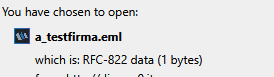
I need to create a file attachment in a Leap page using an EML file. When I try it everything seems to work fine but the attachment isn’t really stored in the form : when I try to download it I got the prompt “RFC-822 data” (correct) and size = 1 byte which is obviously wrong .
Already tried to modify the Leap config using attachmentFilesWhiteList with eml file extension and message/rfc822 as mime-type but without success.
Also, opening the leap application from the Notes client I noticed that the document for the attachment has been created but the field where the attachment should be stored is empty.
I ran some test and I’ve experienced the same problem on different environments with different versions of Domino Leap:
1.1.4.0_21
1.1.8.0_25
1.1.10.0_14
About the network tab : I don’t see any error response :
HTTP/1.1 201 Created
Server: Lotus-Domino
Date: Tue, 24 Mar 2026 08:46:43 GMT
Connection: close
I also tried a different test : I tried to attach the eml file (and got the problem) then I renamed the file form .eml to .txt and in this way I was able to attach the file correctly.
Based on the description, it sounds like the attachmentFilesWhiteList is not configured or enabled properly. If set correctly, then you should be able to add an .eml file as an attachment.