We have one unique Domino Server R12 + Traveler 11 running on WindowsServer, working ok, traveler, inotes, etc, etc.
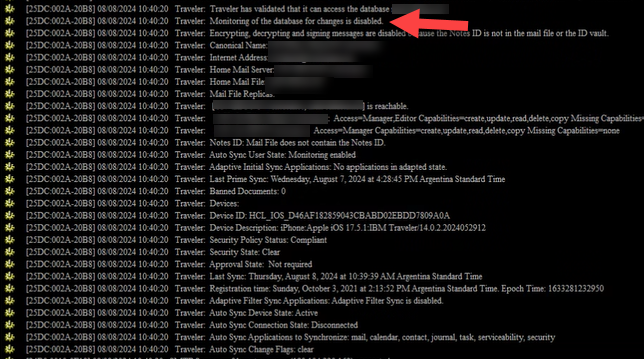
After an upgrading "in place" to Domino R14 + Traveler 14 .... inotes is working ok, notes ok, but devices with HCL Verse (android and iphone) has strage problem to sync (hcl verse app):
don´t sync inbox and send items.
If we send an email from hcl verse app, mail is sended ok to external and internal recipients.
If we delete the hcl verse app and reinstall it, the emails are synchronized ok but only the emails that existed before the migration, not the new ones.
Other validations:
tell traveler status -> is green (ok)
HCL Verse app logs -> Full Sync: Updated (ok)
if we access to https://traveler.xxxxx.com/traveler from a browser, traveler is available (ok)
It is very strange, because on the phones there are no synchronization or connection errors on app logs, the Traveler service is in green status, the service is shown as available at www.xxxx.com/traveler ... what other validations or console commands can we execute?
To diagnose the issue, execute the "DbRecordsCheck" command on your Traveler server. This process takes some time and it involves reviewing all sync state entries for all users and devices. It will identify which users have missing device records by comparing the table of documents that should be synced.
Below are the commands: Example: tell traveler DbRecordsCheck show 1000
Or if you directly want to repair by resetting the users:
Example: tell traveler DbRecordsCheck repair 1000 The number is the maximum number of users that should be checked/fixed.
Note: The command runs a while (it could be 1 hour or more for 1000 users) and checks one user after another. So we would suggest you to run this command post business hours.
After running several traveler commands, defragmenting the database, rebooting the computer, etc, etc. I saw this error that very randomly appeared in the Domino console:
mm/dd/yyyy hh:mm:ss Error connecting to server ACME/XXX: The remote server is not a known TCP/IP host.
We tried running a trace ACME/XXX (from the ACME server itself), and indeed no IP was resolved. However, a ping ACME from Windows Server did resolve it. Strange, right?
We ran a trace x.x.x.x (the server's IP) on Domino Console , to force the server to find itself, then we ran the same first command that hadn't worked trace ACME/XXX but this time it did resolve the IP, and bang!, all the phones that had stopped synchronizing started working without problems.
This error "Error connecting to server ACME/XXX: The remote server is not a known TCP/IP host." started happening after upgrading from Domino 12 to Domino 14. Has anyone else had a similar experience?
Mentioned error message: "Error connecting to server ACME/XXX: The remote server is not a known TCP/IP host." would be received when Traveler is installed on the same server as a mail server and when the Domino server does not know how to connect to itself.
Please refer to the article below for information.