Steps to resolve weird Notes Client Issues

For many years we have followed a few steps to resolve weird issues.

  1. Delete CACHE.ndk file and restart Notes
  2. Delete desktop8.ndk file and restart Notes
  3. Delete specific lines from notes.ini file and restart Notes
  4. Uninstall Notes, Delete any remaining C Drive HCL\Notes folders (For clean reinstall)

We do each step until we reach #4. We now have Client V12.

Has the attempt to resolve weird\corruption issues improved?
Has HCL created a cleanup process\exe to resolve these issues?

Thanks in advance.

Hi.

Well, it will depend on the issue you may be facing.

Before step 4, I would go with delete workspace folder and restart Notes client (it will be recreated, but you will loose any customization you have made to your workspace, but it indeed solves some issues).

So, step 5 would be your current Notes uninstallation. This can be achieved using NICE Tool, which for extreme cases, can be run twice: First, normal, for uninstallation, and the second one ticking the option for Wipe mode.

It can be run even in silent mode.

Notes Install Cleanup Executable (NICE) tool for Notes 12.x and CAA (hcltechsw.com)

Hope this helps.

Regards,

I think the NICE tool is exactly what I need. Thank You

nice depend on notes-version. In case of notes 12 or notes 14 you have to use nice 32bit or nice 64bit depend of your installed notes client version

NICE depends on notes client bitness.

Nice is for Notes up to 12.x, 32-bit

Nice64 is for Notes 12.x 64 bit and 14+

I'm not shure if you can use Nice12 32bit to remove notes 10, they remove different registry entries.

I always use the nice tool from the installed notes version.

Description says:

for nice 12:

The tool removes various files and settings, including registry setting values, program files, and Notes user data files. It obtains the location of applicable files and folders by searching the registry for settings that contain an "xpdInstallLocation" or "XPD_INSTALL_LOCATION" value, such as the following:

HKEY_LOCAL_MACHINE\SOFTWARE\HCL\Lotus\Expeditor\[UpgradeCode]
HKEY_CURRENT_USER\SOFTWARE\HCL\Lotus\Expeditor\[UpgradeCode]
HKEY_USERS\.DEFAULT\Software\HCL\Lotus\Expeditor\[UpgradeCode]
HKEY_USERS\.DEFAULT\Software\HCL\Lotus\Expeditor\[TARGETUPGRADECODE1]
HKEY_USERS\.DEFAULT\Software\HCL\Lotus\Expeditor\[TARGETUPGRADECODE2]
HKEY_LOCAL_MACHINE\SOFTWARE\HCL\Lotus\Expeditor\[TARGETUPGRADECODE3]
HKEY_CURRENT_USER\SOFTWARE\HCL\Lotus\Expeditor\[TARGETUPGRADECODE3]
HKEY_USERS\.DEFAULT\Software\HCL\Lotus\Expeditor\[TARGETUPGRADECODE3]
HKEY_LOCAL_MACHINE\SOFTWARE\HCL\Lotus\Expeditor\[TARGETUPGRADECODE1]
HKEY_CURRENT_USER\SOFTWARE\HCL\Lotus\Expeditor\[TARGETUPGRADECODE1]
HKEY_LOCAL_MACHINE\SOFTWARE\HCL\Lotus\Expeditor\[TARGETUPGRADECODE2]
HKEY_CURRENT_USER\SOFTWARE\HCL\Lotus\Expeditor\[TARGETUPGRADECODE2]

For nice 10:

The tool removes various files and settings, including registry setting values, program files, and Notes user data files. It obtains the location of applicable files and folders by searching the registry for settings that contain a "xpdInstallLocation" or "XPD_INSTALL_LOCATION" value, such as the following:

HKEY_LOCAL_MACHINE\SOFTWARE\IBM\Lotus\Expeditor\[UpgradeCode]
HKEY_CURRENT_USER\SOFTWARE\IBM\Lotus\Expeditor\[UpgradeCode]
HKEY_USERS\.DEFAULT\Software\IBM\Lotus\Expeditor\[UpgradeCode]
HKEY_USERS\.DEFAULT\Software\IBM\Lotus\Expeditor\[TARGETUPGRADECODE1]
HKEY_USERS\.DEFAULT\Software\IBM\Lotus\Expeditor\[TARGETUPGRADECODE2]
HKEY_LOCAL_MACHINE\SOFTWARE\IBM\Lotus\Expeditor\[TARGETUPGRADECODE3]
HKEY_CURRENT_USER\SOFTWARE\IBM\Lotus\Expeditor\[TARGETUPGRADECODE3]
HKEY_USERS\.DEFAULT\Software\IBM\Lotus\Expeditor\[TARGETUPGRADECODE3]
HKEY_LOCAL_MACHINE\SOFTWARE\IBM\Lotus\Expeditor\[TARGETUPGRADECODE1]
HKEY_CURRENT_USER\SOFTWARE\IBM\Lotus\Expeditor\[TARGETUPGRADECODE1]
HKEY_LOCAL_MACHINE\SOFTWARE\IBM\Lotus\Expeditor\[TARGETUPGRADECODE2]
HKEY_CURRENT_USER\SOFTWARE\IBM\Lotus\Expeditor\[TARGETUPGRADECODE2]
Deleting desktop8.ndk means, the user looses "his" workspace(s). Therefore I'd move this to just before un- and reinstalling Notes.

Deleting the workspace folder removes quite some settings (and eventually installed plugs) - I'd put it directly before deleting desktop8.ndk.

Deleting the bookmark.nsf might help in some situations, too.

I'd add cleaning the cache as second step:

Start Notes with notes.exe -RPARAMS -clean

see: HCL Notes and Domino wiki : Lotus Notes : Various ways to launch Notes client (hcltechsw.com)

I'm not absolutely sure, if the following is the same as deleting the workspace folder. Before trying the latter, you could use:

Start Notes with notes.exe -RPARAMS -resetconfig

in some cases (tabs in notes client are empty or couldn't close, or problems with navigation bar in mailfile

deleting workspace\.metadata\.plugins\org.eclipse.e4.workbench\workbench.xmi solved the problems

Hi there,

where can I find the new version of the NICE Tool 12.x ?

In FlexNet Itried to find it, but gave up after 10 minutes.

Any hints or keywords I should look for ?

TIA,

Jochen "joe" Herrmann

Hi Jochen,

it is in every notes installer under Utility\NotesCustomizationKit_1_0.zip

Regards

Jürgen

In the Admin/Designer/Notes client, Utility folder, in the NotesCustomizationKit_1_0.zip.

and in MyHCLSoftware:

https://my.hcltechsw.com/downloads/domino/dominotools/all

Hello Thomas,

unfortunately I always get the message :

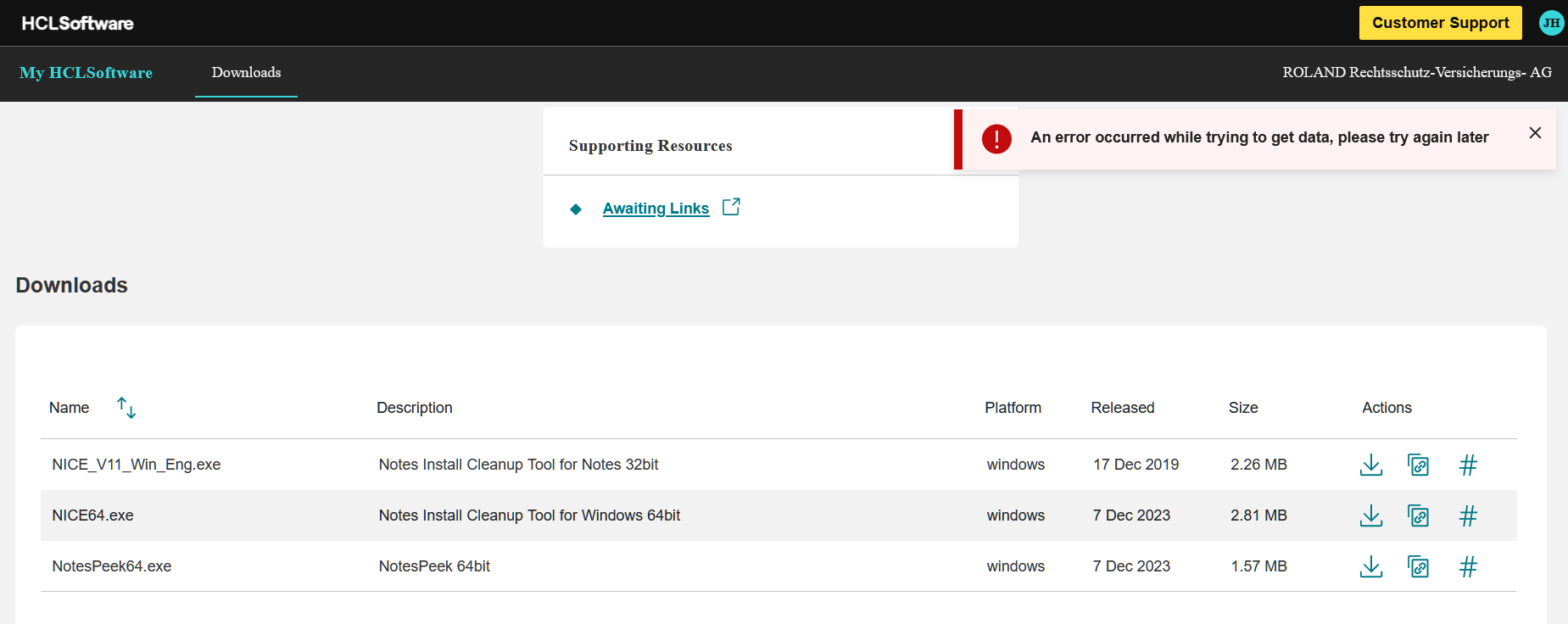
An error occurred while trying to get data, please try again later

I tried it now for several days and I still get this message. Guess something is wrong there.

TIA,

Jochen "Joe" Herrmann

Hi @Jochen Herrmann, I could open the link 3 days ago and today.

Can you open https://my.hcltechsw.com/, login and then open "HCL Domino", "Domino Tools" (quite at the bottom of the page) and than "All Releases"?

Yes that works fine up to this point:

Hallo @Jochen Herrmann,

I'm afraid, this is something only the HCL support can solve.

Contact me at tbahn@assono.de, if you need a quick workaround.

@Jochen Herrmann
Just additional: You also find the matching NICE-Tool for each version by unzipping the client installation file (e.g. Notes_12.0.2_Win_German.exe). Then have a look at the zip flie into the folder "Utility".
NICE works with all previous client versions als long as the bit version is the same.

Best regards
Oli