ST 11 Proxy: Login from iOS and Web is successful. But no chat is possible. In iOS the message can be send but is not visible in the chat windows. In Webclient it is not possible to chat with any person. Any suggestions?
In stconfig.nsf, please verify
Chat Logging Flag:
If it is set to off, change to relax
Hi Rahul, the Chat Logging Flag is already set to "relax".
Please verify MongoDB configuration as per the documentation:
https://help.hcltechsw.com/sametime/11.0.0/admin/installing.html
Do you see any error in the log?
Hi Rahul, i think there is a problem with the replset. When query rs.initiate() i got the following output: > rs.initiate()
{
"ok" : 0,
"errmsg" : "This node was not started with the replSet option",
"code" : 76,
"codeName" : "NoReplicationEnabled"
But when trying to enter the cfg = Rs.conf() there is the following error:
2020-07-06T10:58:58.912+0200 E QUERY [thread1] Error: Could not retrieve replica set config: {
"ok" : 0,
"errmsg" : "not running with --replSet",
"code" : 76,
"codeName" : "NoReplicationEnabled"
https://help.hcltechsw.com/sametime/11.0.0/admin/t_configure_mongodb.html
step 10: verfy mongod.cfg
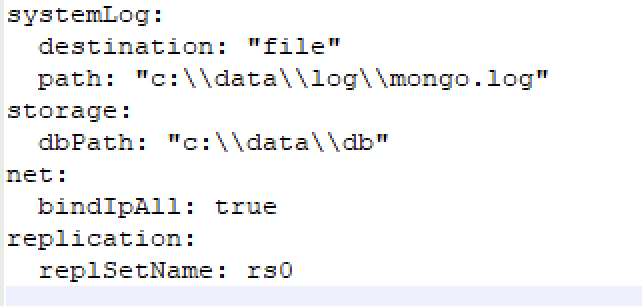
Did you check mongod.cfg file: Do you have a replication enabled there:
replication:
    replSetName: rs0
You can check sametime.ini: there is an entry for the name of the chat logging database:
Please check the line
MONGO_COLLECTION
In my case It was all lowercase whereas the expected entry was
MONGO_COLLECTION=EVENTS
Hi Torsten, it is written in uppercase.
Marcus
Open the Mongo use rs.conf to check the configuration
if the rplica set is not running then use
rs.initiate() to initiate the replica set.
use rs.status() to check the status of the replica set
lastly check the mongo log to see if any errors are being reported
laslty open a case with support for additional asistance
I already tried this:
rs.initiate()
{
"ok" : 0,
"errmsg" : "This node was not started with the replSet option",
"code" : 76,
"codeName" : "NoReplicationEnabled"
But when trying to enter the cfg = Rs.conf() there is the following error:
2020-07-06T10:58:58.912+0200 E QUERY [thread1] Error: Could not retrieve replica set config: {
"ok" : 0,
"errmsg" : "not running with --replSet",
"code" : 76,
"codeName" : "NoReplicationEnabled"
Marcus at this point I would recommend following this documentation
https://help.hcltechsw.com/sametime/11.0.0/admin/t_configure_mongodb.html
and making sure that Mongo is configured correctly
Also check the following article
https://support.hcltechsw.com/csm?id=kb_article&sysparm_article=KB0076424&sys_kb_id=3a6820601b60d058c48197d58d4bcbb9
If you are not able to fix your issue then please open a case with support
please let me know if this was helpful
Hello Markus,
are you using Domino Directory, Domino LDAP or AD LDAP as user repository?
I had a similar problem, in my case have set the field "The attribute of the person entry that defines the internal ID of a Sametime user" (which is optional) to "dominounid" and according to the support this is what caused the issue.
To solve it, I had to add "CL_USE_USER_DN=0" to the [config] section of the "sametime.ini" file.
HTH
Milan
Hello Milan,
i use Domino Directory as the user repository.
I think i have a problem with the Mongo DB configuration - the rs.initiate() is throwing errors.
Regards,
Marcus
Hello Marcus,
I assume you are starting the MongoDB via Windows Service.
Check if the service was created correctly and using the mongo.cfg file. This issue could be provoked by the missing "replSet" parameter at the start of the service.
You could also try creating the service in following manner:
mongod.exe --dbpath D:\MongoDB\data\db --logpath D:\MongoDB\logs\mongo.log --logappend --replSet rs0 --bind_ip_all --service --install
Just to rule out that something has not gone awry with the "mongo.cfg" file.
HTH
Milan