Using the “Add A Calendar…” function in my Calendar and adding a room I see entries for all rooms and resources overlayed on my calendar not just the selected room. Anyone else seeing this ? Bug or some config change required ?TIA
Subject: i guess
Since all rooms are in the Reservations-DB and that DB only has one Calendar, thats why it shows you all Rooms insted only the selected one.
regards
Tibor
Subject: You can in the overlay calendar view,
select a room entry and notice the action bar would change, where you can pick show rooms filter actions and select a room you want to see
Subject: Thanks & Why
Thanks Ram, that is what I was missing. So can anyone explain the logic behind this extra step ? If I have already specified on the side which room I wanted to see overlayed why do I get all rooms & resources and then have another action to filter it down ? (and the filter does not stick)TIA
Subject: The room you picked is not passed in, its just opening the calendar view in the R&R db
Its a shame that the View Actions don’t show through either, if they did they’d be able to use the [View by Room or Resource] button to filter just the room or resource they want. Instead, they have to right click on the added calendar and open in new tab to see the Action buttons.
Unfortunately there is no “Default” way built in Notes to do this. What I did for my customer: I created additional views in Ressource-Database for every single room:
- Copy ($Calendar) view
- Name the Copy ($Calendar-Room1)
- Add & @Name( [Abbreviate] ; ResourceName ) = “Room1/Site1” to the select formula of that view
Then user can select this view as “Application calendar”:
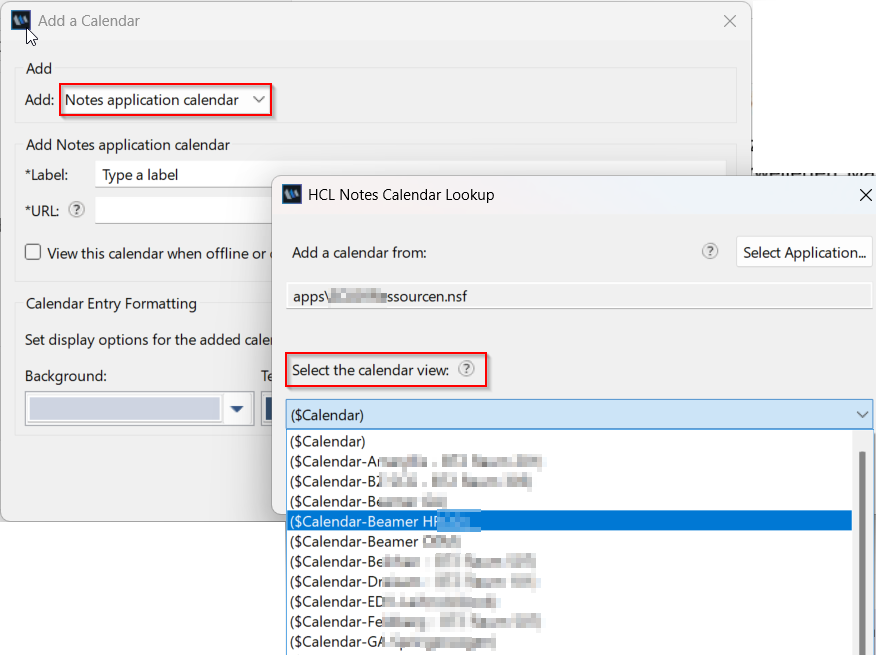
If Rooms / Ressources are more or less static, then this can be a manual task but I created an agent that creates / updates these views automatically and runs daily…
1 Like