Hello,
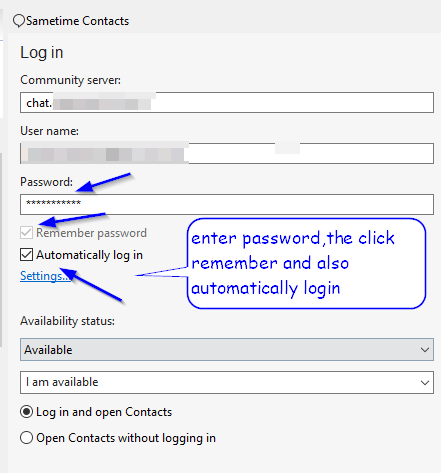
Sametime does not auto-login on startup. The problem is that not "remember" the password if i click to remember the password.
(actions: re-installed hcl notes 12.0.0 , clear notes.ini)
thank you in advance.
Hello,
Sametime does not auto-login on startup. The problem is that not "remember" the password if i click to remember the password.
(actions: re-installed hcl notes 12.0.0 , clear notes.ini)
thank you in advance.
@Alvertos Stratis
can you clarify (step by step) exactly what you are doing?
Step 1: Open HCL Notes
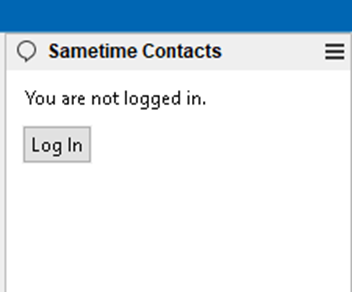
Step 2: Sametime status: You are not logged in:
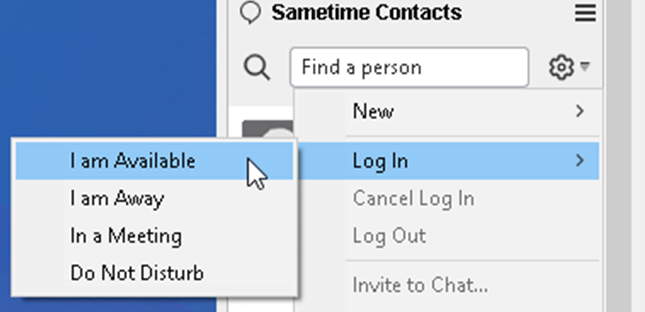
Step 3: If i click "Log In" :
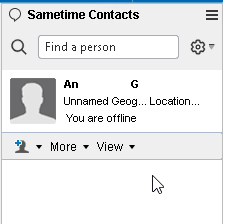
Step 4: For some reason the user's status is "offline" - changing to "I am available" :
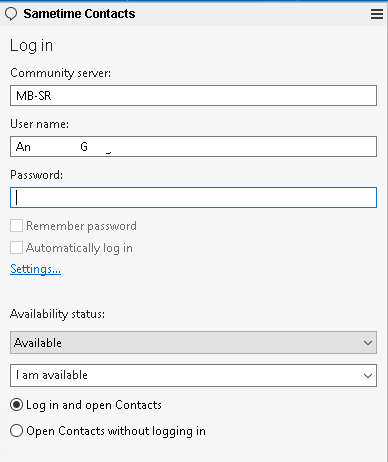
Step 5: Password missing
Step 6: If i type manual the password tick the "Remember password" option and "Automatically log in" it will connect.
Please note that every time that the HCL Notes close and open the user had to do this to login.
Hi.
It seems a question more for the Domino forum rather than for the Sametime forum.
Did you double check you don't have a Domino policy that enforces not storing the password ?
When you performed the uninstall and install, did you perform a Notes cleanup with NICE tool ?
I'd also suggest to go with Notes client 12.0.1 or even 12.0.2 FP1
Just our of curiosity: Which OS is this ? MacOS or Windows ?
Regards,
Elvis
@Alvertos Stratis
try this
after you have logged in
shutdown notes
and start notes again
if you are still having an issue, please open a case then with support
Hello Everyone,
Many thanks for your replies. I resolved the problem.
Steps:
1. backup desktop8.ndk , user.id , workspace , names.nsf
2. run Notes cleanup
3. restart machine/laptop/pc
4. fresh installation HCL Notes
5. restore only: desktop8.ndk & user.id , workspace
6. problem solved with auto-login of the sametime.