In your case the rule will have to be @LowerCase(@RighBack(filename,".")) ='com' to identify offending file ending in .com or an equivalent expression depending upon the context to identify files that end with .com rather than contains .com
In case your context is global mail rules in config document then the only options are contains, is , is not etc.
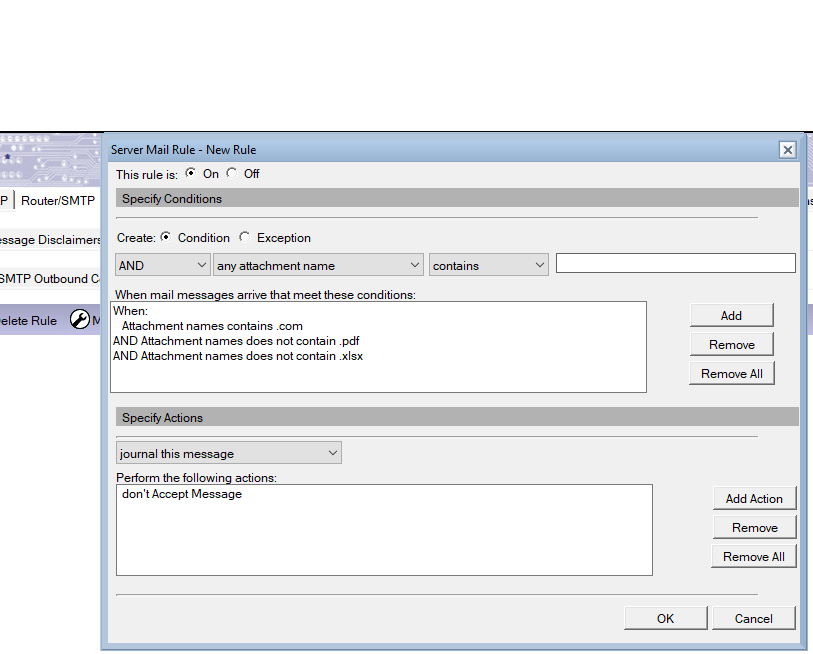
However, there seems to be a very primitive method to handle your use case. You may consider modifying the rule to :
any attachment name contains .com AND any attachment name does not contain .pdf AND ....(all other allowed options)
etc. This is a primitive work around to fool the system but may solve your pressing issue. (please see screen shot)
A rule like ends with might be good idea to cater to a neater option.
Im afraid there is none. Actually the rule should have catered for something like "ends with" or "file extension" . There is an enhancement request for the same at
If it were not the mail router one could have found a programmetic workaround but unfortunately thats not the case. This being a core system issue, HCL will need to address this one. Regards
The rule is working properly as it matches the condition specified as the attachment name contains .com
Hence, if the file name contains .com, that message will also be blocked on the server end as per the rule configured.
Please ask the end user to rename the file name so that it does not contain the file name ".com" or any other blocked type of attachment that is included in the server mail rule
For the attachment road,compass.pdf, ask the end user to rename the file as roadcompass.pdf and then send it. The end user will receive the mail properly.
Pending the resolution of the issue at the system level (if the idea is finally implemented). You could use the workaround.
The basic issue is that you dont want to accept files that end in .xxx where as the system is capable of discerning NOT contains .xxx.
Work around one : why does the user need to name his files as yyy.xxx.zzz there should be only one dot in the end before the file extension name. Just educate your users.
Workaround 2 : modify your rule :
(Any attachment names contains .com or any attachment names contains .exe or ... all other offending types) AND (any attahment names does not contain... all use cases for allowed types)..
Im not sure how long this checking criteria is allowed to be. You may try to play around with this idea in the interim.
Thanks for your help and workarounds. We will try to work with the second option for now. But of course, we are very much looking forward to fixing the problem at the system level