Reduce number of fields in a Get API response

Hi,

I am using a Get API call to receive json response. The form has 25 fields. But I only want to receive values of five fields from each form. What is the method to select which fields to be returned with the json response from a Get request?

Thanks

Hi Omar,

For clarity, may you please tell first which method you used when using Get API call to receive JSON response?

And regarding the form that has many fields, do you mean you want to reduce and get only five specific and needed fields in the response?

If applicable, please share if you have any sample screenshot.

Thanks,

Jayve

Hi I am using the method showed in https://help.hcltechsw.com/domino_volt/1.0/ref_data_rest_api_list.html

Here is a sample call shown in the documentation:

curl --user <loginId>:<passwd> http://<host>:<port>/apps-basic/secure/org/data/dd34da19-15c4-4267-8f1e-9f12ece743d7/
     F_Form1?format=application%2Fjson&sortBy=lastUpdated&order=DESC&from=10&to=20


This call will return all the fields of the form. I do not need all the fields. So I am looking for option to select which fields to return with the call.

Thanks

Hi Omar,

Thanks for your clarification. I believe there is no query parameter yet to select which specific fields to return in a list of records endpoint. If you want this to be feasible or applicable, then I would suggest you to submit a new feature request or idea at the Ideas portal.

https://domino-ideas.hcltechsw.com/

Thanks,

Jayve

Hello @MD Omar Howlader ,

If you want to manipulate JSON response, and you want to get specific field, I believe JSON.parse will work. For reference:

https://www.w3schools.com/js/js_json_parse.asp

Hope this helps.

Thanks,

Jayve

Hi Jayve,
In my API call response consists of nearly 50 records making it almost 4MB in size. Many of the returned fields, I do not need for the landing page dashboard. So I was looking for options to select fields I want to be returned, making the response size smaller and loading time faster. I am manipulating Json response as I could not find any server side selection method.

Thanks
Omar

Hi Omar,

Please try fields query parameter. For example,

http://<host>:<port>/apps-basic/secure/org/data/dd34da19-15c4-4267-8f1e-9f12ece743d7/
     F_Form1?format=application%2Fjson&sortBy=lastUpdated&order=DESC&from=10&to=20&fields=name,age

Thanks,

Jayve

Hi Jayve,

Thank you for looking into this. This is the parameter I tried as you suggested, here "F_MachineSerial" is the ID of the field I want to be returned.

http://<host>:<port>/volt-api/secure/org/data/16473204-6a50-4fe3-9d56-5a4aedcd0765/F_IssueForm/b82c02cf-7b78-4f08-88e5-60f729f1a3d4?format=application/json&fields=F_MachineSerial

Unfortunately, the call still returns all the fields from the record.

Hello Omar,

Thanks for trying. I thought it will work as per this reference I found.

In my opinion, retrieving specific fields when using GET List method is not supported yet. Please submit a new feature request at the Ideas portal to make it feasible in the future: https://domino-ideas.hcltechsw.com/

For the meantime, since you are manipulating JSON response, I would suggest you to utilize the combination of JavaScript fetch command for JSON response, and then utilize JavaScript Array's map to transform JSON data to get only specific fields you need.

Please follow the below steps to apply:

1. First off, you need to make sure secureJS is false in your configuration.

2. Let's say your API format looks like this:

<host_name>/volt-api/secure/org/data/<app_id>/<form_name>?format=application/json

Example:

http://127.0.0.1/volt-api/secure/org/data/6f5ba4b4-6259-4fac-8b34-9fec23a3bf75/F_ApprovedHWSW1?format=application/json

3. Apply example code somewhere in your design element's event:

// create the url for REST call
var formID ="F_ApprovedHWSW1" //make sure the form id matches the form you are going after
var appURL = app.getAppURL();
var apiURLbase = appURL.replace("-apps/landing/org/app", "-api/secure/org/data");
var fetchURL = apiURLbase +"/"+formID+"?format=application/json";
// fetch the JSON data from the form
fetch(fetchURL, {
method: "GET"
}).then((response) => {
response.json().then((jsonResponse) => {
// grab "items" array field in the JSON reponse to get all the data of the form
var items = jsonResponse.items
// retrieve specific fields, for example: F_Category1 and F_Product1 only
var selectedFields = items.map(({F_Category1, F_Product1}) => ({F_Category1, F_Product1}));
// test if new JSON response is only returning fields: F_Category1 and F_Product1
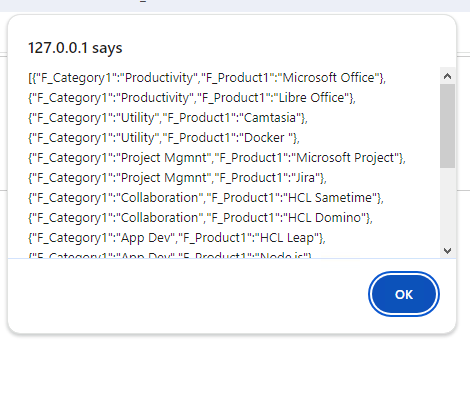
alert(JSON.stringify(selectedFields))
// loop through the "selectedFields" array to get each individual data
for(var i=0;i<selectedFields.length;i++) {
var category = (get(selectedFields,i).F_Category1);
var product = (get(selectedFields,i).F_Product1);
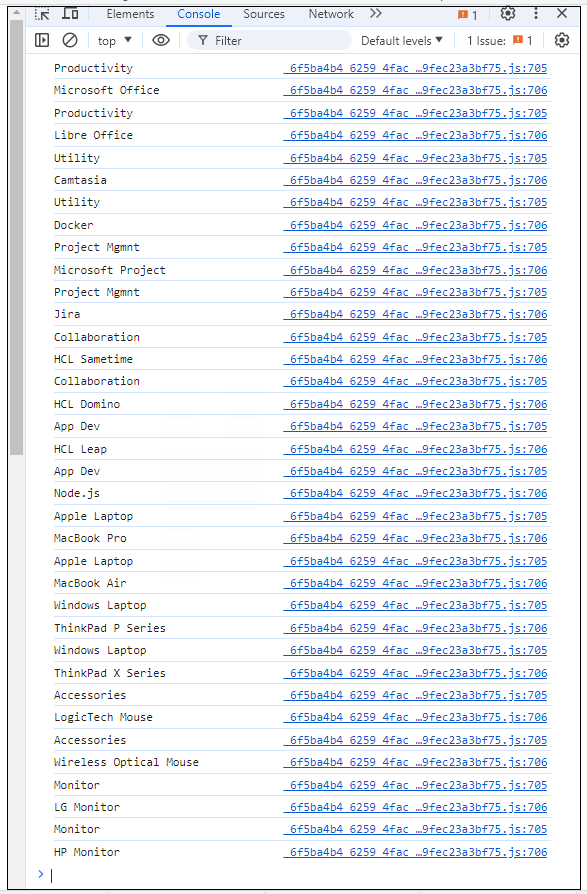
console.log(category)
console.log(product)
}
// close fetch
})});

4. These are the following output:

For reference for the idea I found:

https://hclwiki.atlassian.net/wiki/spaces/HDV/pages/1187610673/HTML+Table+with+fetch+on+App+Page

If you think an answer answered your question, please accept it. It will benefit others having same problem / query.

Hope this helps.

Thanks,

Jayve