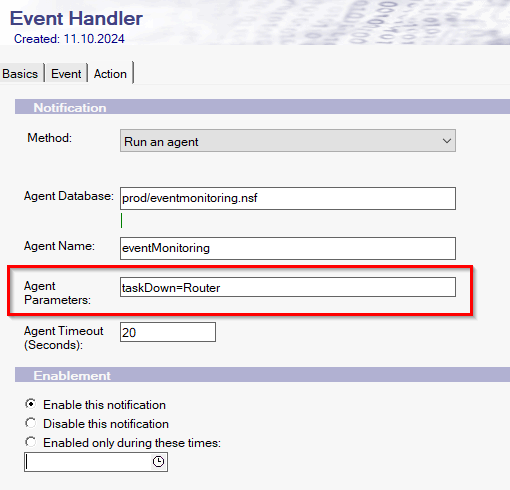
Here's an example of how you might pass custom parameters to an agent in IBM Domino:
Let's say you have an agent that processes customer orders. You want to pass the following custom parameters to the agent:
OrderID: The unique identifier for the order.
CustomerID: The unique identifier for the customer.
Priority: The priority level of the order (e.g., high, medium, low).
Here's how you can set this up:
Open Domino Administrator:
Launch the Domino Administrator client and connect to the server where you want to set up the event handler.
Access the Monitoring Configuration:
Navigate to the "Configuration" tab.
Expand "Monitoring Configuration" and select "Event Handlers."
Create or Edit an Event Handler:
Click on "Add Event Handler" to create a new event handler or select an existing one to edit.
Specify Event Criteria:
Define the criteria for the events you want to monitor. This can include specific event types, severity levels, and other conditions.
Choose the "Run an Agent" Notification Method:
In the notification methods section, select "Run an Agent."
Configure Agent Details:
Specify the agent name, the server, and the database containing the agent.
Enter the custom parameters you want to pass to the agent. For example:
OrderID=12345 CustomerID=67890 Priority=High
Enable the Event Handler:
Once configured, enable the event handler to start monitoring and running the agent based on the defined criteria.
Save and Test:
Save your changes and test the event handler to ensure it works as expected.
In this example, the agent will receive the parameters OrderID=12345, CustomerID=67890, and Priority=High, which it can then use to process the order accordingly.