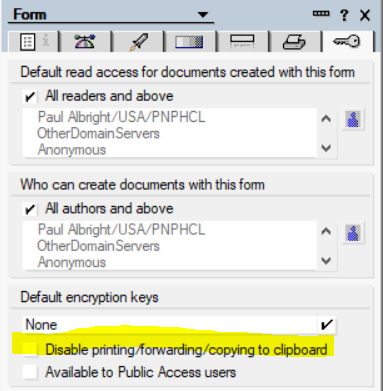
I have a database with 250 views and 20+ forms. I want to prevent all users from copying and pasting documents created by only 2 forms (Proposal & Project). All other documents can be copy and pasted. All text within all documents including the Proposals and Projects can be copy and pasted.
I'm hoping there might be a "Clear clipboard if Form = Proposal or Project" type of thing.
Checking that box will prevent any new documents created with that form from being copied but will not effect any existing documents. You will need to create an agent that loops through all of the documents and use the NotesDocument ComputeWithForm method and then the NotesDocument Save method.
Hi Paul, I should have been more clear. I am OK with the users' ability to see the data, copy, paste & print the text within all documents all day long, I just don't want then to duplicate the documents in the database. So, this option will not work for me. But thanks for pointing it out.
Ok I see what you are wanting to do now. I've never actually tried this but it looks promising. You will need to add code toe the QueryPaste event of all the views in your DB that you do not want them copying the documents to. We will need to get a handle on the document(s) to be pasted but there is no built in way to accomplish that but on OpenNTF I found the following link:
Sub Querypaste(Source As Notesuiview, ContinueAs Variant)
Dim clipDb AsNew NotesDatabase("","~clipbrd.ncf")
Dim dc As NotesDocumentCollection
<span class="hljs-keyword">Set</span> dc=clipDb.AllDocuments
<span class="hljs-comment">' dc now contains copied documents.</span>
EndSub
So we could run through dc(all the documents about to be pasted) and see what form they are based off of and see if they are one of the 2 forms. If so Continue = False and if Not Continue = True
You can also add Continue=False in the "QueryPaste" event of the view where you want to restrict the pasting of documents. However, this will be applied to the whole view, irrespective of the Forms added in the selection formula of this view.
Sub Querypaste(Source As Notesuiview, Continue As Variant)
	Continue=False
End Sub
If you want to restrict copy-paste of the document content then you can also set field $KeepPrivate="1" programmatically in the document. This is the field created by enabling the property explained by @Paul Albright.
This is a built-in feature of the Notes client. Users will not be able to copy, print, or forward any document that includes the $KeepPrivate field where its value is set to a text string "1". This field does not prevent users from reading the document. To manage who can read a document, consider implementing the $KeepPrivate field in conjunction with a Readers field.
Note that users can still take screenshots of the document using some screen capturing tools.
@Abhay Shirke This is what we thought of until someone copied document in a restricted view and pasted into an unrestricted view. We still want the users to use the content to the fullest ability so $KeepPrivate="1" won't work for our situation. Thank you for responding.