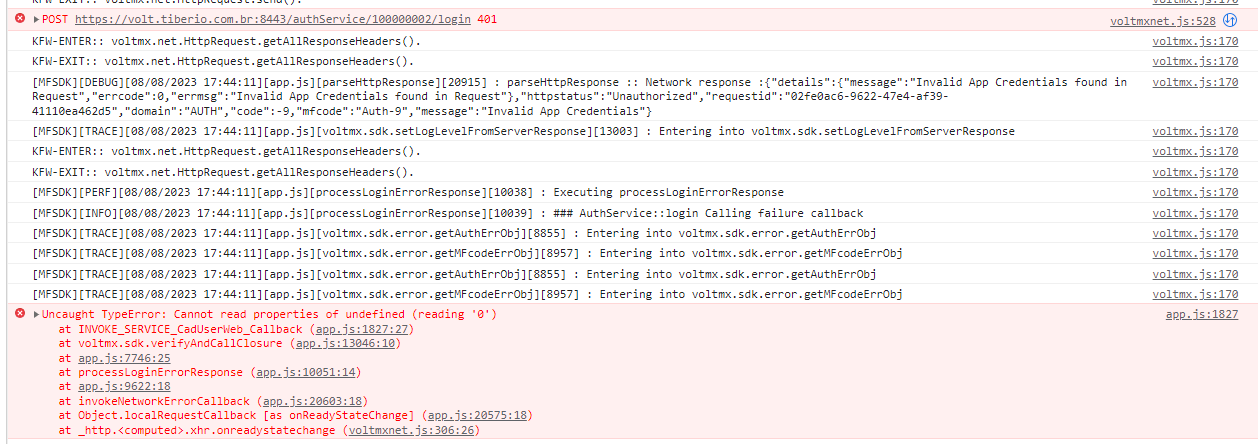
[MFSDK][DEBUG][08/08/2023 15:29:30][app.js][parseHttpResponse][20916] : parseHttpResponse :: Network response :{"details":{"message":"Invalid App Credentials found in Request","errcode":0,"errmsg":"Invalid App Credentials found in Request"},"httpstatus":"Unauthorized","requestid":"592e0b13-089d-4586-8472-8f28f4b39196","domain":"AUTH","code":-9,"mfcode":"Auth-9","message":"Invalid App Credentials"}
Hi Rubens,
Please check your authentication and authorization flow. The error is "Unauthorized" which means your app has failed validation of the "login" process.
It was the first item I checked, it's very strange.
Hi Rubens,
Please try to do a line-by-line debug of your app. You should be able to track where the auth is failing.
Hi Rubens,
Please try your Foundry Identity service from within Foundry itself. Hopefully that will help to pinpoint what has changed.
The only solution I found was to create a new app in Foundry, recreate all the APIS, but with different names than what already existed and make the VOLT link with this new APP. Thus the problem was circumvented. I believe there was some problem in the Foundry itself.
Hi Rubens, the reason for the error you saw was likely that the App Key and App Secret do not match what Foundry thinks they should be. I've seen this typically when unpublishing/republishing a Foundry app and Iris has the old app key/secret still cached in the workspace. I've found this to be more common when developing web apps and when switching between environments.
To troubleshoot, using Chrome Dev Tools while debugging your application, inspect the generated app.js. You will see the app key and secret that Iris generated. Compare these values to your app key and secret in Foundry.


If you do not see these values in the app.js at all, verify that your services are published to Foundry, that Iris is pointed to the correct environment, and that Iris is linked to the correct Foundry application via the Data Panel.
On occasion I've found that Iris will have an old key/secret cached and will just simply not update these values if they have changed in Foundry. To workaround this, I will frequently remove the generated code from my workspace prior to performing a Build and Publish.
Iris will generate app code in a couple of different locations in the workspace for a project:
[workspace home]/.webapps/[project name]
[workspace home]/temp/[project name]
[workspace home]/webapps/[project name]
[workspace home]/webapps/[project name]r
When I make a change to a web application, I will go through these steps to ensure the update publishes with the correct app key/secret:
1. Unpublish the existing app in Foundry.
2. In Foundry, navigate to Manage Client App Assets -> Web and delete the existing web app binary.
3. Republish the services in Foundry.
4. In your Iris workspace, delete the generated project-specific folders in the locations above. These will be recreated upon the next build. For example, if you have a project named "MyWebApp" and your workspace is in C:\workspace\iris, you will have the following folders you would delete:
C:\workspace\iris\.webapps\MyWebApp
C:\workspace\iris\temp\MyWebApp
C:\workspace\iris\webapps\MyWebApp
C:\workspace\iris\webapps\MyWebAppr
5. In Iris, perform a Build and Publish.
In my experience this has typically helped to avoid and/or also resolve this issue.
Perfect!!!