Yes , you can.
Create a password policy and apply to all users or specific users. The password policy is pretty comprehensive and caters to various password complexities as well as password change requirements.
In response to your question, yes you can. You can apply it to all users, or specific users.
Follow the steps below for the configuration:
Create an Explicit Policy (this is for all the users).
Navigate People & Groups
Select Policies
Click on Add Policy
Configure Security Settings:
Under the Basics tab, locate the “Security” setting type.
Click New
Set Password Change Requirements:
Go to the Password Management tab.
Find “Enforce Password Expiration” and configure it as needed
Enforce Eight-Character Passwords:
While still in the Password Management tab, locate “Use Custom Password Policy”
Change its status to YES
Custom Password Policy:
Once you’ve enabled the custom policy, navigate to the Custom Password Policy tab.
From there, you’ll be able to specify the minimum password length, including the eight-character requirement.
Review Expiration Settings:
Within the Custom Password Policy tab, you’ll also find the “Password Expiration Settings” where you can further manage and confirm “Enforce Password Expirations”
I hope these steps are clear and helpful. Kindly refer the knowledge articles below for further information:
**Assigning an explicit policy
Excellent information, thx to you both. We are a SaaS vendor, and we host an Inspection DB for multiple Clients. Not all are interested in applying those controls. Are these settings at a Server or Database level?
This is at server level and not database level. However, you can apply different password policies for different users, effectively effecting different databases in case your inspection dbs are organization specific . So you could apply a strict policy for users of Databases A, B,C whereas users of database D,E may have no specific password policy applied to them.
Again, good info. Each of our Clients have many Users, so assigning a password policy at a User level would be labour intensive. Is it possible to assign a password policy at a Group level?
Yes, you can assign a password policy to a specific group
Once policy is created, open it and go to the Policy Assignment tab. Click Edit Policy, then click the dropdown button to select the users and groups you want to assign the policy to. Confirm by clicking OK, then save and close.
Thx again… we’ll give that a try… the key will being able to select Groups from different DBs… worst case we crate a different Password Policy for each Client.
As per the description you mentioned that Domino servers are accessed by browser UI.
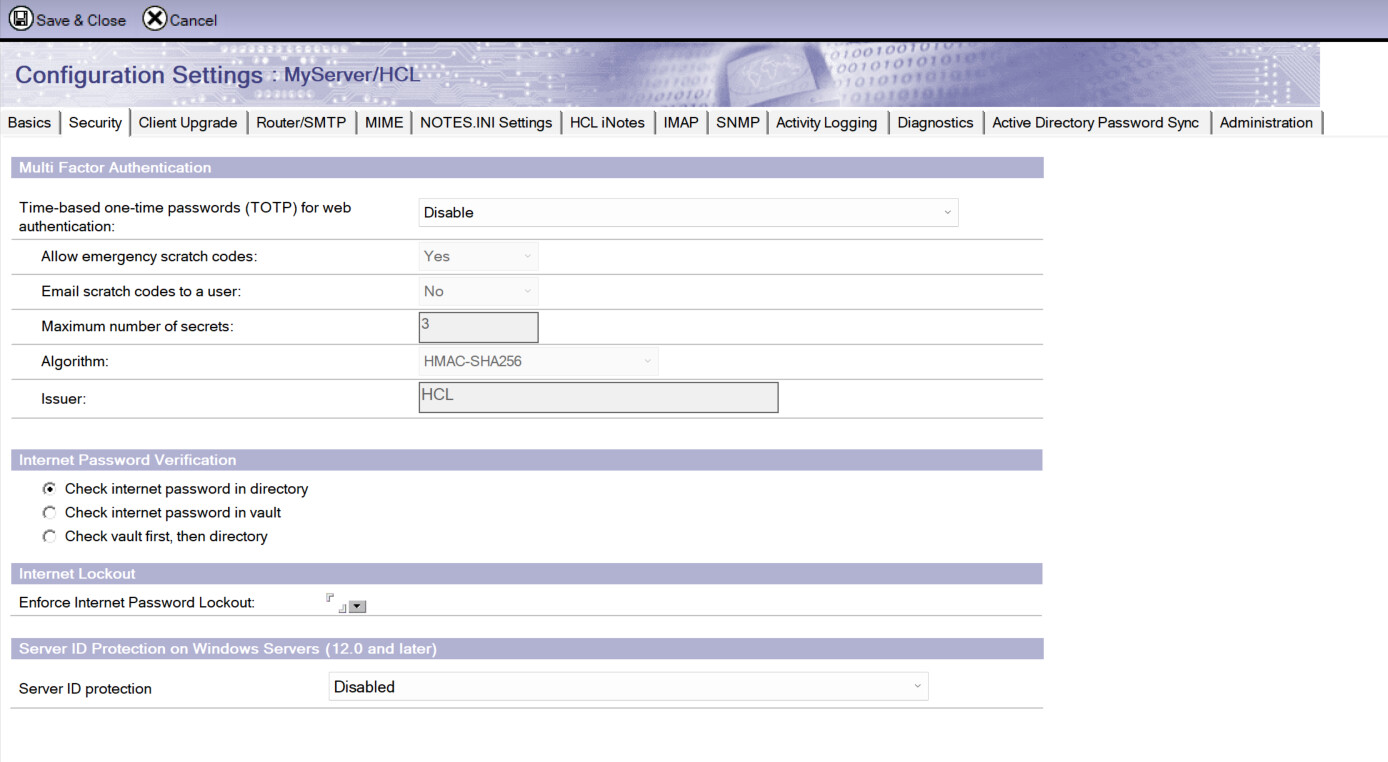
So, for web interface, internet password will be used or you can set to use the IDvault password for web authentication in server configuration document as on below screenshot.
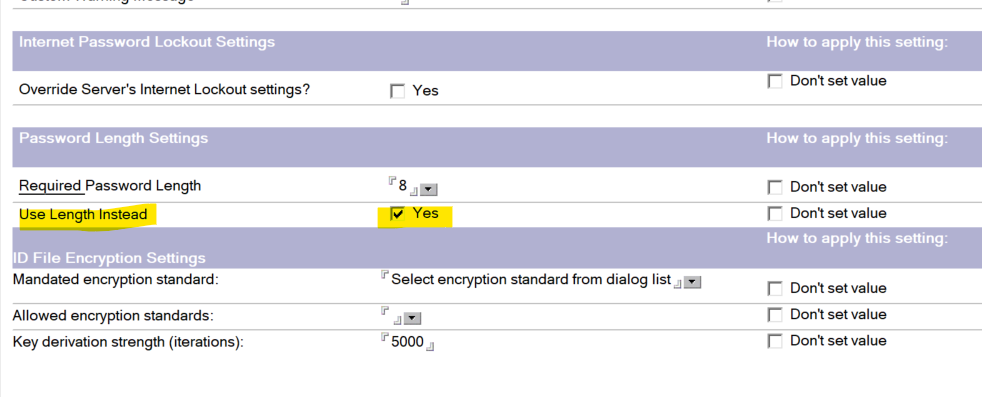
To make sure the web users use the internet password and set minimum password length to 8 characters, Make sure to check “Use Length Instead” in Security setting document → Password Management → password Management Basics tab as on below screenshot and then select the security setting in Explicit policy document and apply to groups.
Thanks, as Paul mentioned above, we’re running Domino 9.0.1FP10 on Linux 6.1.0-31-amd64 and I can see how this will help with passwords in Notes IDs in the Notes Client, but how will these be applied to internet passwords from a browser? . . . AND, adding to the complexity, we’re using several separate NABs that are aggregated to an Extended Directory Catalog.
Any ideas would be greatly appreciated.
Thanks
Mario
Internet Password Lockout Settings are not working. After about a dozen failed attempts, I was able to log in using the correct password. I should have been locked out after 3 attempts.
I did make some progress since yesterday.
Password length and expiration settings are now working for the internet user. I created and edited the policy. The dropdown on the Policy Assignment tab did not have the user in the list (probably since we’re using separate nabs), but it did allow me to enter the abbreviated name of the assigned user. That helped, but lockout is still an issue.
Password Expiration Settings in the security policy are NOT working for the internet user. My previous post was wrong. The result I got was due to a “forced password reset on next login” that had been set in the user’s document in the NAB.
I have not tested all security policy settings; all I can say is that the setting for password length (not set in the user’s Person doc) is working.
Does anyone know how to get Password Lockout and/or Expiration Settings working for internet users in separate NABs aggregated to an EDC? I really need some help with this.