I am trying to provide service to a customer who need to use Outlook client when their mail file is on a Domino server.
Before we used the IMSA 64 on a Domino v9.0.1 FP9 server in combination with Outlook and IMSMO v2.0.2.8
Then we (I) thought we could install a Domino v11.0.1 FP1 server with Traveler v11.0.1 and use the HTMO 3.0 on the client would "solve all problems".
But talking to HCL Support today about this setup left me with more questions than answers.
Are there anyone out there with experience on this ?
Anyone who can help me out ?
HCL Support will not even touch my ticket with ONE client no being able to sync mail with the server - because I do not have a DB2 server set up. Despite that the documentation actually states that using built in features for VERIFICATIONS is ok...
If you have experience, please feel free to call me to set up a meeting ?
Stig-Erik Halvorsen
Firstpoint Poland
mobile +47 915 61 761
seh@amesto.com
Hello,
you actually don't need DB2 to run Traveler (DB2 enterprise database is required only if you're planning to set up High Availability environment).
Everything you need to set up Traveler for Outlook is described here:
https://help.hcl-software.com/traveler/11.0.0/htmo/3.0/adm_config_addon_tab.html
Few important things to remember - pay attention to REST services (check http://[yourhostserver]/api to verify Data and Mail are enabled:true) and Home server for HTMO users (they should have HTMO server as Home Server).
I set up HTMO 3.0 recently and don't observe any issues there
Thank you Aleksandr, I also thought DB2 was only required for HA and even mentioned it to HCL Support but they still refused.
I will review your input asap...but our 4-leg Mia needs to poop so - "first things first" :D
Aleksandr, I will revert with my results here :)
Best regards,
Stig-Erik Halvorsen
So be careful with your statement on the requirement for DB2 with HTMO. Its not just an HA statement. HTMO is an uber client and is a heavy user of the database which is why Traveler states for production that an enterprise db is required. Your point is technically correct in the sense HTMO support can be configured on a standalone server w/Derby. Stig is correct that the doc does call out that this configuration is supported for verification purposes in https://help.hcltechsw.com/traveler/11.0.0/Clustering_and_failover.html?hl=proof
If you use HTMO clients, your HCL Traveler deployment must use an enterprise database in production environments due to performance, scale, and administration/maintenence benefits. This support statement applies even if you are using only one Traveler server. Due to ease of setup and configuration, Derby may be used for proof of concept or testing, but Derby-specific issues will not be supported in production environments.
HCL Development
Thank you Charles !
However, does this mean that a DB2 server IS in fact needed in order to at all get an environment of less than 25 Outlook clients working with a single dedicated Domino v11.0.1/Traveler v11.0.1 server ?
If so I am really disappointed with HCL in their effort to communicate this requirement in order to have Outlook work from a Domino server !
(Please note that this v11.0.1 Domino server installed with Traveler v11.0.1 is used for NOTHING else than as a mail server for those Outlook clients !)
And what about Domino v12.x that we saw during HCL Digital Week 2020. Demoing both Outlook and - at least CLAIMING to have support for Apple mail (?) "straight out of the box" without any IMSMO or HTMO etc. Are there ALSO some hidden requirements for that to work ?
Thank you very much in advance ;)
"The HCL dedicated tattoo guy - Stig-Erik..." ;)
Hi again Aleksandr.
https://help.hcl-software.com/traveler/11.0.0/htmo/3.0/adm_config_addon_tab.html
Been through all elements from the URL you provided - as carefully as I can - but still:
:-(
-seh-
Remeber that licensing DB2 should not be an issue, because I think a DB2 license for use with Domino is included. If I go to flexnet i find an item IBM DB2 Enterprise Server Edition Authorized User Single Install Option Quick Start and Activation V11.1 for Linux, UNIX and Windows Multilingual in the Domino Complete Collaboration 11.0.1 download set. I think this is the license, and the DB2 server code is available for both Windows and Linux in the same download set.
So then it becomes an issue of creating a small DB2 server for use with the Traveler server. If the Windows license is a problem then you can run a Linux instance.
Hi again Aleksandr,
obviously I would like to avoid the DB2 issue if I can. It does not appear to be a simple side-kick to the Domino environment and the Traveler server.
At the same time, I cannot neglect that HCL say it is needed.
It is a bit unclear to me for what it is needed ?
But here is my real question: Do you actually have Traveler running without DB2 implemented, for how many clients, for how long ?
Our environment is about 21 user accounts (mail files) on each Domino server, used from about 35 different computers - so some mail files are open simultaneously from e.g 2 computers, using same authentication to the Domino server.
Thanx in advance :)
Best regards,
Stig-Erik Halvorsen
This might be a stupid question - but then again, one of my professor's in the University about 100 years ago said that there are no stupid questions, only stupid answers:
I cannot seem to be able to view these HCL pages in full. There is this "Copyright 2020 HCL Tehcnologies....." disclamer on the bottom that prevents me from viewing the page in full. I have tried to acknowledge but it does not go away. And I cannot scroll down to see all the options a each page...
Any good ideas on how to get passed this ?
-seh-
Definitely an issue on some pages, including the configuring traveler for outlook page. I have reported this to the information developer. Not sure how much you are seeing but there's nothing beyond the "monitoring" topic other than related concepts. You can see this if you look at the page source. Also, for reference purposes, you can look at the 10.0 equivalent page (just to know what topics you are missing): https://help.hcltechsw.com/traveler/10.0.1/topics/adm_config_addon_tab.html
I can reproduce the problem with the documentation, either using Firefox or Chrome. Using Ctrl-I (Inspect) and deleting the Footer node reveals the hidden content, albeit that not a lot of content is obscured.
This is what I am trying to achieve.
Moving AWAY from IMSMO/IMSA and over to HTMP (on the client) and Traveler (on a dedicated server).
I have access "all the way" from my client to being able to load the mail file using a browser from the EMP-LD12 server (via VPN, DNS, Internet Site documents, redirecteed login, redirect to SSL/HTTPS (have also tried without SSL), authentication with Domino server and finally able to open test-mail file on EMP-LD12 in the browser.
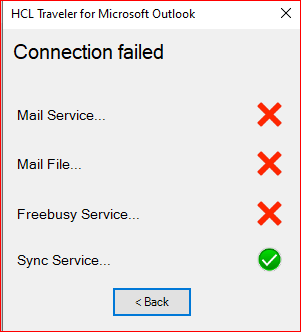
When when trying using HTMO installed on the client and via the Outllok client, I get the famous:
...and SOMETHING tells me this has NOTHING to do with DB2 being in or out of the picture ?
-seh-
You are correct this has nothing to do with the type of sql database in use. Make sure that the APIs are available by hitting the traveler/mail server (EMP-LD12) with /api. You should get back a list of domino access services enabled which must include mail and freebusy. On the Traveler server, you can do a "tell traveler user <user name> and verify that traveler has access locally to the user's mail file
[07A4:0056-21C4] 11/18/2020 16:46:18 Opened session for EMP-LD12/XXXXXXXXXX (Release 11.0.1FP1)
[05E0:002C-1E84] 11/18/2020 16:46:18 Traveler: Traveler has validated that it can access the database mail/XXX/T3ST/FirstpointT3st.nsf.
[05E0:002C-1E84] 11/18/2020 16:46:18 Traveler: Monitoring of the database for changes is disabled.
[05E0:002C-1E84] 11/18/2020 16:46:18 Traveler: Encrypting, decrypting and signing messages are enabled because the Notes ID is in the mail file or the ID vault.
[05E0:002C-1E84] 11/18/2020 16:46:18 Traveler: Canonical Name: CN=FirstpointT3st FirstpointT3st/OU=FPP/O=XXXXXXXXXX
[05E0:002C-1E84] 11/18/2020 16:46:18 Traveler: Internet Address: firstpoint3st@xxxxxxxxxxx.com
[05E0:002C-1E84] 11/18/2020 16:46:18 Traveler: Home Mail Server: CN=EMP-LD12/O=XXXXXXXXXXXX
[05E0:002C-1E84] 11/18/2020 16:46:18 Traveler: Home Mail File: mail/XXX/T3ST/FirstpointT3st.nsf
[05E0:002C-1E84] 11/18/2020 16:46:18 Traveler: Mail File Replicas:
[05E0:002C-1E84] 11/18/2020 16:46:18 Traveler: [CN=EMP-LD12/O=XXXXXXXXXXX, mail/XXX/T3ST/FirstpointT3st.nsf] is reachable.
[05E0:002C-1E84] 11/18/2020 16:46:18 Traveler: ACL for FirstpointT3st FirstpointT3st/FPP/XXXXXXXXXXX: Access=Editor,Editor Capabilities=create,update,read,delete,copy Missing Capabilities=none
[05E0:002C-1E84] 11/18/2020 16:46:18 Traveler: ACL for EMP-LD12/XXXXXXXXXXXX: Access=Manager Capabilities=create,update,read,delete,copy Missing Capabilities=none
[05E0:002C-1E84] 11/18/2020 16:46:18 Traveler: Notes ID: Mail File does not contain the Notes ID.
[05E0:002C-1E84] 11/18/2020 16:46:18 Traveler: Auto Sync User State: Not registered
[05E0:002C-1E84] 11/18/2020 16:46:18 Traveler: No devices have synced for CN=FirstpointT3st FirstpointT3st/OU=FPP/O=XXXXXXXXXXXXX
This is the doc for configuring and validating the REST APIs. Need to be careful where you enable it if you have an Internet Site doc (versus the server config doc)
https://help.hcltechsw.com/traveler/11.0.0/htmo/3.0/adm_enable_rest.html
All responses to the "tell traveler..." command seem to be ok..
I believe I saw somewhere that I could/should disable SSL/HTTPS...although I seem to remember that both ID-Vault and https were REQUIREMNETS for Outlook to work from a Domino server ?
-seh-
Stig, I notice that you have not responded to the query to test the REST api. Could you please do that and post the results? Perhaps post the JSON reply so we can help you interpret the response?
{
  "services":[
    {
      "name":"Calendar",
      "enabled":false,
      "version":"11.0.1.v01_00",
      "href":"\/api\/calendar"
    },
    {
      "name":"FreeBusy",
      "enabled":true,
      "version":"11.0.1.v01_00",
      "href":"\/api\/freebusy"
    },
    {
      "name":"Core",
      "enabled":true,
      "version":"11.0.1.v01_00",
      "href":"\/api\/core"
    },
    {
      "name":"Data",
      "enabled":false,
      "version":"11.0.1.v01_00",
      "href":"\/api\/data"
    },
    {
      "name":"Mail",
      "enabled":true,
      "version":"11.0.1.v01_00",
      "href":"\/api\/mail"
    },
    {
      "name":"TravelerAdmin",
      "enabled":false,
      "version":"11.0.1.0",
      "href":"\/api\/traveler"
    },
    {
      "name":"autoupdate",
      "enabled":false,
      "version":"10.0.0",
      "href":"\/api\/autoupdate"
    }
  ]
}
I thought that core , calendar and traveleradmin should be true too.
Did you do http and/or https with the /api check? Any difference between them?
For HTMO configuration did you specify http or https for the server?
Hi :)
I am assuming that since I am using the Notes.ini parameter NTS_OUTLOOK_ONLY=true, perhaps some of these options are not available ?
At least in the Internet site document I can only see "Data, Calendar, Mail and Freebusy"
I have now selected "Calendar, Mail and Freebusy"
What about the fields in the "Microsoft Outlook" tab in the server document ?
Microsoft Outlook support: Enabled
Freebusy URL:
Password management URL:
External Server URL:
User Cleanup Timeout: 90days