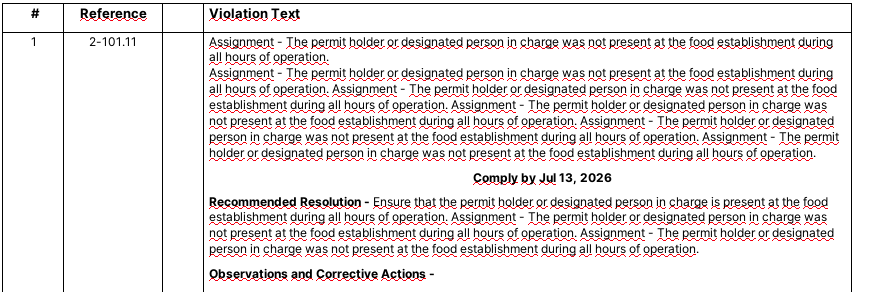
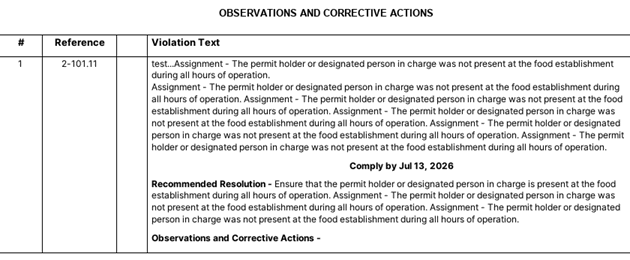
The spell checker reacts differently in the Chrome Browser versus the PWA…
In the PWA it highlights all words as incorrectly spelled…
In Chrome it does not
Any ideas on how to standadise would be appreciated
Paul
Domino/Notes Version: 14
Add-on Product (if appropriate, e.g. Verse / Traveler / Nomad / Domino REST API): Nomad
Its Version:
Operating System:
Client (Notes, Nomad Web, Nomad Mobile, Android/iOS, browser version):
Problem/Query:
Hi Paul,
The only difference between the PWA and the browser is the browser menus/framing around it. It runs exactly the same underneath. If you start in the PWA where you see the mis-spelled words squiggle underlined and then do the 3 dot menu to “Open in Chrome”, it should look the same. We also have it the other way around - going from browser to PWA using the icon on the right of the address bar to reopen it in the PWA. Kindy try toggling back and forth to confirm it is the same. Thanks!
Best Regards,
Mikee
Thx for yours, Mikee,
I’m glad I took, and included, screenshots of how it behaved in Chrome and the PWA respectively yesterday, because today, it is behaving differently.
Today… if I open first in Chrome then the mis-spelled words squiggle underlined do not show. If I toggle from there to the PWA, they are not there.
if I open in the PWA first, the mis-spelled words squiggle underlined do not show. If I toggle to Chrome, they are also not there.
I also tested in Edge, and get the same correct result. I logged out..same good result. I reset…same good result!
Screenshots don’t lie, so there was clearly an issue, but I can’t reproduce it. I’ll continue testing and if I can reproduce it, I’ll let you know.
Best
Paul
Hi Folks, still hoping to find a resolution to this issue. Any help would be appreciated.
Hi Paul,
back in April you wrote “I’ll continue testing and if I can reproduce it, I’ll let you know.”
Can you reproduce it? If yes, how?
Sadly I lost sight of this until your F/U…Thx for that.
No, I cannot reporoduce this issue, so I’ll consider it Closed.