While following the instructions from https://help.hcl-software.com/domino/14.0.0/admin/conf_settingupthesampleselfserviceapplicationtoallowi_t.html
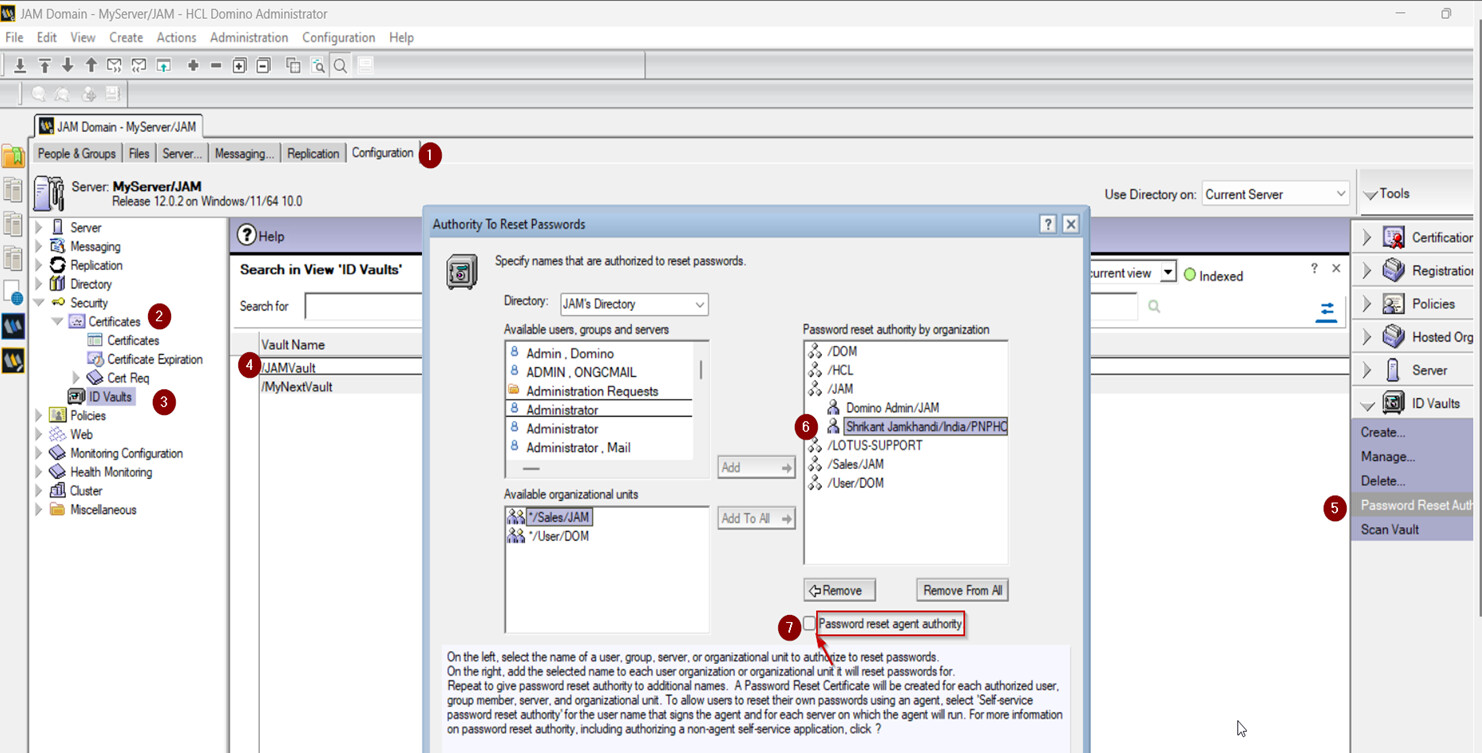
it's unclear where to find the "Self-service password reset authority" field in the Step 5 below:
5. Assign password reset authority to the following names:
- The name that signed the agent in Step 2. Be sure to select the Self-service password reset authority field.
- The names of each server you allowed to run the agent in Step 3.
Also, please confirm where to specify instructions in Step 6.
Thanks in advance!
This is really about ID Vault (Domino) and not about Nomad (yes, Nomad uses the ID Vault like all the other clients use it, but the ID Vault is really a Domino thing), so it would be better to post this over in the Domino forum:
https://support.hcltechsw.com/community?id=community_forum&sys_id=cd74744e1b16f340c48197d58d4bcb66
Philip, refer the below screen shot with numbering where to click for the steps to have the vault password reset authority user who has signed the agent to set as "Self-service password reset authority".
When you set the user as "Self-service password reset authority" in the vault it shows red color "@" as shown below.
Step 6: I believe you have already configured the ID vault, in that case you can open the security settings document and mention the as below for instructions to display for users who forget their passwords.
Step 7: You can disable in the same above document "Enforce password change after password has been reset"
Thank you
Regards
Shrikant J
Thank you for your prompt responses!
However, when continuing "What to do next" (from https://help.hcl-software.com/domino/14.0.0/admin/conf_settingupthesampleselfserviceapplicationtoallowi_t.html), I think this reset capability is to let a Nomad user to change their current password (still remembered) to a new one, rather than to set a new password when a Nomad user forgets their password.
A great day!