Hello Mubasher,
Find the below information on your requirement and query on TOTP setup.
Any step by step guide.?
ANS: Below are the overview steps:
1) Domino directory (names.nsf)/Id vault database/Domcfg database template should be of version V12 once the Domino servers are upgraded to V12.
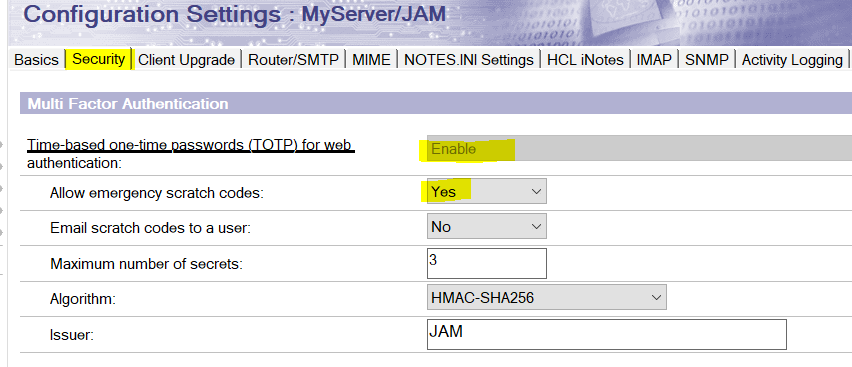
2) Enable TOTP in the Server Configuration document.
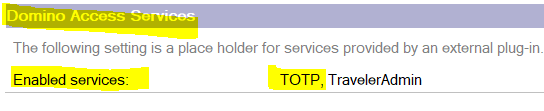
3) In the server document / Internet site document enable the below settings.
Internet Protocol -> Domino Web Engine -> Domino Access Services -> Enabled Services -> TOTP
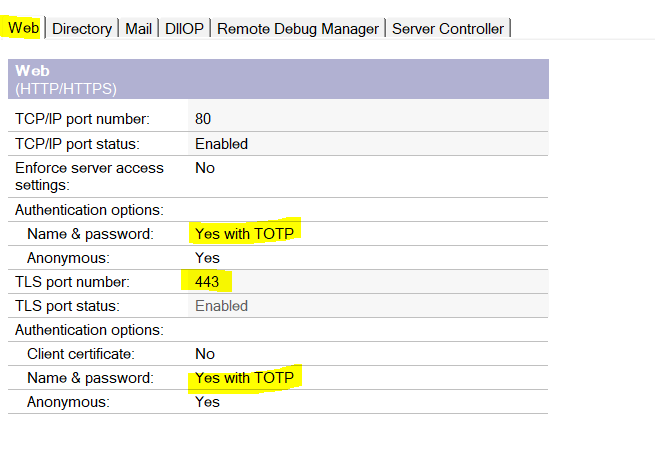
Ports->Internet Ports ->Web -> Name & Password set as "Yes with TOTP" as shown below.
4) Create MFA trust certificate by issuing the below command.
mfamgmt create trustcert "*/O=JAM" cert.id password
> mfamgmt create trustcert "*/O=JAM" cert.id ********
[11B8:0006-0E7C] MFA Trust created successfully
Verify issuing the Show idvault command.
[4120:0006-1088] Show idvault
[4120:0006-1088] ID Vault /JAMVault (IBM_ID_VAULT\JAMVault.nsf)
[4120:0006-1088] Control Vault Name: /JAMVault
[4120:0006-1088] Control Vault Servers: MyServer/JAM
[4120:0006-1088] Vault Operations Key: VO-ajec-adav/MyServer/JAMVault
[4120:0006-1088] Servers: MyServer/JAM
[4120:0006-1088] Vault Name: /JAMVault
[4120:0006-1088] Description: JAMVault
[4120:0006-1088] Administrators: Domino Admin/JAM
[4120:0006-1088] Servers: MyServer/JAM
[4120:0006-1088] Administration Server: MyServer/JAM
[4120:0006-1088] /JAM trusts this vault
[4120:0006-1088] /JAM trusts /JAM for MFA
[4120:0006-1088] /JAM trusts MyServer/JAM to reset passwords
[4120:0006-1088] /JAM trusts Domino Admin/JAM to reset passwords
[4120:0006-1088] Setting JAMVaultVaultSetting uses this vault
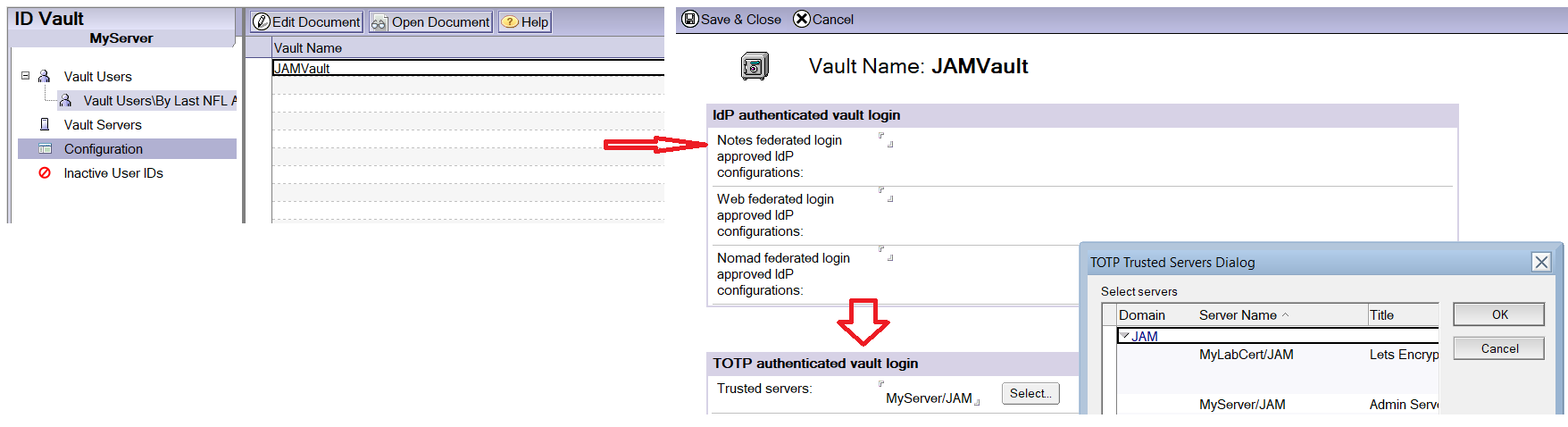
5) In the ID vault servers database open the configuration and then add the all the TOTP authenticated trust servers.
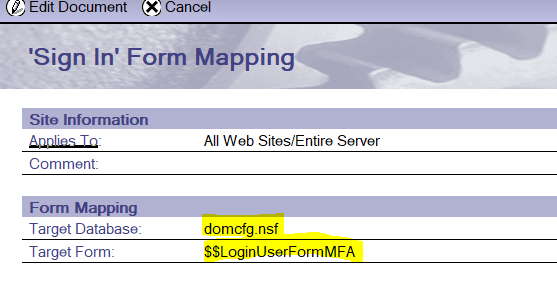
6) In the domcfg choose the login form as "$$LoginUserFormMFA". If you need to have customization to this form you can have it.
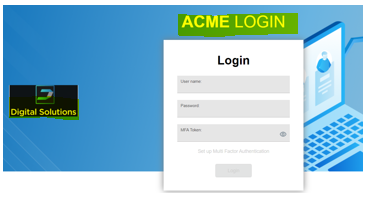
7) After these changes restart the Http task ( Restart Task HTTP). When you login you should see a login page as below. Below login page shows and text and logo has been added.
ID vault is managed by only on 2 mail servers rest have the replica.
running "mfamgmt create trustcert , only run on */O=ABC (cert.id) or we also have to do it on OU.
ANS: Not required, just for root certifier is enough */O=ABC. Since root certifier will cover all OU's. Issue the command at console of a vault server.
Note: The cert.ID file should be in the Data directory of the Vault server, because, when you run the mfamgmt command, the server checks the cert.ID file in this location. You may remove the file once after the trust certificate creates.
We already have customized domcfg.nsf with $$loginUserForm our company logo page with html, we have to create a new domcfg?
ANS: Yes, TOTP works with the new design with new Login form from domcfg V12 server. You need to upgraded the existing database with the new template and carry out the customization to the new login form ($$LoginUserFormMFA).
Will it work for iNotes and verse?
ANS: Yes, it will work for iNotes, Verse and Traveler.
Traveler : https://help.hcltechsw.com/traveler/12.0.0/whats_new_1200.html
We have to do the above on all remaining servers and traveler server as well.
ANS: Not necessarily for Traveler but, if you have a requirement for two factor authentication for Traveler user too then go for it.
TOTP for V12 Traveler support has following Limitations:
TOTP authentication support is limited to the HCL Domino support. Authentication proxies that may provide multi-factor authentication are not supported.
The HCL Companion or To Do applications for iOS do not support TOTP Authentication.
TOTP authentication is not supported by clients that use the Microsoft Exchange ActiveSync protocol, including the Apple iOS Mail client.
The HCL Traveler for Outlook client does not support TOTP Authentication.
TOTP authentication is not available when working with encrypted mail. The end user is prompted for their Notes ID password.
For HCL Verse Android, application passwords are not supported when configured for TOTP authentication. A Traveler server setting or policy setting requiring application passwords will be ignored.
Thank you.
Regards
Shrikant J