Hi @Jan Henrik Schlüter
Brazil is no longer observing DST since 2019 and when that change was done, it was necessary to take actions on both servers and workstations, to make sure that the OS from machines is properly updated with the new DST definitions.
The main point you need to check here is that the OS from both the Domino/Sametime server and the user's machines are properly configured. If the OS DST setting is not properly configured, there is nothing that can be done on Domino/ST side regarding the problem.
You can see this easily by looking at these variables in the notes.ini file from the server and the user's workstations.
DST=0
DSTLAW=0,0,0,0,0,0
If the values of the variables above are different from "0", it means that the OS is not properly configured and this will have a direct impact on the calendar appointments, meetings, etc...So it is necessary to fix the OS settings before continuing...
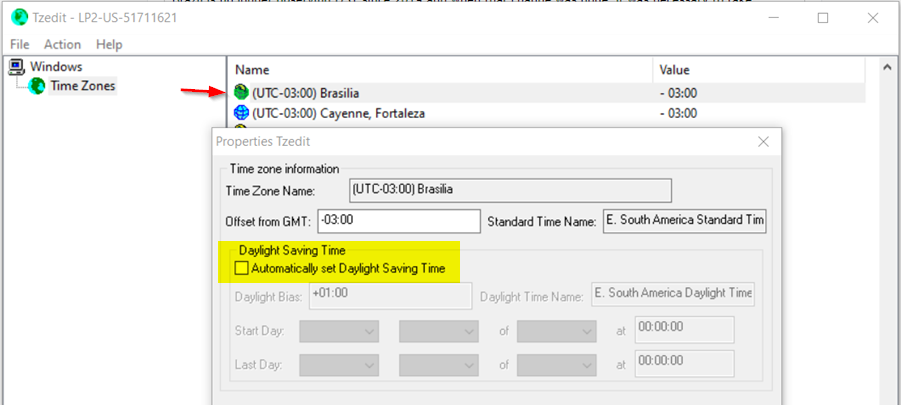
You can also download the Tzedit tool to check this. It's a single executable file and when opening it, you need to click on the Time Zone which is green (in use) and the "Automatically set Daylight Saving Time" field must be unchecked, as in the picture below:
https://download.cnet.com/Tzedit/3000-2094_4-76358086.html
If the field is checked, you can uncheck it using the tool and save the settings to fix the OS.
But if the OS DST settings are fine, so the problem may be related to the DST settings from JVM which was not updated also. In this case, you need to download the latest JTZU updates and apply them to the Domino Servers and user's workstations if they are using Notes Clients.
You can find references to this matter in the following articles:
Brazil no longer following daylight savings time (DST) in 2019
https://support.hcltechsw.com/csm?id=kb_article&sysparm_article=KB0072808
Sametime Connect client not following the 2019 daylight savings time (DST) settings for Brazil
https://support.hcltechsw.com/csm?id=kb_article&sysparm_article=KB0073696
But if you have any difficulties, I recommend that you open a case so that HCL Support Teams can help you accordingly.
Best regards.
Wiliam Dias