PFA image. The integration service returns a collection and each record needs to be binded with the label's text property in segment. But it is giving an error to map the parent first. Please guide.
Hi Bibin,
From the shared image it seems you are mapping one collection's elements to another collection's element.
- As per the document, when you map a collection to another collection, you must first map at the parent-level (map one collection to the other collection) and then map the elements.
Reference : https://opensource.hcltechsw.com/volt-mx-docs/docs/documentation/Iris/iris_user_guide/Content/Working_with_Mapping_Editor.html
Are you seeing this error even after mapping the parent collections ?
Yes, I think the parent collection is mapped, but I don't know which parent is the error talking about. My service collection is like -
choices: [
{
"message": {
"role": "user",
"content": "some text"
}
}
]
I want to bind the content field with the label.
Hello @Bibin Philip ,
Here are few inputs below, please review and see if these help in your scenario. Thank you.
In my example show below I have a XML news feed from NewyorkTimes. In this I get news articles as a collection of "items" in the parent element "channel".
You can hit this endpoint URL of NewyorkTimes feed in browser to see the response structure: https://rss.nytimes.com/services/xml/rss/nyt/world.xml
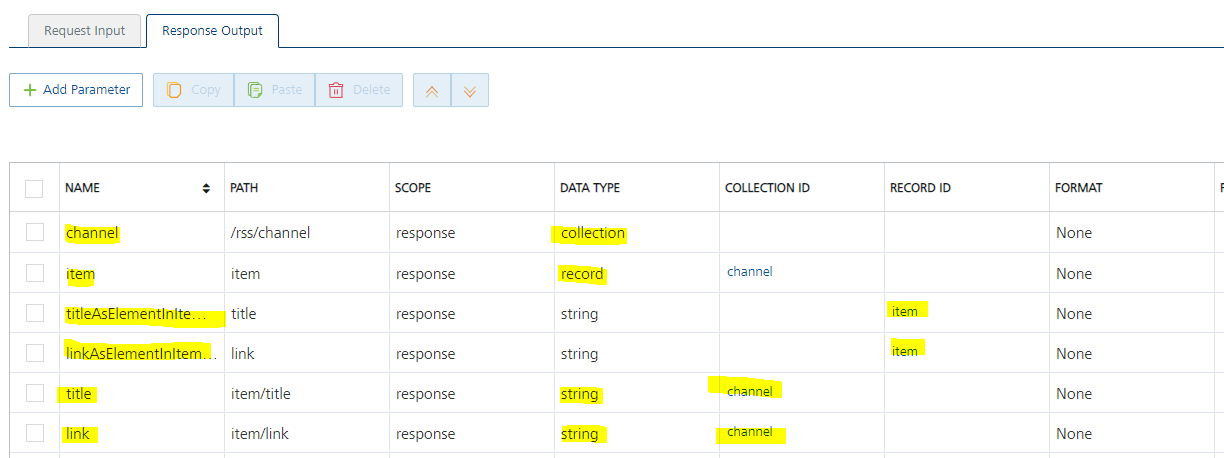
In Foundry, I created an integration service with response output parameters as below, just to show the difference of adding elements into a record in a collection versus directly adding elements into a collection.
Here "titleAsElementInItemRecord" and "linkAsElementInItemRecord" are elements added into "item" record in "channel" collection. Where as "title" and "link" are elements added directly into "channel" collection.
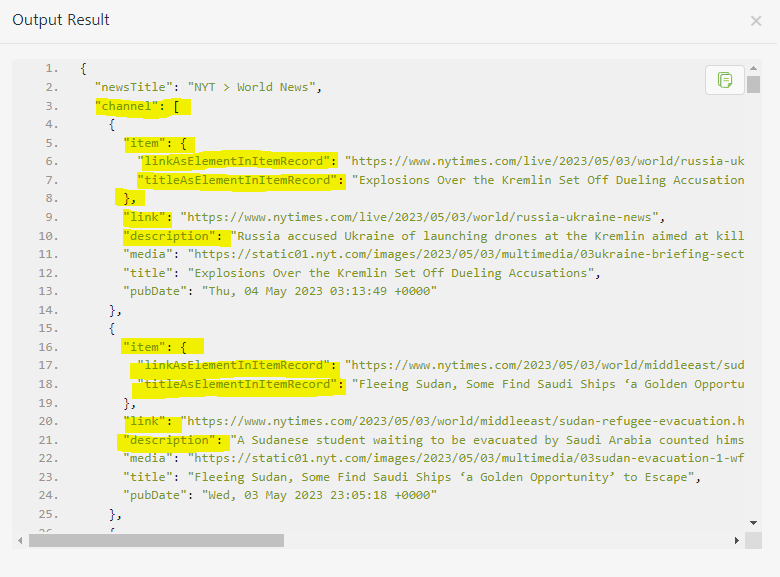
With this configuration below is the output result that Foundry sends to Iris front-end application.
In front-end Iris application, I map this response into a segment as shown below. I map the "channel" collection to segment's "rowData" collection, and then map "title" and "link" elements that are directly in "channel" collection to the labels in segment widget.
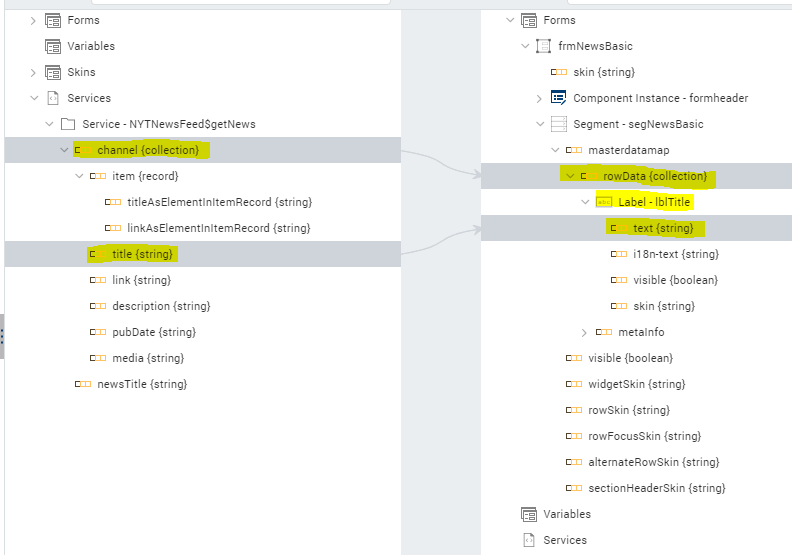
So. I think, in your scenario, you can avoid creating the "message" record in "choices" collection in the your response output parameters configuration in Foundry integration service. And add "role" and "content" elements directly into "choices" collection. This way you can map "choices" collection to "rowData" collection of the "segMessages" segment and then directly map "content" element to text property of "lblSubHeader" label in the segment.
Thanks and Regards,
Venkata Raju Bankapalli
I tried with your suggestion, but the individual properties are not getting filled up. However, the message field is filled correctly. PFA image
Hello @Bibin Philip ,
Requesting to please share your backend response, so that we will be able to check the response output parameters JSON path once and see how the output result is getting generated. Thank you.
Thanks and Regards,
Venkata Raju Bankapalli
Below is the log from Foundry
Integration Service Output
--------------------------------
{
"Response": {
"Status": "Success",
"Headers": {
"Transfer-Encoding": "chunked",
"x-request-id": "4e52000c2c12b88269e05db986ec487a",
"x-ratelimit-limit-tokens": "40000",
"openai-organization": "user-9ghxembi4moioedulfjmuhwn",
"Server": "cloudflare",
"CF-RAY": "7c1ede119c40575e-IAD",
"Connection": "keep-alive",
"x-ratelimit-reset-requests": "20s",
"x-ratelimit-remaining-tokens": "39894",
"x-ratelimit-remaining-requests": "2",
"Date": "Thu, 04 May 2023 07:00:35 GMT",
"strict-transport-security": "max-age=15724800; includeSubDomains",
"x-ratelimit-reset-tokens": "159ms",
"access-control-allow-origin": "*",
"CF-Cache-Status": "DYNAMIC",
"Cache-Control": "no-cache, must-revalidate",
"Content-Encoding": "gzip",
"x-ratelimit-limit-requests": "3",
"openai-model": "gpt-3.5-turbo-0301",
"openai-processing-ms": "1239",
"openai-version": "2020-10-01",
"alt-svc": "h3=\":443\"; ma=86400, h3-29=\":443\"; ma=86400",
"Content-Type": "application/json"
},
"StatusCode": 200,
"ResponseBody": {
"created": 1683183634,
"usage": {
"completion_tokens": 27,
"prompt_tokens": 12,
"total_tokens": 39
},
"model": "gpt-3.5-turbo-0301",
"id": "chatcmpl-7CNF4Nfky1znDVyq7jluRG2l5PkWJ",
"choices": [
{
"finish_reason": "stop",
"index": 0,
"message": {
"role": "assistant",
"content": "As an AI language model, I do not have a name, but you can call me OpenAI. How may I assist you?"
}
}
],
"object": "chat.completion"
}
}
}
Response
-----------
{
"Status": "Success",
"Response": {
"opstatus": "0",
"choices": [
{
"message": "{role=assistant, content=As an AI language model, I do not have a name, but you can call me OpenAI. How may I assist you?}"
}
],
"httpStatusCode": "200"
},
"StatusCode": 200
}
