Managed-settings.xml is not updated from server

This is a follow up question to this question of mine.

This is about the "old" Sametime 11 Server and managed-settings.xml not being updated.

On that sametime server there is a policies.user.xml containing this line for "Default" and "Anonymous" policy:

<p:policy-attribute id="im.2012" type="string" current-value="http://sametime.mycompany.de/sametime/update" 
default-value="" master-attribute-link="null" possible-value-labels="null" possible-values="null" 
label="im.2012.label" description="im.2012.desc" visible="true"/>

on the server "sametime.mycompany.de" there is a "managed-settings.xml" in the path

/local/notesdata/domino/html/sametime/update

with the following content:

<?xml version="1.0" encoding="UTF-8"?>
<ManagedSettings>
    <settingGroup name="com.ibm.collaboration.realtime.chatwindow" lastModDate="20231123T131111Z">
        <setting name="useTabs" value="true" isLocked="true"/>
    </settingGroup>
    <settingGroup name="com.ibm.rcp.managedsettings" lastModDate="20231123T131111Z">
        <setting name="UpdateIntervalInMins" value="10" isLocked="false"/>
    </settingGroup>
    <settingGroup name="com.ibm.collaboration.realtime.community" lastModDate="20231123T131111Z">
        <setting name="loginByToken" value="true"/>
        <setting name="defaultAuthType" value="ST-DOMINO-SSO"/>
        <setting name="authServerUrl" value="" isLocked="false"/>
        <setting name="loginTokenRefreshInterval" value="1800000"/>
    </settingGroup>
</ManagedSettings>

This has been changed multiple times over the course of the day always updateing the lastModDate.

On the clients in the directory

...Notes\Data\workspace\.metadata\.plugins\com.ibm.collaboration.realtime.policy.sametime

There is the following "managed-settings.xml":

<ManagedSettings>
    <settingGroup name="com.ibm.collaboration.realtime.chatwindow">
        <setting name="useTabs" value="true" isLocked="true"/>
    </settingGroup>
    <settingGroup name="com.ibm.rcp.managedsettings">
        <setting name="UpdateIntervalInMins" value="60"/>
    </settingGroup>
</ManagedSettings>

This is the content of the file like it was yesterday.

This file is updated on every Notes Client start, but I cannot -for the life of me- can get the newest version. It ALWAYS rewrites this old version even if I manually delete that file it is recreated with the old content.

In file

...Notes\Data\workspace\.metadata\.plugins\org.eclipse.core.runtime\.settings\com.ibm.collaboration.realtime.policy.prefs

the correct update url is set:

ConnectUpdateUrl=http\://sametime.mycompany.de/sametime/update

Any advice how to force the clients to reload the correct ManagedSettngs from server instead of using the "cached" version?
Hi @Torsten Link ,

first check if the xml is available through your browser.

http://sametime.mycompany.de/sametime/update/managed-settings.xml

This is the way i check if

  • the site is available without login
  • the xml is formatted correctly or you get errors within the browser

Also check if you have update site urls defined via notes-policies (eclipse settings) or plugin-customization.ini (or Marvel Client).

Maybe the managed-settings.xml is preloaded from a other instance, before login to sametime

Alex

Hi @Alexander Novak , thank you for your advice: I checked: The file is accessible. I even checked using LotusScript to make sure there are no Notes client settings messing with this:

Dim webRequest as NotesHTTPRequest
Dim result as Variant
Set webRequest = g_ses.CreateHTTPRequest()
result = webRequest.get("http://sametime.mycompand.de/sametime/update/managed-settings.xml")

msgbox result

There is no plugin-customization.ini in use and no Marvel Client.

Hi Torsten,

There are two types of files referenced when setting an Update Site URL.

  1. managed-settings.xml
  2. managed-community-configs.xml

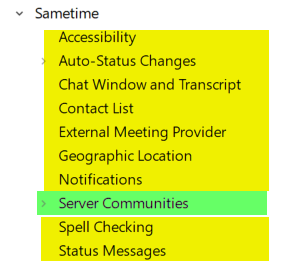
Referencing File > Preferences > Sametime, the sections I've highlighted in yellow can be set via managed-settings.xml and the section I've highlighted in green can be set via managed-community-configs.xml.

What you are attempting to set need to be in the managed-community-configs.xml file, as these are not preference settings but connectivity settings. See here for more information and open a support case if the managed-community-configs.xml file is not working.

Updating connectivity settings with the managed-community-configs.xml file

Hope this helps,
Trevor

Thank you very much. This seams to match. I will add this section to the managed-communicy-configs.xml and check the result. Will report on Thursday how it worked.

Have you tried to debug?

in rcpinstall.properties

com.ibm.collaboration.realtime.policy.sametime.managedsettings.level=FINEST
and:

com.ibm.collaboration.realtime.policy.level=FINE
personnally for your concern I used: managed-community-configs.xml
in this file I used
<managed-communities>
<managed-community id="MyStCommunity" host="sametime.mycorp.com" loginAtStartup="true" loginByToken="true" authServerUrl="mydominoserverVIP" authType="ST-DOMINO-SSO" useGlobalConnSettings="true" />
<managed-community id="MyStCommunity" host="sametime.mycorp.com" newHost="sametime.mycorp.com"/>
<managed-community-action type="update" managed-community-id="MyStCommunity"/>
</managed-communities>
MyDominoserverVIP load balancer points to port 1352 on my 2 clustered DOmino server with NETWORK_SPRAYER_ADDRESS=* in  domino server notes.ini for domino token authentifcation.

@Torsten Link , have you checked all of these: https://support.hcltechsw.com/csm?id=kb_article&sysparm_article=KB0038860 ?

I had followed these instructions but nothing in the logs pointed to why this files was always old...