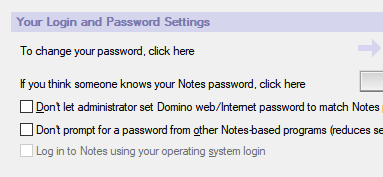
Log in to Notes using your operating system login feature is not working for me. Below are the steps I carried out and please find attached security snapshot and advise me if i missed out anything.
- Ran the HCL Notes 11.0.1 client setup and selected Modify and enabled the "Client Single Logon Feature" and setup was completed successfully.
- Login to the Notes client and changed the password same as windows password and restarted the system.
- Login to windows without issues and when I open the Notes client, it suppose to login automatically instead it is prompting for the password and i have enter the new password again.
Please note that Am using Notes client with admin and designer
you should uninstall the "Client Single Logon Feature" you have enabled during Installation, I think this is deprecated and will not work on all versions of Windows.
After you have done this, just follow the following Guide.
Notes Single Logon is deprecated, because it is not secure - by design.
A driver is installed to intercept the Windows password, when the user logs in, and stores it in RAM. Even non-system, non-privileged accounts can read all memory and could search for the password.
Notes Single Logon (SLO) is only supported on Windows 7 machines running Notes 9.0.1.x and later, however, to prevent the potential for vulnerabilities, HCL recommends to disable Notes Single Logon (SLO) and use Notes Shared Login (NSL) or Notes Federated Login (NFL) instead.
Comparison between Notes Single Logon and Notes Shared Login:
--------------------------------------------------------------------------------- Steps to enable Notes Shared Login
Please find steps to Enable Notes Shared Login:
1. open Domino Administrator client and login with system administrator ID file.
2. Connect to System Administrator server
3. select people & Groups
4. click on "Settings" located on left panel.
5. select and open the security policy that is applied to all the users in your organization.
6. Click on "Edit Settings" button located on left top corner of policy document.
7. select "password management" tab
8. select "Notes Shared login" sub-tab.
9. under "Notes Shared login", please choose "yes" for option "Enable Notes shared login with operating system".
10 select "How to apply this setting" as "Set initial value".
11. click on "save & close" to save the settings.
After making above changes, please replicate names.nsf across all servers in your Domain.
On next login to Notes clients after the policy is updated in $Policies view of Notes client names.nsf, users will not be prompted to provide password.
For Information on how to enable "Notes Shared Login" , please refer below article:
Hemant -- OK I have followed these steps on our server but testing with my Notes client in the Security settings LogIn using Operating system Login option is greyed out.
I have disabled the Notes Single Login task on the local Windows 10 machine.
Also checked via Designer and the $Policies view has not been updated despite activating Notes Shared Login on the server names.nsf. Do you need to force an update or refresh for it to kick in?
Any thoughts??
Murray
PS Why does url link in your post open in Japanese ???
When you have created a policy and applied to user/users. If you wanted to update the the hidden views which are related policies to be applied to users.
You can use below commands.
If Domino server is running on Windows: load updall -t ("$Policies") names.nsf -R load updall -t ("$Users") names.nsf -R
If Domino server is running on Linux/Aix load updall -t ($Policies) names.nsf -R load updall -t ($Users) names.nsf -R
Once you run the above commands, you can prevent server restart after updating policies and it should push the policies to client
Hemant -- perhaps being a slow here. I have applied the policy updates server side but how do I activate the "Log in to Notes using your operating system login" that is currently greyed out on user Notes client security ?? I have disabled the old Single SignOn service on the local PC.