I have ID Vault set up on a test server. The directory has some IDs copied from production domain, and a security settings document linked to an organizational policy document (*/ORGNAME).
I was able to load my on ID into the Vault manually, but how do others get loaded in? Is it only when the user log on to that server?
Hi Andrew,
Once the ID vault policy gets pushed down to your user's Notes client, their IDs will be harvested in the backend.
See our documentation for reference: https://help.hcl-software.com/domino/14.0.0/admin/conf_howanidvaultworks_c.html
synchronization occurs as follows:
- The client checks for changes periodically, generally every eight hours. To prevent a heavy demand on vault servers during client startup in the morning, a client does its first check at a random time within the first eight hours from client startup.
- If an attempt to check or to synchronize fails, for example, if the client is unable to connect to an 8.5 server, up to three retry attempts are made at five-minute intervals. If still not successful, checking resumes at the next eight-hour checking interval.
- To ensure that clients that are frequently started and stopped check the vault regularly, if a client has been started and stopped three times and it has been more than 24 hours since it has checked for the need to synchronize, it checks about five minutes after startup.
Hi @Andrew Brew
If the security policy is correctly assigned to the users, then when next time user authenticates with server, the local ID file will be uploaded to the ID Vault.
There is another way to upload the ID file to vault. Vault administrators can manually upload user ID files.
Refer the steps mentioned here:
https://help.hcl-software.com/domino/12.0.0/admin/conf_uploadingidstovaultmanually.html
Thank you. That is what I thought, but it is not happening, so I guess the key is "If the security policy is correctly assigned to the users"...
The policy has a name of */<ORG NAME>, and the "Security" field points to the Vault security settings document.
Is more required?
Yes, ensure that the vault name in the Security policy is in the correct format as seen from the admin client - Configuration tab > Security > ID vaults view.
Thanks, Joanne
I am not sure what you mean by "in the correct format". The ID Vaults view shows the Vault name as "/TestIDVault", which is identical to the name in the security settings document. The name of the security settings document is "TestIDVaultVaultSetting", which is what is selected in the policy document in the "Security" field dropdown.
Hi @Andrew Brew
Few things you can check here:
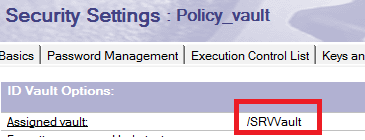
1. Correct format of ID vault name in security policy. Format should be like "/IDVault_name". Do not forget to add "/".
screen shot:
If this is correctly assigned, then next step would be
2. Check the policy synopsis for user from your Admin client.
3. If policy synopsis shows the */Org policy assigned, proceed to verify if the security policy has been pushed to the client. Verify in local names.nsf $policies view.
If this response helps you to resolve, you can mark this thread as "Accepted" so that it can help others as well.
Sorry to have left you for so long on this.
What various people have described as how things are supposed to work is in accordance with my understanding, but it is not working. People's IDs (of the nominated organisation) are NOT being loaded into the vault as I expect.
I think my settings look correct, but something must be amiss.
I attach screenshots of Security Settings and the associated policy document - for some reason I cannot paste them inline. Can anybody point to anything that looks wrong, or suggest what else I need to check?
Please open up a support case so that team can assist you further considering the fact that it may need to review data of your environment to understand why IDs are not being uploaded to the ID Vault.
Support ticket is being opened.
Hello @Andrew Brew ,
From the organization policy uploaded, I can see the policy name is selected as "*/<Org Name Redacted>" it looks suspicious.
The name of the Organization policy should be in the name of Organization ID name or OU name as below.
Example: If the organization ID being used to register users is /ACME and user ID is in format as : User1/ACME, then the name of the Organization policy name should be as below.
Policy name: */ACME
Please check and update the policy name accordingly.
Best Regards,
Chaitanya Y
Hi Yalavarthy
The text "<Org Name Redacted>" stands in for the actual organisation name ("ACME", in your example), because I do not want to post the actual organisation name. It is not the literal text in the policy document.
Warm regards,
Andrew
Hello @Andrew Brew
Please check Security events in any one of the Notes user client's log.nsf.
Determine any error messages reported in log.nsf while try to upload the ID file to IDvault database.
Hello.
Once an ID Vault enabled policy is applied to a user, an Notes.id file is periodically uploaded to ID Vault database for each user.
If you are using a Notes client to access the server, it will automatically upload the file.
On the other hand, you can also upload manually.
One ID file:
https://help.hcl-software.com/domino/12.0.2/ja/admin/conf_uploadingsingleidvaultadmin.html
Multiple ID files:
https://help.hcl-software.com/domino/12.0.2/ja/admin/conf_uploadingmultipleidwithcsv.html
Regards,
Shigemitsu Tanaka
Hello @Andrew Brew ,
After the policy is updated on user's Notes client, the user IDs are automatically uploaded to IDvault database periodically.
So, please continue to monitor the IDvault database to confirm Notes user IDs are uploading to vault database regularly.
Regards,
Chaitanya Y
Hi Andrew,
Hope you are doing well
When the policy is applied to the end user and it is synched with the Notes client, The ID vault synchronization occurs as follows:
- The client checks for changes periodically, generally every eight hours. To prevent a heavy demand on vault servers during client startup in the morning, a client does its first check at a random time within the first eight hours of client startup.
- If an attempt to check or to synchronize fails, for example, if the client is unable to connect to an 8.5 server, up to three retry attempts are made at five-minute intervals. If still not successful, check resumes at the next eight-hour checking interval.
- To ensure that clients that are frequently started and stopped check the vault regularly, if a client has been started and stopped three times and it has been more than 24 hours since it has checked for the need to synchronize, it checks about five minutes after startup.
Other than this the ID file will be pushed to the ID vault in case if end user changes his password or performs a switch ID on the notes client.
Reference link
https://help.hcl-software.com/domino/12.0.2/admin/conf_howanidvaultworks_c.html
If your Domino server is Version V12.x, you can upload the ID file by using “Upload ID files to ID Vault.” Option.
Please refer the below links
https://help.hcl-software.com/domino/12.0.0/admin/conf_uploadingsingleidvaultadmin.html
https://help.hcl-software.com/domino/12.0.0/admin/conf_uploadingmultipleidwithcsv.html
I hope the above information will help in answering your concerns.
Thank you
Nishant Shendre
We have an answer. It is that in order to be loaded a user must have a mail server in the domain specified, even if they are not using Notes mail.
Thank you to all for your suggestions.