Hi all,
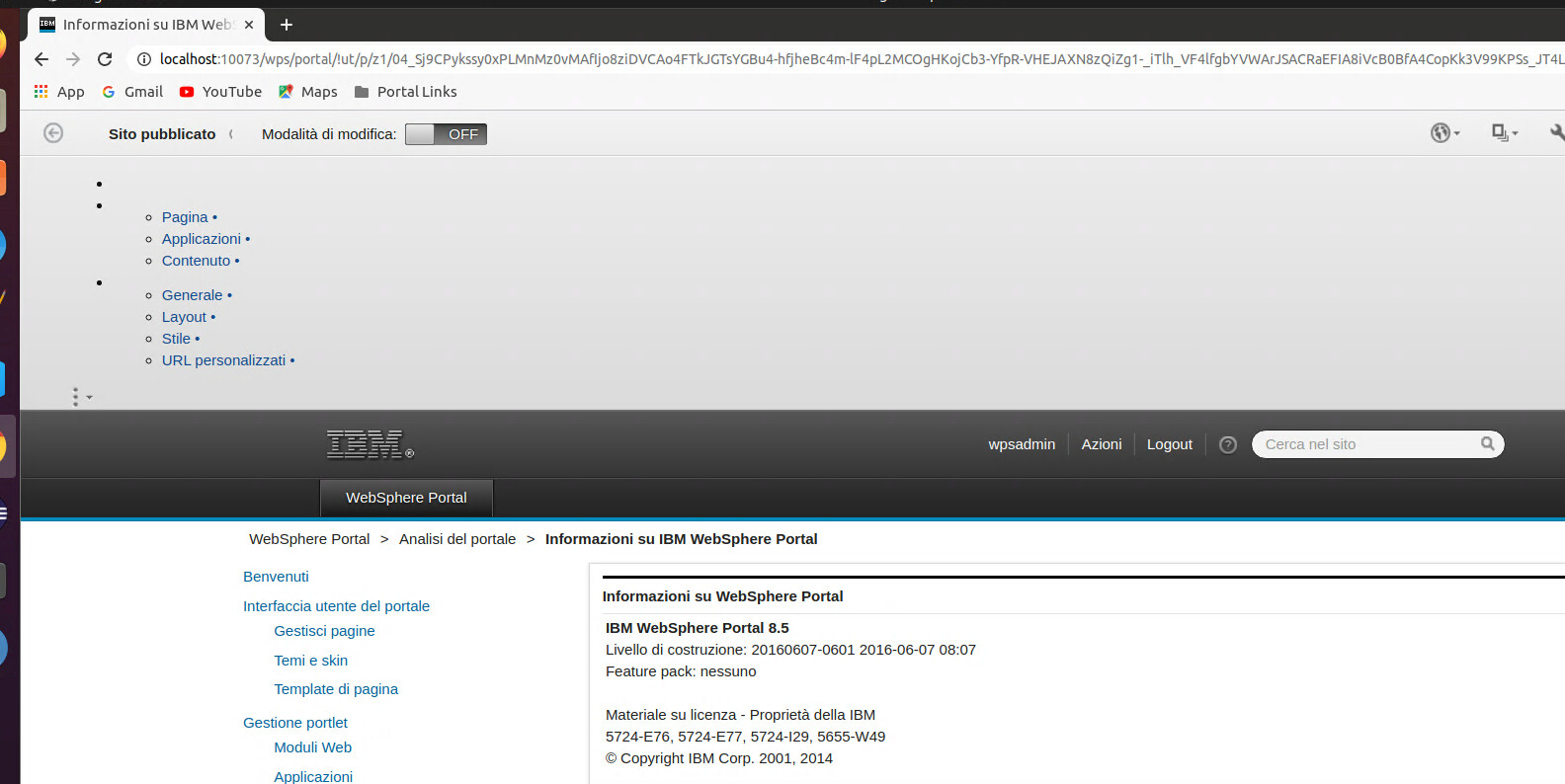
I've istalled CF11, but the portal is not working anymore (at least site manager); Without CF11 there is no way to have site manager, with CF11 th site manager do not work properly:
As you can see Site manager open on the up and not on the left;
Also I've checked the CF installed (as indicated in https://support.hcltechsw.com/csm?id=kb_article&sysparm_article=KB0081472), and I have that:
the file at <PortalServer_root>/wps.properties, contains:
ProfileName=wp_profile
ProfileDirectory=/home/dev/IBM/WebSphere/wp_profile
UnixFilePermissions=550
fixlevel=CF11
mode=standard
but the file at <wp_profile_root>/PortalServer/wps.properties contains:
rofileName=wp_profile
ProfileDirectory=/home/dev/IBM/WebSphere/wp_profile
UnixFilePermissions=550
fixlevel=0
im.portalDataName=IBM WebSphere Portal Server V8.5
mode=standard
So I'm asking what's wrong with the installation? Is there some other step to follow?
thnaks
Hello Francesco,
The Cumulative fix process is a two step process.
Install the CF via the Installation manager and then run ApplyCF.
Please see the following Cumulative fix instructions here:
https://help.hcltechsw.com/digital-experience/9.5/overview/ccf_95_standalone.html
Apply Cumulative Fix (CF)
1) Ensure the HCL Portal server is stopped on the profile you intend to upgrade.
2) Execute the following command from within the path of the profile to configure.
If you are installing the CF on an empty portal, see Special Considerations below before running applyCF.
If the applyCF command fails for any reason, check the error logs and correct error conditions before re-running.
Hi thanks Michael,
Indeed I miss a step; But when I run the script applyCF.sh I get:
print-final-message:
isIseries currently set to: null
Creating failure log in directory: /home/dev/IBM/WebSphere/wp_profile/ConfigEngine/log
traceFile created /home/dev/IBM/WebSphere/wp_profile/ConfigEngine/log/failure2022-04-21-09.12.41.log
basepath = /home/dev/IBM/WebSphere/PortalServer/installer/wp.update
Exiting due to error. Return code = 1
ERROR: Update to CF11 is not complete.
Review these logs, correct error conditions, and reattempt the update:
/home/dev/IBM/WebSphere/wp_profile/ConfigEngine/log/applyCF-20220421_211215.log
/home/dev/IBM/WebSphere/wp_profile/ConfigEngine/log/ConfigTrace.log
END: 2022-04-21_21:12:41
And looking at the two files:
1. applyCF-20220421_211215.log
Logging execution of applyCF.sh
=========================
START: 2022-04-21_21:12:15
=========================
Skipping step-01-01: already completed.
Skipping step-01-02: already completed.
Skipping step-01-03: already completed.
SiteBuilder PAA is not installed. Continuing with update procedure.
Script Portlet PAA is not installed. Continuing with update procedure.
2022-04-21_21:12:15: Executing command: /home/dev/IBM/WebSphere/wp_profile/ConfigEngine/ConfigEngine.sh action-apply-cf -DVirtualPortalTitle= -DVirtualPortalRealm= -DVirtualPortalHostNa
me= -DVirtualPortalContext= -DVirtualPortalNlsFile= -DVirtualPortalObjectId=
Exiting due to error. Return code = 1
ERROR: Update to CF11 is not complete.
Review these logs, correct error conditions, and reattempt the update:
/home/dev/IBM/WebSphere/wp_profile/ConfigEngine/log/applyCF-20220421_211215.log
/home/dev/IBM/WebSphere/wp_profile/ConfigEngine/log/ConfigTrace.log
=========================
END: 2022-04-21_21:12:41
=========================
2.ConfigTrace.log
[2022-04-21 21:12:41.220] Target finished: cleanup-config
BUILD FAILED
/home/dev/IBM/WebSphere/PortalServer/installer/wp.update/config/includes/upgrade_health_check.xml:427: 'PortalAdminPwd' not specified
at org.apache.tools.ant.taskdefs.Exit.execute(Exit.java:139)
at org.apache.tools.ant.UnknownElement.execute(UnknownElement.java:275)
at org.apache.tools.ant.Task.perform(Task.java:364)
at org.apache.tools.ant.Target.execute(Target.java:341)
When I ran the script I inserted wpsadmin as identity and wpsadmin as password, so why it complain PortalAdminPwd is not specifide?
And also do I need to install SiteBuilder PAA and Script Portlet PAA??
How I can correct the errors?
thanks really much
The link below has the following syntax...
https://help.hcltechsw.com/digital-experience/8.5/overview/ccf_85_standalone.html
(profile_root)/PortalServer/bin/applyCF.sh -DPortalAdminPwd=(password) -DWasPassword=(password)
If that is what you already tried then you can try to edit the 'PortalAdminPwd' value directly into the wkplc.properties file and re-run the applyCF script without providing the '-DPortalAdminPwd=(password)' on the command line
Hello Francesco,
Per the documentation provided by Mike, all of these variables should be set in wkplc.properties:
- Edit the (wp_profile root)/ConfigEngine/properties/wkplc.properties file and ensure the following values are set correctly:
WasRemoteHostName=(the hostname of your WAS instance)WasSoapPort=(the soap port of your WAS instance)WasUserid=(your WAS admin user)WasPassword=(your WAS admin pwd)PortalAdminId=(your Portal Admin ID)PortalAdminPwd=(your Portal Admin password)WpsHostName=(Your Portal hostname)WpsHostPort=(The port you use to access Portal)WpsContextRoot=(your Portal context root)- (For HCL DX 9.5 CF19 and later releases):
CwUserPwd=xxxxxx (your Config wizard password) - (Optional, For HCL DX 9.5 CF202 and later releases):
skipWoodburnUpdate=true
If you are on Linux or Windows, these passwords could be removed during the upgrade process. To prevent that, you'll need to set this param in wkplc.properties too: