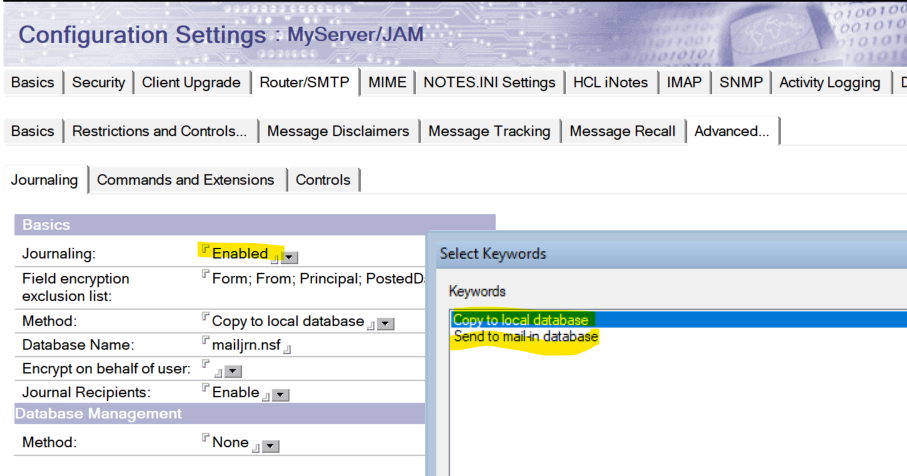
Local journal database or mail-in database. Sending to a mail-in database can be any external email address, like a cloud-based email account, which can provide an e-discovery functionality.
If you want to maintain the INBOX of the user mail file, we have another feature called "Inbox Maintenance." Using Inbox Maintenance to manage mail file size.
As others wrote: To have a complete storage of all emails going into and out of the company, you can use the mail journaling feature. In addition to enable mail journaling on all Domino servers with the SMTP task running or using SMTP to sent emails outside of the Domino domain, you need to create a mail rule in the * configuration document to journal all emails containing . (full stop) in the sender or any recipient of the mail. This way you only save emails coming from the outside or going to the internet (all valid SMTP mail addresses contain at least one . in the mail domain).
You can specify to automatically create a new mail journal database every x days or after reaching a certain size. We opted for the latter and set the size limit to 2 GB.
On the searching/e-discovery part: You could use domain indexer and domain search (but no, you do not want to use this). ;-)
Third party products are an valid option.
For a customer we created a simple search application to search in all mail databases concurrently and copy the resulting mails to the search database. Optionally you could add the mail archive databases to the search, too. Or instead of searching the mail databases (where incoming emails could have been deleted or outgoing never been saved), you could search the mail journals.
Thanks for answering. Academized's https://academized.com/order-essay essay service saved me a lot of time and effort. They delivered a well-written essay that exceeded my expectations. The writers are knowledgeable and professional, and they ensured all my requirements were met. Their prices are reasonable, making them accessible to students like me. If you're looking for reliable essay writing assistance, Academized is the way to go.