Example:
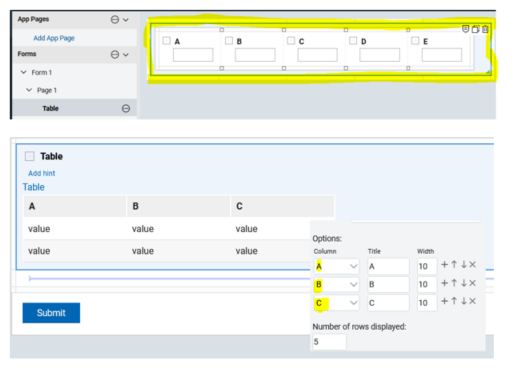
a table sub-form may contain 10 input fields however only 6 are currently included in the table.
The following will return the 6 currently assigned to the table, but can we access the other 4?
page.F_Table1.getColumnHeaders();
Is it possible to either getChildren from a table sub-form or build a path to the table sub-form?
Best regards
Stephen
This function returns the headers that you have configured in the UI for the summary/table view of the table data.
What is the use case? What are you trying to do and when?
If you have a handle to the table data object then you will get all of the fields:
You can then look through all of these items to get the id and value of the field.
Note: the one gap that we have is that you are working with a business object (data), which does not contain the field's label. If the property secureJS=false, then you can get at the label, as it is part of the internal structure, just not currently exposed in the api, using "__boa".
This code will print out all the field labels and values in the table:
var tbl = BO.F_Table1;
for(var i=0;i<tbl.getLength();i++) {
var row = tbl.get(i);
var children = row.getChildren();
debugger;
for(var j=0;j<children.getLength();j++)
{
var itm = children.get(j);
var inputTypes = ["text","currency","number","date"];
debugger;
var title = inputTypes.indexOf(itm.getType()) != -1 ? itm.__boa.label : "";
var value = inputTypes.indexOf(itm.getType()) != -1 ? itm.getValue() : "";
page.F_HTMLArea1.setContent(page.F_HTMLArea1.getContent() + "<br />" + title + ": " + value);
}
}
@Christopher Dawes
Many thanks Christopher!
Is it possible to access all the fields 'potentially' making up the table?
In this case, there are 5 fields (A, B, C, D, E) however only 3 are assigned (A, B, C).
As you can see, the table widgets are located in a section; is there any way of accessing this section and getting the children from Page 1?
Best regards
The code I provided will access all of the fields in the table.
@Christopher Dawes
Thanks, it is accessing all fields, however the HTML area remains empty with the exception of colon separators.
It was not recognising the single line widget type as a member of the inputTypes array namely 'text'.
I experimented by adding 'string' to the array and it worked namely the HTML output returned correct results.
var inputTypes = ['text','currency','number','date','string'];
It seems I'm getting the widget's value type and the not the widget type; am I possibly missing a parameter on the following variable?
var itm = children.get(j)
Hi Stephen,
You might want to check as well the link below if this is applicable to you:
https://hclwiki.atlassian.net/wiki/spaces/HDV/pages/553058412/Interacting+with+Table+from+Main+Form
As described:
"In some case you may want to add, edit and delete items in a table without the “out of the box” table UI. This app will show you how you can control the data in a table from the main form."
Regards,
Jayve
@Jayve Javier
Many thanks for this!
I had a look at the inherent JS however I believe it will only count the columns that are included in the table by referring to an appended new row.
Best regards
Stephen
// Get reference to table (business object)
var tbl = BO.F_Table1;
// Create a new row object
var newRow = tbl.createNew();
// Get array of columns
var newCols = newRow.getChildren();
You're welcome Stephen.
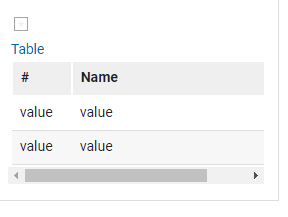
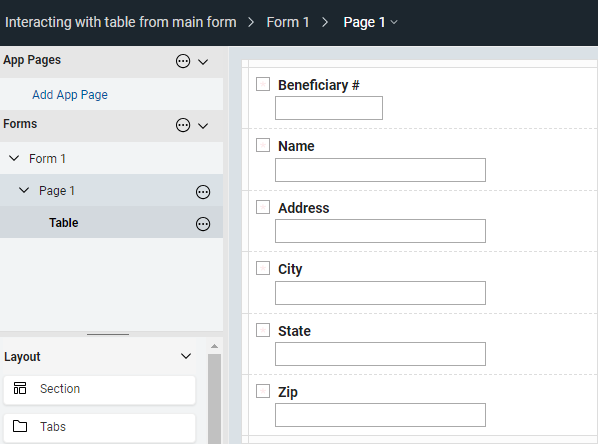
Please check the design, the included columns in table is only # and Name (2 fields only):
As per checking the code, newCols is array of columns of all fields in the table. If you check the JS after those lines, it will access the indices and assign a value using setValue (for all fields):
// Set the column values
newCols.get(0).setValue(field1_value); // index value for Beneficiary #
newCols.get(1).setValue(field2_value); // index value for Name
newCols.get(2).setValue(field3_value); // index value for Adddress
newCols.get(3).setValue(field4_value); // index value for City
newCols.get(4).setValue(field5_value); // index value for State
newCols.get(5).setValue(field6_value); // index value for Zip
Thanks,
Jayve
@Jayve Javier
Sorry! You're absolutely right!
Many thanks
@Jayve Javier
There is an unfamiliar line of code in this example app namely in the number widget '# in Tables':
if(item.getValue(0)===8)
Do you know what purpose the zero serves or is it legacy code or simply erroneous?
Best regards
Stephen
Hello Stephen,
The design of the app is to add up to 8 entries only in the table. That part of code means, if the # in Tables reached number 8, then Add button should be disable.
I believe the purpose is the same with item.getValue(). Try to put alert and test:
if(item.getValue()===8) {
alert(item.getValue())
page.F_Button1.setActive(false);
}
Thank you,
Jayve
Thanks Jayve, it works either way; it's just I've never seen the getValue command with a parameter before!