Please complete the details below then remove this line:
Domino/Notes Version: 14 Add-on Product (if appropriate, e.g. Verse / Traveler / Nomad / Domino REST API): inotes + verse Its Version: Operating System: windows server Client (Notes, Nomad Web, Nomad Mobile, Android/iOS, browser version):
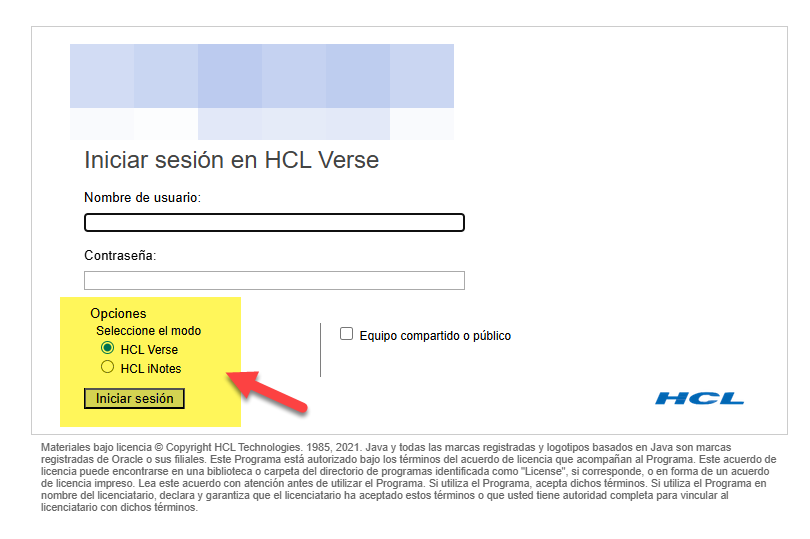
Problem/Query: We have a single Domino R14 server running on Windows Server, and currently we have this login window where users can choose to log in via inotes or Verse.
We have a requirement to implement MFA, but we’ve seen that implementing MFA changes the login window. Is it possible to maintain a login like this, allowing users to select inotes or Verse, and add MFA functionality to it?
Sólo un pequeño recordatorio: remember iNotes is now deprecated on 14.5+, so you may consider this for your users for future upgrade. 14.5 had a FP1 and there is already 14.5.1
Hola Elvis, que bueno encontrar algo de habla hispana por aqui !!!
Si … sé que en v14.5 inotes ya va a estar más (una verdadera pena). Pero en este caso el cliente creo que se va a mantener un tiempo mas v14. El tema es que tienen ese requerimiento de implementar MFA pero creo que si lo implementan, no van a poder mantener esa misma pantalla de login donde el propio usuario puede elegir que version del webmail
Regarding your concern, stated on this knowledge article on question number 2, enabling MFA modifies the login flow and replaces the standard login page. This means the option for users to select between iNotes and Verse on the same login screen is no longer available once MFA is enabled.
Q2: After enabling TOTP is there any way to get both options (verse/inotes)?
Ans: No
Kindly refer the knowledge article below:
**HCL Domino 12: Multi Factor Authentication
We highly suggest to create an enhancement request for this:
I am working on the same project and I’ve encountered a technical blocker while trying to follow the steps to enable MFA on our Domino 14.0 FP3 HF17 (Windows Server 2019) environment.
While trying to set up the infrastructure for the MFA functionality you mentioned, I am unable to create the security key. When I run the following command: keymgmt create b64creds MFA_Key
I consistently receive this error:
“The requested function is not supported by the software on this server”
This error prevents me from proceeding with the creation of the Credential Store (keymgmt create credstore MFA_Key). Since we upgraded from V12 to V14 following the official path, I’m wondering if there’s a specific requirement we missed or if the keymgmt utility needs a specific configuration after the upgrade.
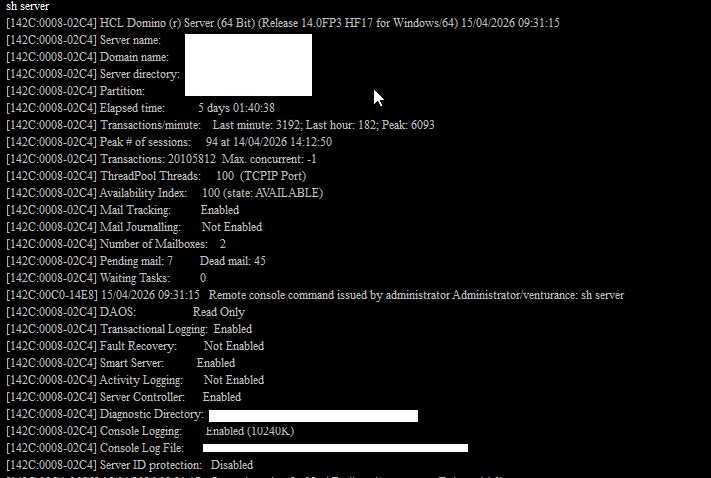
I’m attaching a screenshot of our sh server output to confirm the environment details.
If anyone has tips on how to resolve this ‘not supported’ error, it would greatly help us move forward with the MFA implementation and the login customization Federico described.
Hi, you can use custom 2FA/MFA solution. www.CYONE.eu/2FA
This solution allows login screen customization, additional ways to deliver code, SMS,TOTP, Alternative Email and users may not have ID FILE (regular internet users).
and also you dont need to enable it globally for all. a lot of Enterprise configurable features, and trial installation takes just <10 min.
You can work around this limitation with another domain name prefix and multiple Internet Site documents.
In other words, you can have nomfa.mydomain.com that continues to use authentication w/o it, and while your primary domain, mydomain.com and www.mydomain.com uses MFA. This also necessitated for us to make multiple $$Login forms in the domcfg.nsf app.