I'm trying to swim through the documentation regarding resetting a user password whose ID is NOT in the vault but it seems like everything assumes that either:
a) The user's ID is in the vault, or
b) We have the user's password
Basically I have a user who was issued an ID a few years ago and never used it. They now need to use it and it's not in the vault AND they do not have the password. How do I deal with this? The instructions on how to upload the ID to the vault suggests that you have to enter their password before it will be uploaded, and in order to reset the password, the file needs to be in the vault. So it's a catch 22. Given that they haven't used it yet, what's the repercussions of just removing their existing entry in the NAB and creating a new account using the same name?
Absolutely no issue at all. Remove the person from the NAB along with mail file. Create a new user with the same name. A new id with the same name issued by same certifier would be exactly the same as the old id. Other than the public and private key pair. Since that id was never used, it is safe to assume that there is no document or resource encrypted for him. I think in your scenario, it is absolutely ok to go ahead with deleting the existing user and going ahead with creation of new user with the same name.
You're right that it can be a catch-22 situation if a user's ID file isn't in the ID Vault and the password is unknown. Since the ID file is effectively unusable without the password. So please follow below steps:
1: Remove the old Person Document: In the Domino Directory (NAB), delete the user's existing entry to avoid conflicts.
2: Re-register the user: Use the Domino Administrator to create a new Person Document and generate a new ID file. Ensure that you use the same name to maintain consistency.
3: Set up ID Vault integration (if possible): During registration, configure the user's ID to be uploaded to the ID Vault automatically.
4: Share the new password securely with the end user.
Recreating a user's ID file should only be done as a last resort and should be performed by an administrator. If it becomes necessary to recreate the user ID file, the administrator must inform the user that any documents or databases that were previously encrypted will no longer be accessible after a new ID is created.
For detailed steps on how to recreate the user ID file when the original ID or password is unrecoverable, please refer to the article below:
Title: Recreating a Notes ID for a user when the original ID or password is unrecoverable URL: https://support.hcl-software.com/csm?id=kb_article&sysparm_article=KB0034191
@Pramod Chavan thanks, but I saw your reply too late and we already started the person delete process. Everything seems to be running, including the mail file delete which I approved, but one annoying thing that I see in the log is:
02/06/2025 10:22:30 AM Admin Process: Received the following error performing a Delete Vaulted User request on xxxxx xxxxx/xxx. Server error: Entry not found in index Will try to process this request again at 02/06/2025 10:23:30 AM.
It has run at least twice. Is there some point where it gives up? I don't want to create an ID in the vault just to have it deleted by the AdminP process.
Copying and pasting from my earlier reply which gets hidden when you reply to a specific comment...
@Pramod Chavan thanks, but I saw your reply too late and we already started the person delete process. Everything seems to be running, including the mail file delete which I approved, but one annoying thing that I see in the log is:
02/06/2025 10:22:30 AM Admin Process: Received the following error performing a Delete Vaulted User request on xxxxx xxxxx/xxx. Server error: Entry not found in index Will try to process this request again at 02/06/2025 10:23:30 AM.
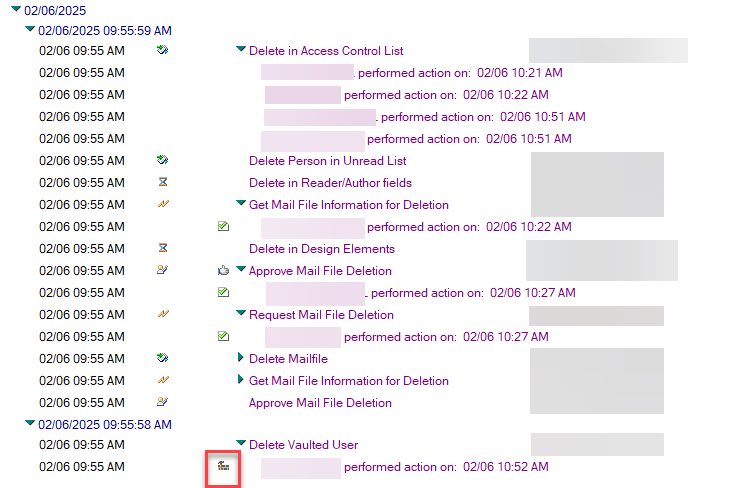
It has run at least twice. Is there some point where it gives up? I don't want to create an ID in the vault just to have it deleted by the AdminP process. What's the hammer and brick wall icon mean in the screen shot below? How do I turn off that process?
As per the update, the deletion of the user's person document has been completed, and the corresponding request has been generated in the Admin process. However, since the user ID does not exist in the ID vault, an error message stating "Entry not found in Index" has appeared.
The icon displayed indicates that the request is "in progress" status and it indicates documents in the Administration Process Log to highlight a potential blocking condition.
Please delete the pending adminp request for this user from the Administration request database. If necessary, you may take a backup of the adminp requests.
Additionally, since the user deletion request has been processed, please verify if the mentioned user name is listed in the Deny List Users group. If it is added, please remove the user name from this group. As you are planning to register a user with the same name, it is important to remove this user name from the Deny List to prevent error messages for the end user later on.
After completing these steps, please proceed to register the user ID, and then verify that everything is functioning properly.
THe cause of the error message about IDvault may be due to below reason:
While deleting the user, delete from IDvault option might have checked in delete user window. So the adminp request generated to delete the user record from IDvault. However, as the user ID is not in the vault database, you noticed the following message when the respective adminp request was processed.
02/06/2025 10:22:30 AM Admin Process: Received the following error performing a Delete Vaulted User request on xxxxx xxxxx/xxx. Server error: Entry not found in index Will try to process this request again at 02/06/2025 10:23:30 AM.
You can delete these requests and proceed to register the user ID.
I did delete the entry in the view that was trying to delete the ID from the vault. I know we did leave the option to delete it selected when the delete request was created, but I figured it would just error out and move on, not keep trying over and over!
The only thing left is to work with the user and get him up and running. My thought was that I should have him manually delete his old ID file from his machine, as well as clear out his notes.ini, so he gets the wizard asking him to enter his name, which I'm hoping will download his new ID from the vault, and everything will work again.
There was mention somewhere of having to re-cross certify some certs, which worries me, but I'll take that as it comes. Again, thanks all.