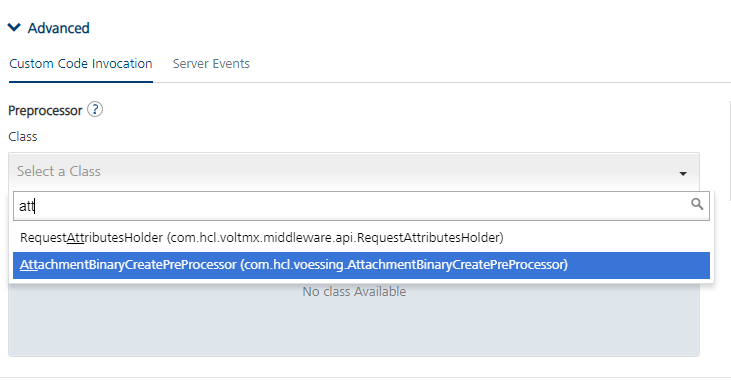
Followinfg the docs, I created the preprocessor below:
package com.hcl.voessing;import java.util.HashMap;
import java.util.Map;import com.hcl.voltmx.middleware.common.DataPreProcessor2;
import com.hcl.voltmx.middleware.controller.DataControllerRequest;
import com.hcl.voltmx.middleware.controller.DataControllerResponse;
import com.hcl.voltmx.middleware.dataobject.Result;public class AttachmentBinaryCreatePreProcessor implements DataPreProcessor2 {
@Override public boolean execute(HashMap arg0, DataControllerRequest arg1, DataControllerResponse arg2, Result arg3) throws Exception { System.out.println("Pre-Processor started"); // Below sample code is to append input params to the request // String content = arg1.getAttribute("AttachmentRT"); // if (content != null) { // arg2.setAttribute("AttachmentRT", "PreProcessor"); // System.out.println(content); // } System.out.println("Pre-Processor ended"); return true; }
}
I can now select the following in my object service after uploading the jar to my service:
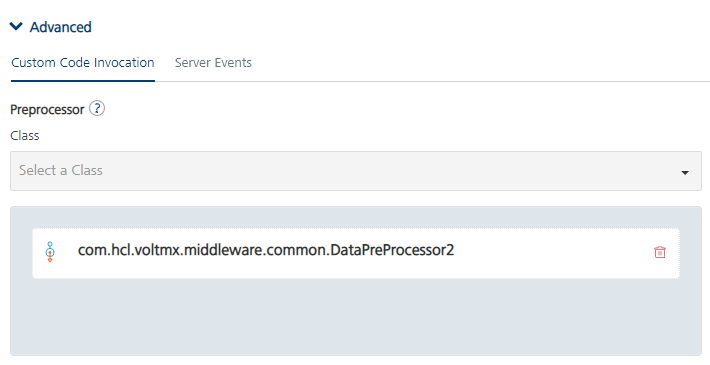
Besides that one, all other methods from the middleware.jar are also selectable from the dropdown - but not my new class from above.
The execution of the service fails with
[MFSDK][DEBUG][9.7.2022 14:27:13][app.js][parseHttpResponse][18755] : parseHttpResponse :: Network response :{"opstatus":16000,"errmsg":"Execution of request processor [com.hcl.voltmx.middleware.common.DataPreProcessor2] failed with error."}
voltmx.js:170 [MFSDK][TRACE][9.7.2022 14:27:13][app.js][Function.voltmx.sdk.setLogLevelFromServerResponse][10933] : Entering into voltmx.sdk.setLogLevelFromServerResponse

voltmx.js:170 [MFSDK][TRACE][9.7.2022 14:27:13][app.js][networkerror][10384] : Entering networkerror

voltmx.js:170 [MFSDK][PERF][9.7.2022 14:27:13][app.js][networkerror][10396] : Executing Finished invokeObjectOperation

voltmx.js:170 [MFSDK][TRACE][9.7.2022 14:27:13][app.js][Object.voltmx.sdk.error.getObjectServiceErrObj][6997] : Entering into voltmx.sdk.error.getObjectServiceErrObj

voltmx.js:170 [MFSDK][ERROR][9.7.2022 14:27:13][app.js][invokeFailureCallback][10201] : ### OnlineObjectService::_customverb::invokeFailureCallback Error:{

“opstatus”: 16000,

“errmsg”: “Execution of request processor [com.hcl.voltmx.middleware.common.DataPreProcessor2] failed with error.”,

“httpresponse”: {

“headers”: {

“access-control-allow-methods”: “GET, HEAD, POST, TRACE, OPTIONS, PUT, DELETE, PATCH”,

“access-control-allow-origin”: “*”,

“content-length”: “133”,

“content-type”: “application/json;charset=UTF-8”,

“date”: “Sat, 09 Jul 2022 12:27:13 GMT”,

“server”: “nginx”,

“x-voltmx-requestid”: “0782786b-6fc4-49e7-a0f4-9bbf657d50b2”

},

“url”: “https://mxfoundry.voessing.de/services/data/v1/fieldreportsOS/operations/Attachment/createBinary”,

“responsecode”: 200

}

}
Since my preprocessor does nothing, what am I doing wrong?