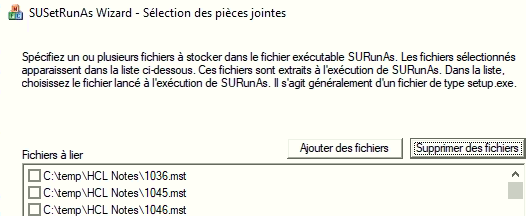
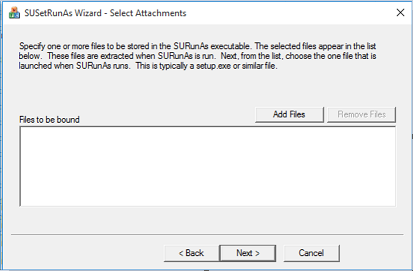
i've an old configuration for SUSetµRun AS Wizard with old files
i want to clear all those.
Can you help me ?
Hello Cecile,
If you are asking about the delete the list of files in "files to be bound" then it's just mark check in that box & click on remove the files.
I hope this is what you are asking.
Thanks,
Sujit
In addition to that, If you want delete all these then just select one file then click on remove files it will remove all files & keep selected one.
it doesn't work, I have to delete them one by one and I want to delete them all at once.
Hello Cecile,
Sorry to inform you that there is no option to select multiple files to delete them at once in SuSetRunAs Wizard. You need select them one by one and then use "Remove Files".
This has been already document in the below SPR.
SPR # XTCN8JADJW - SuRunAS: can not multiselect files to remove in SUSetRunAsWizard
I know its annoying but, this is the limitation which is already documented as above.
Thank you
Regards
Shrikant J
it's a pity
I will make do with...
thanks
@Cecile Furlan
Good Day !!!
When you run SUSetRunAsWizard.exe first time with check box setting Select "Save all Setting on exit", Setting stored. The old configuration files will be display whenever you run SUSetRunAsWizard.exe again.
To remove this old configuration, there are two ways.
1. You can simply verify the below registry key and change the values.
HKEY_CURRENT_USER Software\IBM\SUSetRunasWizard\Defaults
Check for Value Name --> SaveSettingOnExit Change the "Value data" to 0
Or
2. If you dont want to make changes in the registry key, then Workaround is to remove all configuration is to re-run the SUSetRunAsWizard.exe again, Uncheck the "Save all Setting on exit" and verify.
You will not find old configuration files next time.
Point 1 is easy and simple solution. There is no risk in this particular registry key change.
I have tested both information multiple times in my test environment. Its work for us.
Please try the above suggestion and let us know whether work for you or not.
I hope you are looking for this information.
================================================
Additional Info:
If you are using 10.0.x and Later, use Notes AutoUpdate (AUT).
More information as below :
https://help.hcltechsw.com/domino/10.0.1/inst_aut_overview.html
Thanks & Regards
Hemant Naik
Thank you Hemant for identifying the registry workaround which would help to clear the previous configuration information in SuRunAsWizard.
Regards
Shrikant J
Thank you Hemant
Regards
@cecile furlan
Hi,
Welcome !!
We have created Knowledge Article to document this information for the other customers.
https://support.hcl-software.com/csm?id=kb_article&sysparm_article=KB0085799
Please mark this question as answered and helpful if your issue is resolved.
Thanks & Regards
Hemant Naik