Hello,
We're integrating an external REST service in a Volt App and having issues with it. How can we troubleshoot a POST request issues inside a Volt App ?
Thanks.
Hello,
We're integrating an external REST service in a Volt App and having issues with it. How can we troubleshoot a POST request issues inside a Volt App ?
Thanks.
My best luck has been in the error.xml Log file from within the Notes Client (or on the filesystem if you have access). There is usually more detailed information on the error there.
The other tactic is to use a REST client like Postman or Paw etc to get you REST service working correctly with headers and auth, etc then replicate in Volt
The service had previously been tested with a REST client and was working fine.
The Volt app is consuming another REST service from the same source and also working fine.
Regarding the error-log-0.xml, we can capture the error ( file attached ) but is quite cryptic. Is there a debug option that you could enable at server level in order to be able to capture:
1. The REST url of the service invoked
2. The JSON file sent to the REST service. ?
Both are automatically generated by Volt from the Service configuration wizard and are crucial to debug the problem.
Thanks in advance
error.xml.txt
In this file, I see a message "Unsupported Media Type" but not sure if that's related to this call or not.
You can improve the logging by updating the settings per here: https://help.hcltechsw.com/domino_volt/1.0.2/troubleshooting.html
Just make sure to turn them back off as they may impact performance and log size
Yes, "Unsupported Media Type" is related to the issue.
Thanks for pointing us to the troubleshooting parameters. We've updated the rcpinstall.properties file but the information provided by the logs doesn't give a hint of the problem.
Did you check the trace as well as the error logs? When you increase the logging, I believe, it gets written to the trace log files. Should be visible by when they were updated by date.
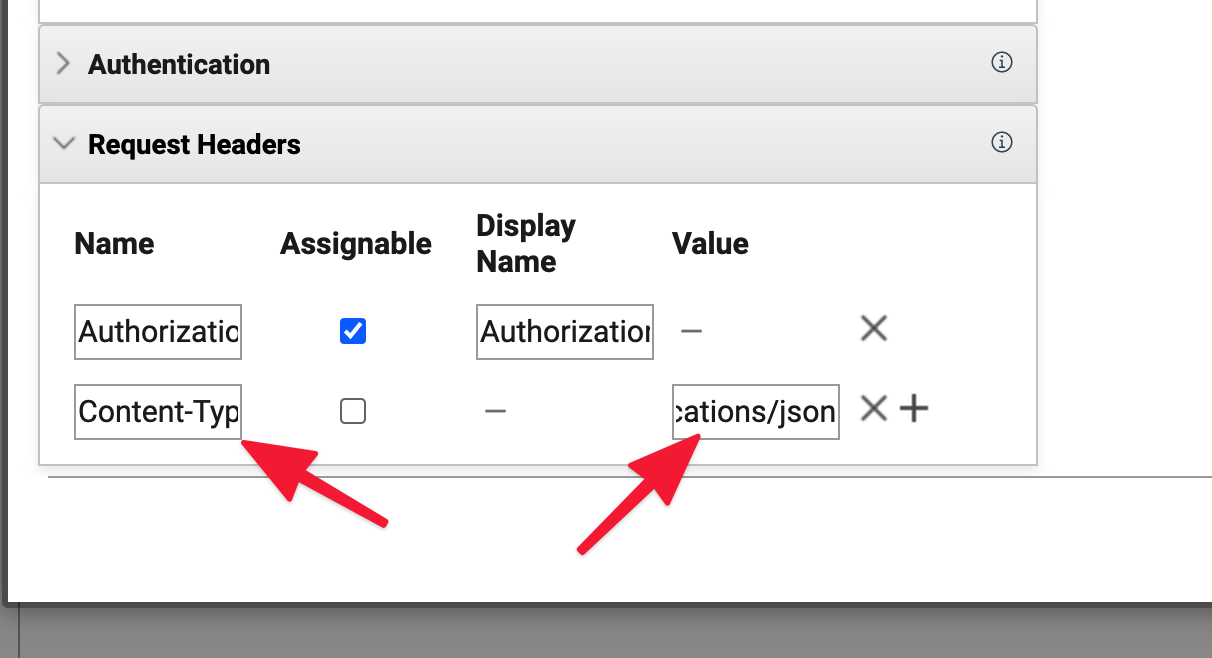
As for the unsupported media type, may need to know more about what the REST service is doing. That message means it's returning data in a format not known to the server (i.e. JSON, XML). You may need to set the Content-Type header in the service call (see image) so it knows what is being sent and what is being returned. You should be able to see this in the REST test client request and response depending on if it's a GET or POST
We've added the Content-type header that was missed in our first attempt. The error is a different one now.
But neither the Trace... nor the Error... log files show us low level detail of the REST POST request in order to troubleshoot the error.
Miguel, If you add the trace string "com.ibm.form.nitro.service.*=finest" then you will get all the debug information that you need to identify why a service is not working.
What is the current error? What is the URL service you are connecting to, is it one that I could access?
Generally you need both the Accept and Content-Type headers defined.
@Christopher Dawes That was it. We can see the JSON that Volt creates, and the REST communication process. We've narrowed down the problem and finally been able to solve it.
Thanks