The Leap application language on the default page "/volt-apps/secure/org/ide/manager.html" is selected based on the browser preference. For me this is not good. I do not want to change my preference in the browser but I still want the Leap UI in English. How can I force the language to be English.
(I know that you can set default language for a Leap application when you design it. But I do not know how to set it and force it for the Leap designer).
Hi Filip,
Have you tried the following steps below?
1. First off, set the browser's default language to English.
2. Go to Domino Leap manager site "/volt-apps/secure/org/ide/manager.html".
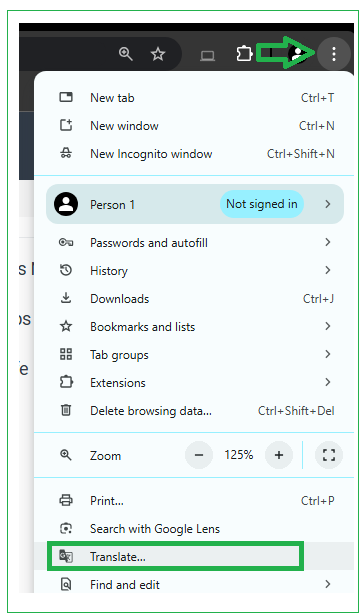
3. I am using Google Chrome browser, go to Translate option:
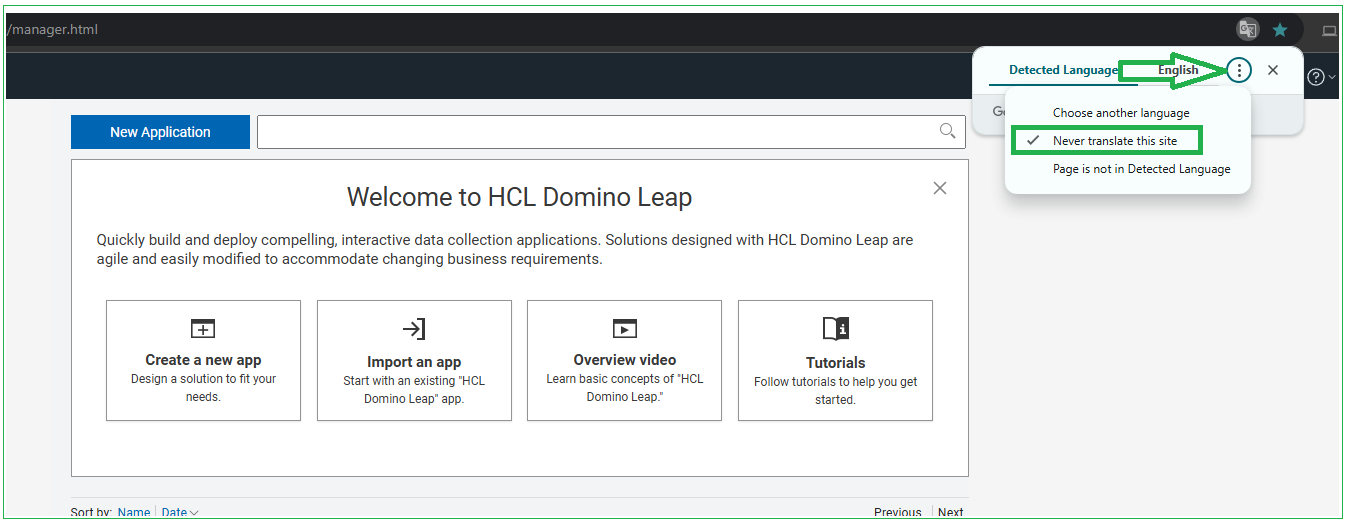
4. Ensure the "Never translate this site" should be enabled:
5. Now, change the browser's default language back to desired language. Relaunch the browser.
Hope this helps.
Thanks,
Jayve
Leap does not have any feature to force the translation of the design environment, it will always be based on the browser locale.
I think Jayve's suggestion might be the best option at this time.