Hi,
an Agent call by a scripted activity as run on server raises an error if the agent's server is not the server hosting the HEI.
In earlier versions HEI (aka LEI, IEI) could be installed in a client scenario where this was possible.
This is a big performance issue when running agents that process a bulk of data.
Installing HEI on the "application server" is not the desired solution.
Why don't you run the agent on the designated HEI server?
@Lars: Because the database does not reside on the HEI Server but on the Application Server.
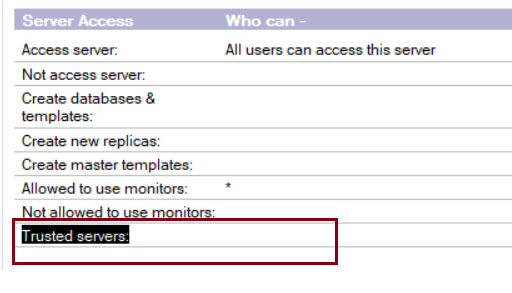
A possible workaround could be to put the HEI server name in the Trusted server field of the Application server hosting the problematic agent.
Open Application server document--->security tab--->Trusted servers---->Add the HEI server name --->Save the Application server document--->Restart domino server.
Now check the issue and confirm.
IF the above approach fails please provide the error screenshot for further assistance.
That would explain why the server containing the agent complains about running it... In the past I have run lots of scripted activities on other servers where no HEI was installed. But that was a previous job, my current company does not have HEI deployed, so cannot test.
I do remember that the local servers trusted each other.
Hi Pravin,
this is what the log says: (I tried so set the Trusted Servers with the calling server's name, also the locadomainservers were already extisting).

That could occur if the agent tries to run another agent using RunOnServer. Is that the case?
Also search for "Julie Kadashevich" troubleshooting agents
I found a russian backup of LDD Today with PDFs of her articles. Immideately made a backup of those, because all those are articles are pure gold. Read them! And again!
Avenues to pursue:
Is the agent allowed to execute restricted operations (Open agent, look at agent properties, Security tab). Try elevating if possible.
Check the signature for the agent and the libraries. Are all signers allowed to execute on the server, is the server itself listed (Server document, Security Tab, Programmability Restrictions).
Click on the field labels for an explanation, also what happens if the field is empty. It might be that a RunOnServer checks these fields unlike when an agent is executed by the Agent Manager, and the server might then need to be listed in a field here.
Quick rundown of Programmability Restrictions:
Sign or run unrestricted methods and operations: Needs to be filled, blank means refuse everyone.
Sign agents to run on behalf of someone else: Needs to be filled, blank means refuse everyone.
Sign agents or XPages to run on behalf of the invoker: Empty allows everybody
Run Simple and Formula agents: Empty allows everybody
Sign script libraries to run on behalf of someone else: Empty allows everybody
HI Stephan,
I don't think we are going to be able to get around that runonserver error. I'm seeing a few hits where this error is also generated by other programs than just HEI. It's seen in XPages and Java Applications etc. and looks to be there for security purposes. I do have one suggestion for you to try. Alter the code in the script library and use the NotesSession SendConsoleCommand and issue a Tell amgr run "dbname.nsf" 'agent name'.
depending on how busy the agent manager is on that server, you may need to increase the number of agent manager threads.
SendConsoleCommand (NotesSession - LotusScript®)
Sends a console command to a Domino® server.
Note: This method is new with Release 6.
Syntax
consoleReturn$ = notesSession .SendConsoleCommand( serverName$ , consoleCommand$ )
Parameters
serverName$
String. The name of the server. The user must have administrative access to the server. Use an empty string ("") to indicate the current computer.
consoleCommand$
String. The console command. Must be a valid console command.
Return value
consoleReturn$
String. The server's response to the command. This value is the same as would be sent to a remote console.
Usage
This method can be used in a scheduled agent on a server to send console commands to another server. The signer of the agent must have privilege to "Run unrestricted methods and operations" on the server receiving the console command.
If this method is executed on a client, the current user must have privilege under "Full Remote Console Administrators" on the server receiving the console command.
If a console command abruptly closes the network connection to the server (for example, "drop all"), subsequent commands to the server fail with a network timeout until the connection is reestablished.
Hi Paul,
thanks for your detailed answer. I will check if we can install the HEI on the app server, though not desired as I stated. The reason for this is, that we heavily use chaining of activities. Means using one of the options always, onSuccess, onFailure.
Sending a Console command will give no feedback when to start the next activity to protect parallel processing of RoS Agents.
I will check with my customer.
I'd look into the signers rights and agent properties before installing or console commands. I have used the same chaining of agents and use of results, albeit on Enterprise Integrator 9.0.1.
@Lars: I am pretty sure that the scenario I stated is NOT possible. That's what Paul stated as well. But thanks your engagement.
Let me get the scenario straight: You want to run an agent from an agent? If the agent is on the same server, then use .Run instead of RunOnServer.
If the called agent needs to run on a different server you could configure the second agent as a separate Scripted Activity, and ask the Enterprise integrator to run it for you. That should work around the limitation.
Finally we "solved" the problem.
We switched all RunOnServer Agents to Agents. Means, the ScriptedActivity starts the "Business Logic Agent" instead of starting a runner agent calling the inner "Business Logic Agent" via "RunOnServer".
Result: Though running via network and not locally the performance ist the same as before - even a little better
Reasons could be:
HCL did a very good job (domno 11 vs domino 9)
64 bit vc 32 bit (Client Scenario)