Hi,
after restart or crash of one of our clients all saved tabs are reopen again.
But in that case very old and no longer availalbe tabs will also reopen.
What is the best way to "clean" up that situation ? Is there a file where this parameters are saved ?
Regards, Stefanie
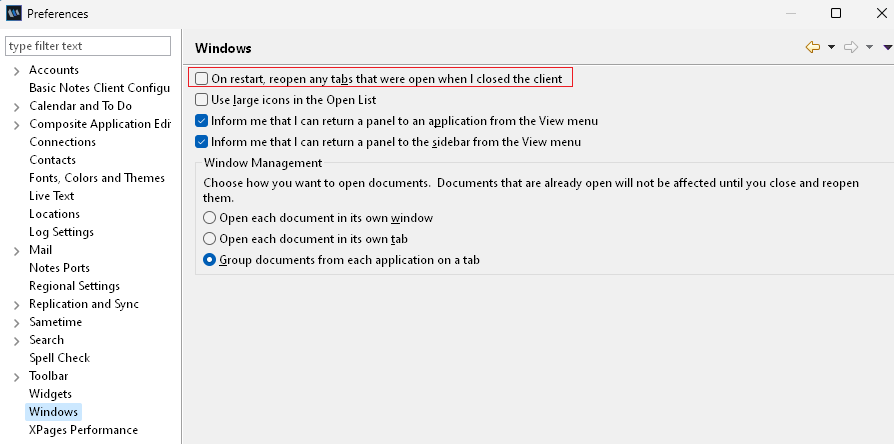
With a Desktop Policy you can force the Client not to re-open tabs using the setting On restart, reopen tabs (Preferences > Window management).
Please check if the following setting is enabled.
Hi Stephanie,
Please refer to the suggestion provided to you above by other folks.
Additional Information -->
Please find information regarding the file that stores the last open tab-related information.
File location Information on last open tab details in Notes client.
The file mentioned in the above URL resides inside the WORKSPACE folder.
Along with the suggestion provided by other folks, you can try to delete/rename the WORKSPACE folder as well as cache.ndk.
Once you launch the Notes Client, this folder and file are created again. This will ensure that the issue was not there due to a corrupt WORKSPACE folder or cache.ndk file.
Regards,
Amit Sharma
Hello Stefanie,
Good Day!
After restarting the Notes client there are settings in preferences which have been already shared with you please refer to the settings.
File / Preferences / Windows
=> On restart, reopen any tabs that were open when I closed the client
After Notes crash all Tabs are closed automatically. It's working as design.
Though already an enhancement request is in place and the product development team is considering the same and may come up with this feature in the upcoming releases.
Below is the link to the enhancement request and I would request you to upvote the enhancement request in order to increase the priority of this request so that it would increase the consideration from product development aspect.
https://domino-ideas.hcltechsw.com/ideas/NTS-I-75
Hope this helps you.
Thank you,
Sujit ANBHULE
Stefanie, to know the information of the old tabs you can open the file "workbench.xmi" and search for the old tab information which is no longer available. The location of this file will be listed below as an example.
D:\HCL\Notes\Data\workspace\.metadata\.plugins\org.eclipse.e4.workbench\workbench.xmi
You can close the Notes client and rename this file to workbenchOLD.xmi and then start the Notes client, it should launch without any tabs.
Thank you
Regards
Shrikant J
Thank you very much for all the information.
I´ll check it out.