Hi there,
I since yesterday get emails from
"HCL Software Community" <hcl_pnp_support@hcl.com>
instead of
"HCL Software Knowledge" <hcl_pnp_support@hcl.com>
Any ideas whats going wrong ?
Sincerly
Jochen "Joe" Herrmann
Hi there,
I since yesterday get emails from
"HCL Software Community" <hcl_pnp_support@hcl.com>
instead of
"HCL Software Knowledge" <hcl_pnp_support@hcl.com>
Any ideas whats going wrong ?
Sincerly
Jochen "Joe" Herrmann
Hi Joe,
Hope you are doing well.
It seems you might have subscribed HCL Community (Forum ) Portal resulting you might be receiving emails from "HCL Software Community" <hcl_pnp_support@hcl.com>.
Could you please access the respective Community (Forum) portal and check if It is subscribed or not.
if Subscribed then you can unsubscribe it if not needed.
Hope the above information will help in answering your concerns
Thanks & Regards
Nishant
Your question is funny in my verse mail
Se attachment
Hi Joe,
Hope you are doing well.
We would like to clarify that both email addresses, "HCL Software Community"<hcl_pnp_support@hcl.com> and "HCL Software Knowledge"<hcl_pnp_support@hcl.com>, are legitimate and coming from our support team.
The difference in the sender name is due to the type of notification you are receiving. If you are subscribed to receive notifications from the HCL Community (Forum) Portal, you will receive emails from "HCL Software Community" <hcl_pnp_support@hcl.com>. On the other hand, if you are subscribed to receive notifications for knowledge article updates, you will receive emails from "HCL Software Knowledge" <hcl_pnp_support@hcl.com>.
If you would like to stop receiving emails from "HCL Software Community" <hcl_pnp_support@hcl.com> you can click on the "here" hyperlink in the email, which will redirect you to the "Manage your subscription and notification preferences" page. From there, you can customize your notification preferences or stop receiving emails altogether.
"If you would like to stop receiving these emails, you can change your preferences here"
We hope this clarifies the matter.
Please mark this question as answered and helpful if this answered your query.
Hi there,
I have subscribed since long and get almost every day email either from
HCL Software Community
or
HCL Software Knowledge.
I use the mail rules to differntiate between them and thus put them in different folders.
But since a while I do not get any more emails in my Knowledge folder and ... surprise they are now all in the community folder.
What do you guys hope to achieve with it ? Is there another way to differentiate between these emails ?
Sincerly
Jochen "Joe" Herrmann
Oh the newest version is now
HCLSoftware Community without a blank ....
"HCLSoftware Community" <hclswsupport@hcl-software.com>
Dear Joe,
We apologize for the changes that have caused the emails to be redirected to the Community folder.
We would like to inform you that as part of our internal migration, our email address has changed from "hcl_pnp_support@hcl.com" to "hclswsupport@hcl-software.com". This change may have affected the mail rules you had set up to differentiate between the emails.
Regarding your question, we understand that you would like to differentiate between the emails from HCL Software Community and HCL Software Knowledge. However, we can suggest an alternative solution. You can set up new mail rules or modify the existing rules based on the below-mentioned email IDs:
- HCLSoftware Knowledge <hclswsupport@hcl-software.com>
- HCLSoftware Community <hclswsupport@hcl-software.com>
We hope this helps to resolve your concern.
Please mark this question as answered and helpful if this answered your query.
Best regards,
Sandeep
Dear Sandeep,
thanks for the clearification. Have changed the rules.
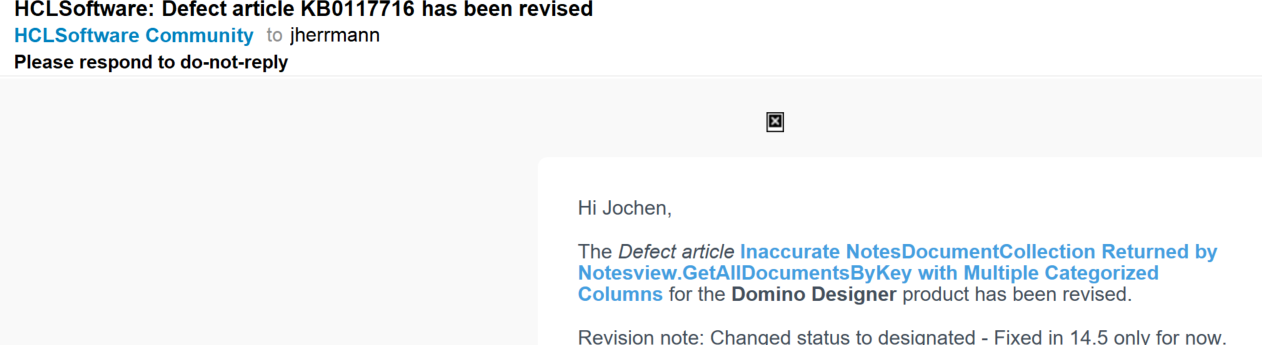
Sorting the HCLSoftware mail I found several emails like this one from 10.03. @ 17:35 :
This was usually a Knowledge mail, but now its a community mail !? Could you guys please verify it ?
Kind Reards
Joe
Dear Joe,
Thank you for highlighting the observation and sharing the screenshot.
We appreciate your efforts in providing detailed information.
Sorry for the inconvenience this has caused.
We will coordinate with our internal team to review and rectify the changes
Dear Joe,
Thank you once again for your patience and for bringing this matter to our attention.
We are pleased to inform you that our internal team has made the necessary updates, and you should now receive an email from the respective name with the email ID. We hope this resolves the issue for you.
Thank you for your understanding.
Please mark this question as answered and helpful if this resolved your query.
Best regards,
Sandeep
Hello Sandeep,
yes, now it works the way it was meant to.
Thank you all very much.
Joe