I am trying to move to HCL Domino 14 (from IBM Domino 9) but cannot recompile some java agents and libraries under Java 17. I am getting following error:
The package org.w3c.dom is accessible from more than one module: <unnamed>, java.xml
Simple code (error shows on bolded import line):
import lotus.domino.*;
import org.w3c.dom.*;
public class JavaAgent extends AgentBase {
public void NotesMain() {
}
}
Domino database with single java agent attached as example
testJavaModule.zip
Hi Zigurds,
The error message “The package org.w3c.dom is accessible from more than one module: <unnamed>, java.xml” occurs because Java 9 and higher have a limitation: the same package name must not be used in more than one module.
As per checking, there are jar files that contents are also supplied in java.xml module of the JavaSE-17 JDK.
To resolve the issue, look for other dependencies that might contain the org.w3c.dom package and exclude it from there.
Best Regards,
Jho Ann Leanne Labayani
Technical Support - Application Development Team
HCL Technologies
Hi!
I just don't know how to exclude those jar files.
As you can see, it is only 2 imports in the provided example.
All jar files that are placed in the "ndext" folder is necessary and provide functionality to other java agents and script libraries.
My agent has no attached jar files.
Hello Zigurds,
May you clarify if you have no other external jar files inside ndext folder? Please share screenshot.
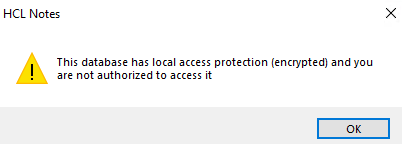
Also to check, kindly reshare here your sample database that is not encrypted, when I tried to open it, there is a prompt message:
Thanks,
Jayve
Hello Jayve,
I do have some external jars inside ndext folder, but all of them are used in other java agents and libraries in my projects and without them other functionality will not work. After installing HCL Domino Designer 14 (on fresh new PC) I went through all my java code and add used jars.
Not encrypted attached.
testJavaModule1.zip
Hi Zirgurds,
Thanks for your clarifications, and sharing updated sample database.
I didn't saw any error when opening database. However, since you confirmed that, you are using external jar files located in Domino or Notes ndext folder, may be there is also external jar files that uses org.w3c.dom package as well. That's why you are encountering this error, as there is already existing org.w3c.dom package in system library.
To verify and simulate, I tried sample external web-dom.jar file (that has org.w3c.dom package), then I copied and pasted to ndext folder. After Notes restarted, and opened Java agent, I encountered the same error "The package org.w3c.dom is accessible from more than one module: <unnamed>, java.xml".
To check if there is other source uses the same package or to find dependency, kindly follow steps below:
- Go to HCL Domino Designer.
- Open Java agent that uses import org.w3c.dom.*;
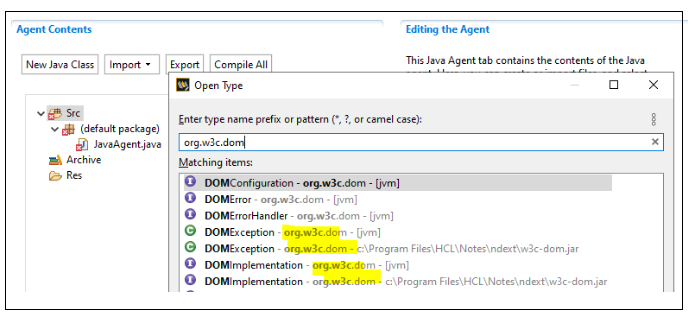
- Open the "Open Type" dialog (by pressing Ctrl+Shift+T).
- In Input box, enter the complete import like org.w3c.dom.* or org.w3c.dom.
- Wait until search is done, you should see multiple sources.
I followed steps above, and there are other sources as well that uses org.w3c.dom package as well (one for existing in system lib, and one for external jar):
Please try to modify external jar, exclude package, and recreate it. Also, since Java 9 and higher does not allow the same package name to be use in more than one module, try to change compliance level to 1.8 (Designer>File menu>Preferences>Java>Compiler>JDK compliance).
For reference:
https://stackoverflow.com/questions/55571046/eclipse-is-confused-by-imports-accessible-from-more-than-one-module
Hope this helps. If you think an answer answered your question, please accept it. It will benefit others having same problem / query.
Thanks,
Jayve
Hi Jayve!
Thank you very much for you reply! I didn't know about "Open Type" dialog and it helps a lot.
Please just clarify the last question for me:
Am I understand right, that if I have working project and for new functionality I need to add new jar file to ndext folder then I need to check all java agents/libraries on server for such error?
Zigurds.
You're welcome Zirgurds, glad to hear that. Yes, you're correct, as long as you encounter the error during compilation. Also, there are various ways to include your JAR files in your project. Please refer to this link below for more information:
"How same JAR file stored at different locations work?"
https://support.hcl-software.com/csm?id=kb_article&sysparm_article=KB0112219
Hope this helps.
Thanks,
Jayve