Hello Everyone,
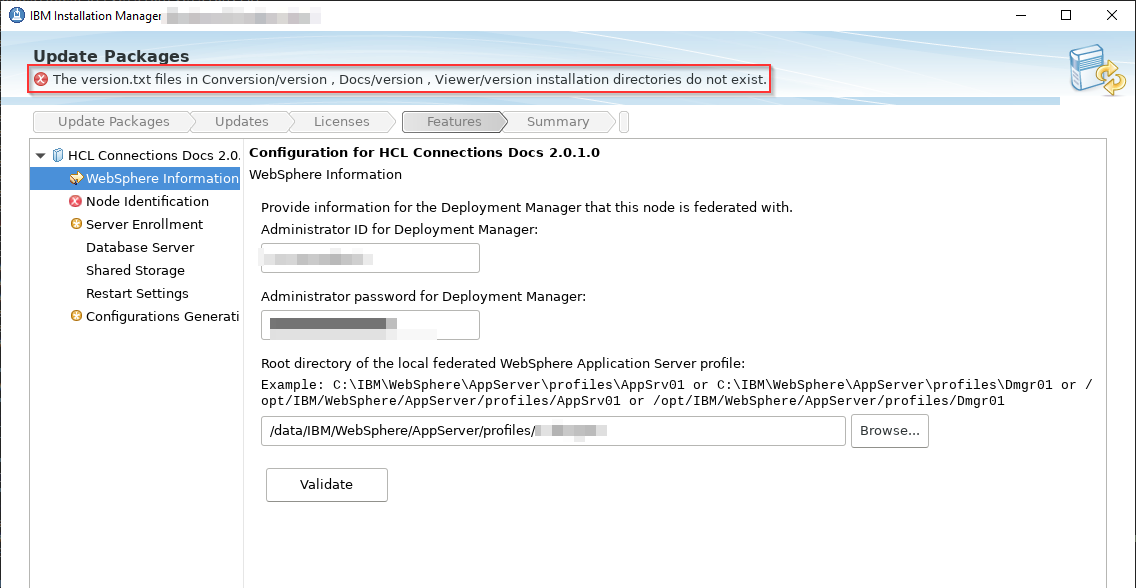
I tried upgrading Connections Docs 2.0 CR3 iFix009 to 2.0.1 via GUI, in doing so I encountered the following error:
Has anyone seen a similar issue? The "version.txt" files are really missing from the mentioned directories.
I could copy the other "version.txt" files which I have found on the system, but those are all referencing the HCL Docs 2.0 base version.
Best regards,
Milan
Hi , I had the same issue.
I fixed that closing the Installation Manager and upgdading docs from command line where worked correctly.
Knowing about the issue of the GUI installer I don't have spent time investigating on this and I followed the console way.
Good luck
Hi Milan,
Please check at the path as installer directory of each component e.g C:\IBM\ConnectionsDocs\Docs\installer
and then see how it goes.
Hope this helps!
Hello,
As Matteo suggested, I also opted for the command line. This is working fine for now...
I just find the error odd... Maybe this is something what should be changed in the GUI Installer in the future releases.
Best regards,
Milan
This was one of the easier ones to fix, I copied the current version.txt files for each of the ones it was listed as missing to the paths it mentioned from the installer folder. There is a copy for each app held here. So for example in a Windows World I copied the version.txt from this path
C:\IBM\ConnectionsDocs\Docs\installer
to this path that the installer was moaning about C:\IBM\ConnectionsDocs\Docs\version and it didn't moan any more and upgraded no problem.
Hope that helps.