Hello,
We've had a business user approach us about getting a mathematical equation into a quiz.
We use HCL Leap to generate quizzes, and these take the form of having a label containing questions and a radio button with a variety of options, one of which is correct. This allows us to present a user with a quiz that they fill in, and if they are correct, they get a prize.
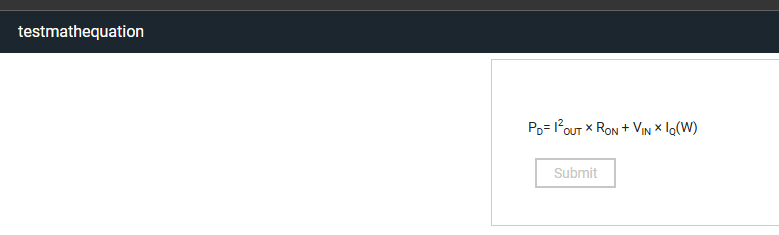
One of the business users wants a formula to appear in the quiz. The formula is:
PD= I2OUT × RON + VIN × IQ(W)
Note the use of subscript and superscript fonting in this.
We've managed to get this into the label in the immediate term by using unicode characters for the superscript and subscript parts, i.e. using this:
PD= I²ₒᵤₜ × Rₒₙ + Vᵢₙ × IQ(W)
Note the lack of subscript and superscript fonting. This second string has the unicode character set doing the heavy lifting, so there is no font formatting done anywhere within the string. The catch with this solution is that it is something I could do, but explaining to someone non-technical the difference between a <sub> tag and a unicode character isn't something I relish.
The underlying problem here is that the label only supports one font and that everything inside the label has to be the exact same.
This isn't the first time we've had an issue like this (we've been asked many times for hyperlinks in labels!), but it's the first time that we've had a significant issue that we (almost) haven't found a workaround for.
I thought I cannot be the only person to have this problem - so I thought I'd ask.
Has anyone here had similar problems? And if so, how did you work around it?